How DeskOS works
The admin console, page by page. The same documentation your team reads inside the product, open to anyone deciding whether DeskOS fits how they run their space.
Receipts
Security deposits, damage charges, and other money that is not subscription billing.
Receipts covers the charges that live outside regular invoicing: security deposits when a company moves in, damage or breakage charges, cleaning charges, late fees, and penalties. Each receipt tracks what was charged, what has been collected, and, for deposits, what has been refunded back.
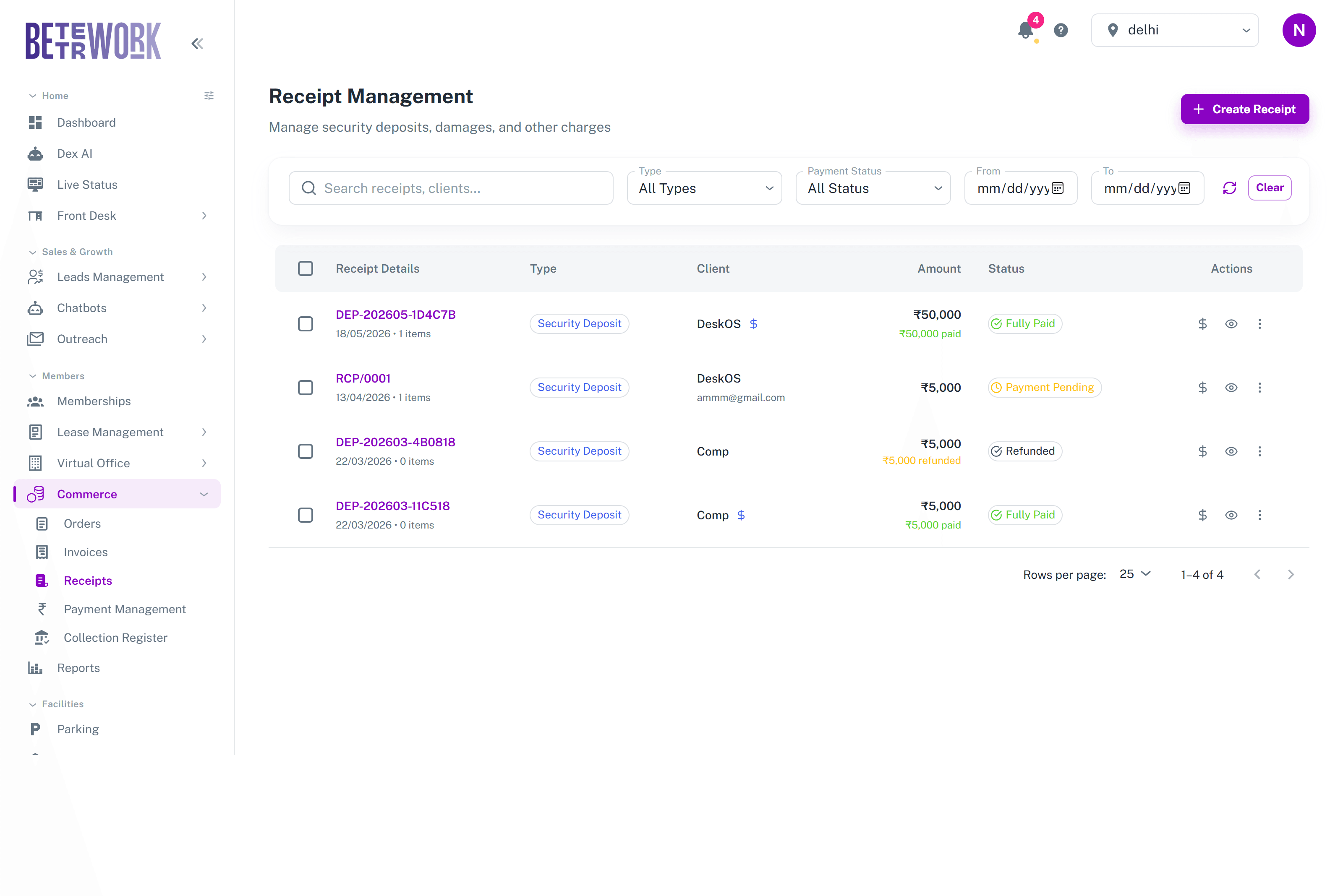
The list
Search by receipt or client, filter by charge type and payment status, and narrow by date. Each row shows the receipt number, its type, the client, the amount with how much has been paid or refunded, and the status: payment pending, partially paid, fully paid, or refunded.
The deposit lifecycle
A security deposit receipt starts as payment pending, becomes fully paid when the money arrives, and ends as refunded when the company moves out and you return it. The amount icon on a row records a payment, and the row menu handles the refund. Deposits recorded here are the same ones that appear on the company’s Financials tab and in its ledger.
Creating receipts
Create Receipt starts a new charge: pick the company, the charge type, and the amount. Use it the moment the event happens, a broken chair, a lost access card, so the charge does not rely on someone remembering it at billing time.
Still need help?
If the docs did not answer your question, our team will. Signed in customers can also raise a request from Support inside the admin console.