Access control software for coworking spaces that ends with the membership, not after it.
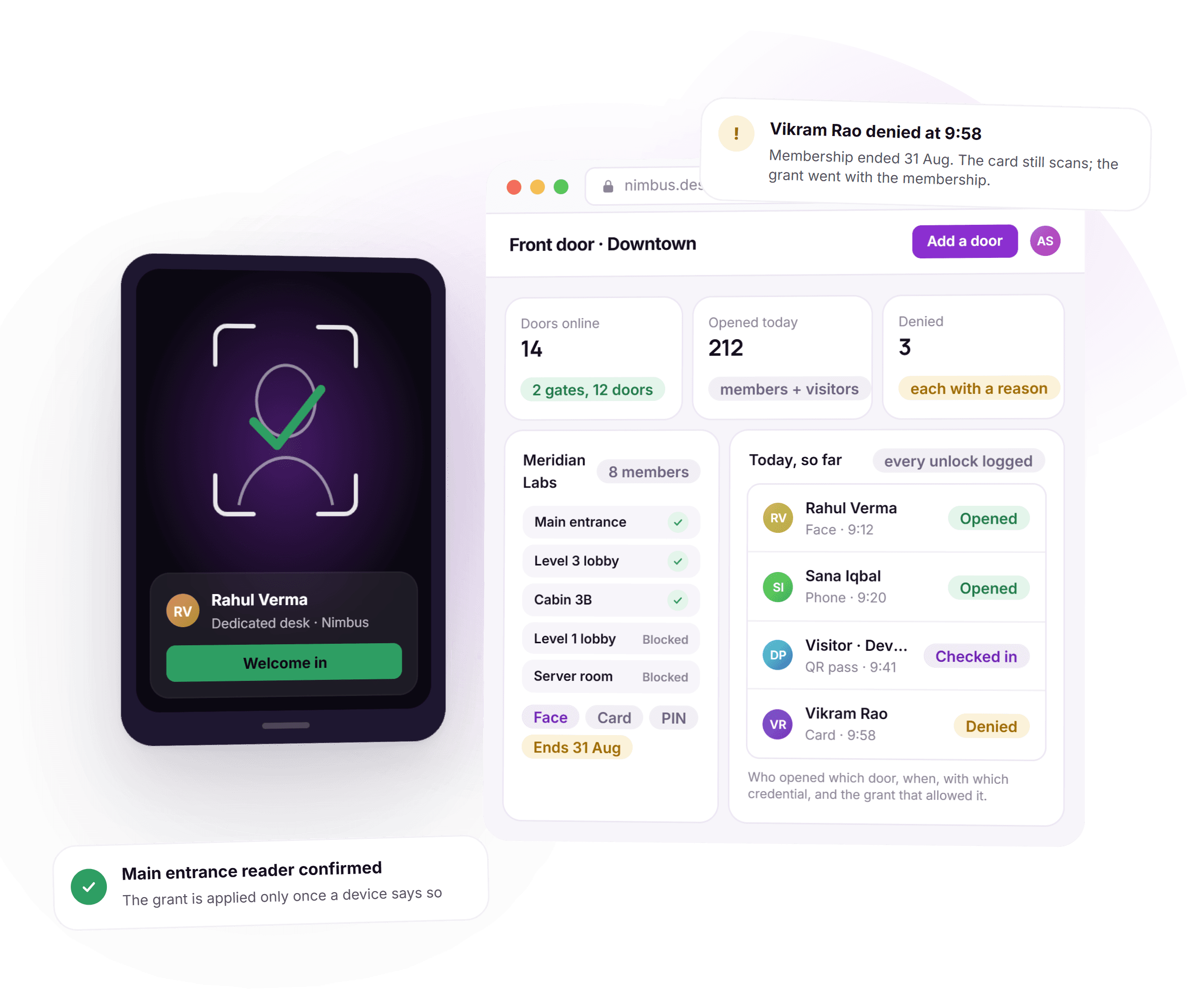
DeskOS is access control software for coworking spaces and managed offices. Door level grants tied to the membership, on whatever readers your building already has, so a credential issues itself when you sell and stops working the day someone leaves, with every unlock on the record.
- One grant per door, per member
- Face, card, PIN and QR on the same grant
- Access ends itself on the last day of the term
- Every unlock logged, searchable in a minute
See it on your own doors
A free thirty minute demo with a person, not a recording. Bring the readers you already have and we will show a grant issue, and expire, live.
Plays with the doors and tools you already use






Everything between the membership and the door.
A door lock only knows who was last enrolled on it. Here the door knows who is still a member, because the grant and the membership are the same record.
- MainLevelCabinServerMembersManagerVisitorsA grant per door, not one credential for the whole building.
A grant per door, not per building
A member gets the main entrance, their floor and their cabin. A staff member gets the server room. Each grant is its own record against a specific door, described exactly rather than approximately.
- Brightpath DesignNoticeSold 3 FebEnds 30 SepSell the plan, credentials issueEnd the plan, access ends
Access starts and ends with the membership
Sell the membership and credentials issue themselves. Log a notice and access ends on the last day of the term. Nobody has to remember, and nobody keeps working access three months after they churned.
How memberships drive the grant - One grant · 3 doors · ends with the planFaceFingerCardPINQRSwap card for face and the doors and the end date do not move.
Face, finger, card, PIN and QR on one grant
Enrol whichever credential the site uses. The grant is the same object regardless, so moving a member from card to face does not mean rebuilding their access.
- Card 4471BlockedDevice rebootstill blockedNightly resyncstill blockedController swappedstill blockedBlocked, not deleted. The grant list is the truth; devices are reconciled to it.
Revoke means blocked, not deleted
Removing access blocks the credential rather than quietly dropping the record, so a revocation survives a device reboot, a resync or a controller replacement. The grant list is the truth, and devices are reconciled against it.
- ConsoleGatewayReaderReader dials outno inbound portCommand queuedwaits for the deviceDevice confirmsnow it is applied
A gateway built for real buildings
Devices behind NAT with no public address still work: they report in and receive their commands, with device confirmation treated as the source of truth. Nothing is applied until a device says so.
Supported readers and controllers - Access logAug · 1,284Rahul Verma · FaceLevel 3 · 09:07Anita Shah · CardServer room · 22:10Front desk · RemoteMain entrance · 22:12Who, which door, when, which credential, which grant.
Every unlock, on the record
A searchable log of who opened which door, when, with which credential, and which grant allowed it. Answer a landlord, an insurer or an incident question from the console rather than from a device.
- Level 1 lobbyRemote unlockHeld open30 secondsPermission gated · Sana Iqbal, front deskLogged like any other unlock
Remote unlock, with a leash
The front desk can open a door remotely, but the unlock is time limited, permission gated and logged like every other event on the door.
- Access windows follow the planWeekday planMon to Fri · 8 am to 8 pmShift planNight · 7 pm to 6 am24/7 planAny hour, any dayThe door opens at the hours the member actually bought.
Access windows follow the plan
Weekday plans, shift plans and 24/7 plans each open the door at the hours the member actually bought, without a separate schedule to maintain by hand.
- Reader enrolmentsMatchedEnrolment 019 · "R Verma"→Rahul VermaEnrolment 044 · "A Shah"→Anita ShahEnrolment 077 · "guest"→skipMove a live site over without queuing everyone at the reader.
Move a live site without re-enrolling everyone
Existing enrolments on a device can be matched to a member rather than re-enrolled, so a site already on ZKTeco hardware moves over without queuing everyone at the reader.
Thirty minutes with a person, on the readers you already own.
From the membership to the reader, without a second list.
Five things happen to a grant over its life. None of them needs someone to remember.
- 1Once, at setup
Doors and locations are mapped
Every door is registered against a location and a gateway, so a grant always knows which building and which reader it applies to.
- 2When a membership sells
The grant issues itself
The doors on the plan become a grant for that member, and whichever credential the site uses gets enrolled against it, once.
- 3At the reader
The device decides, then confirms
A scan is checked against what the reader already holds, and the result is reported back. Nothing on the console is treated as applied until the device confirms it.
- 4When notice is given
Access is scheduled to end
The last day of the term is set on the grant the moment the notice is logged. There is no separate step to remember later.
- 5On that day
Credentials block, everywhere
Every device carrying that grant is reconciled, so the credential stops working on every door it ever opened, not just the one someone remembered.
What used to be a ticket, handled by the record itself.
Four things that used to mean a call to facilities, and what they look like when the door reads from the membership.
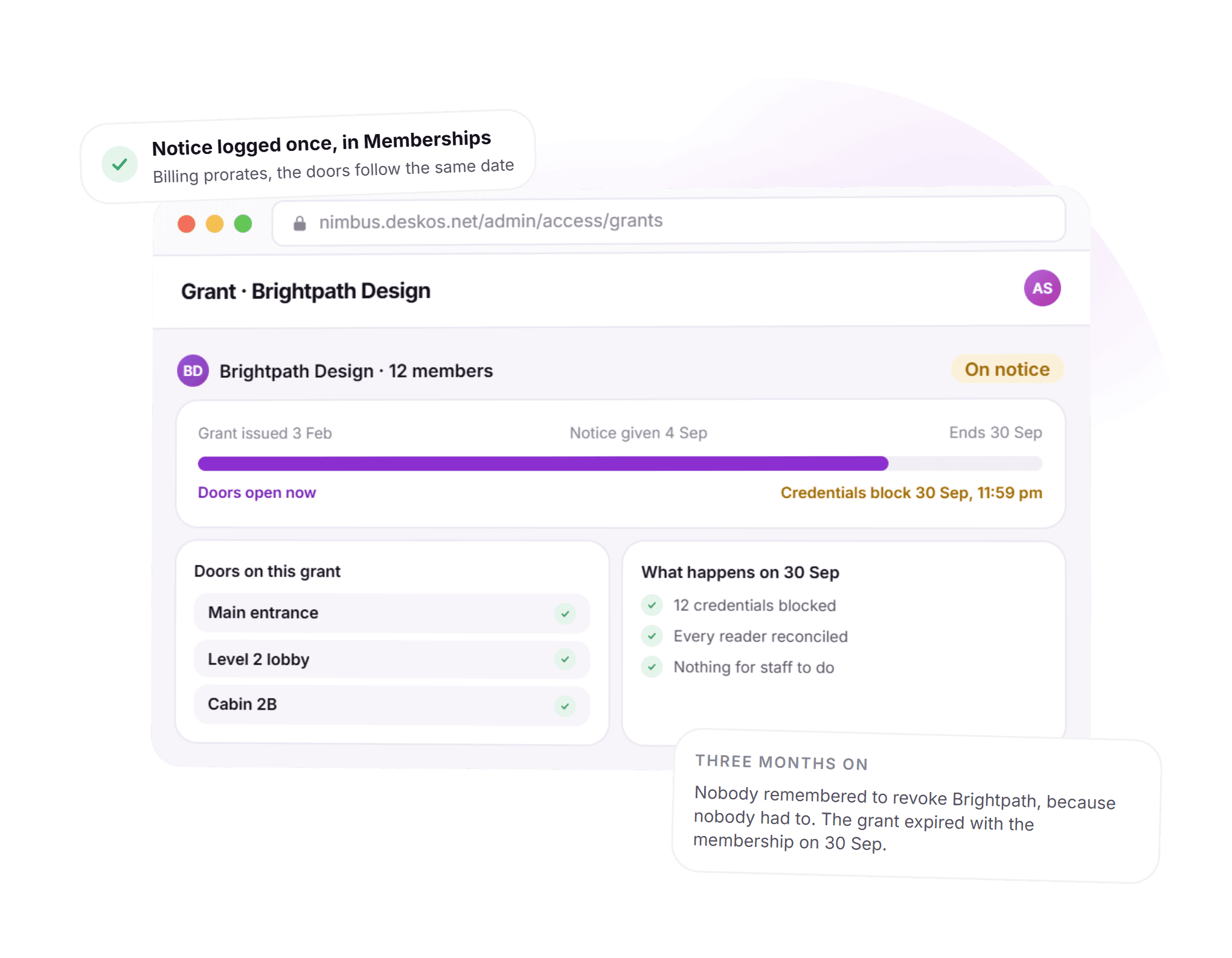
Access ends the day the membership does.
A company on notice keeps every door open until their last day, then loses all of them at once. Nobody logs into a separate access panel to make that happen. Billing prorates the final invoice to the same date the credentials stop working, off the same record.
- One notice date drives the invoice and the door grant
- Doors stay open until the last day, not the day notice was given
- Twelve credentials blocked at once, not chased down one by one
- Nothing for staff to remember on the day itself
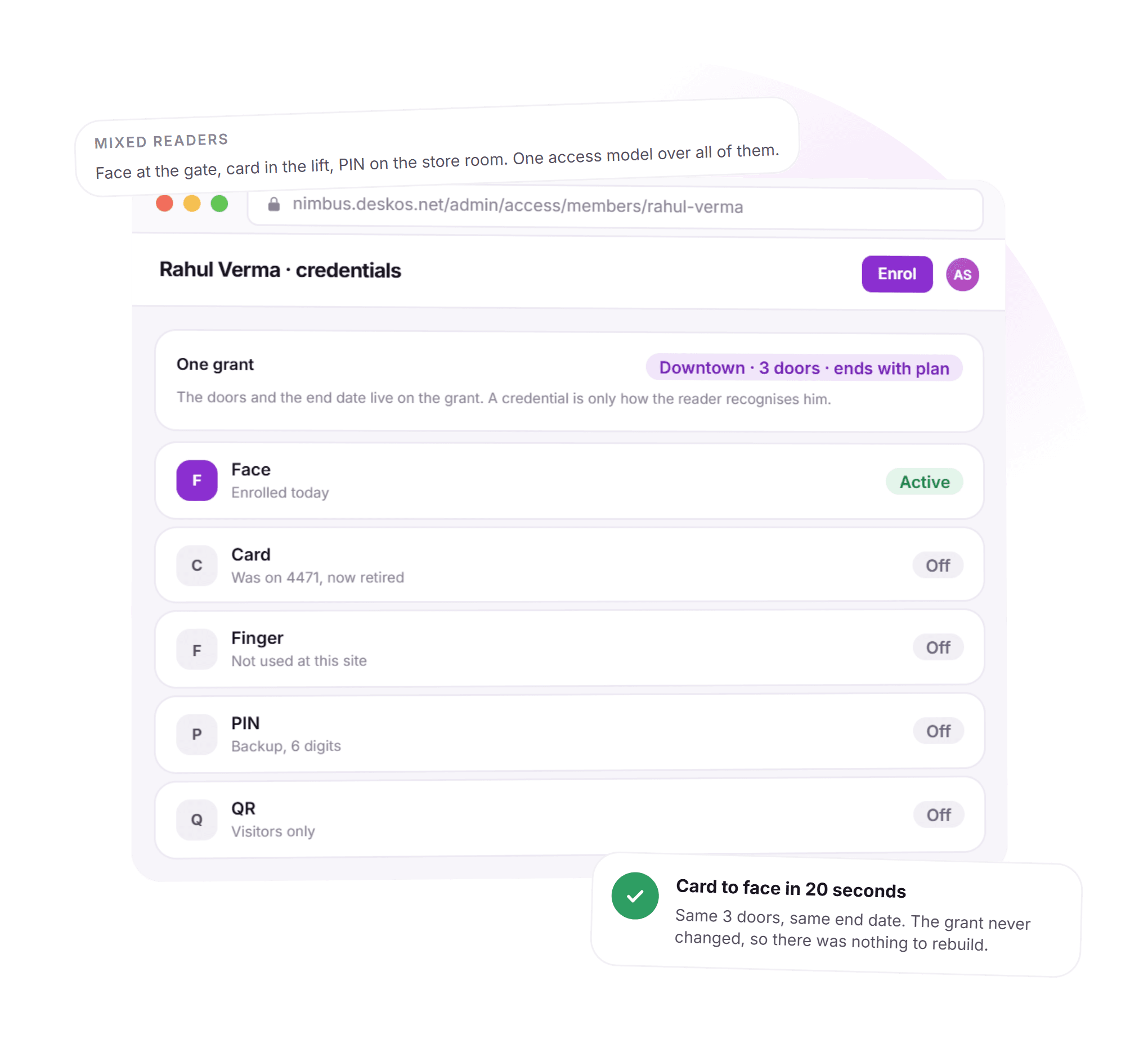
Card today, face tomorrow, same grant.
A member enrols a new credential and nothing else about their access moves. The doors, the location and the end date live on the grant, not on whichever reader happens to recognise them, so a hardware change is a twenty second errand instead of a support ticket.
- Face, card, finger, PIN and QR sit on the same grant
- Switching credential does not touch the doors or the end date
- Retired credentials show as off, not deleted from history
- Works across mixed readers on the same site
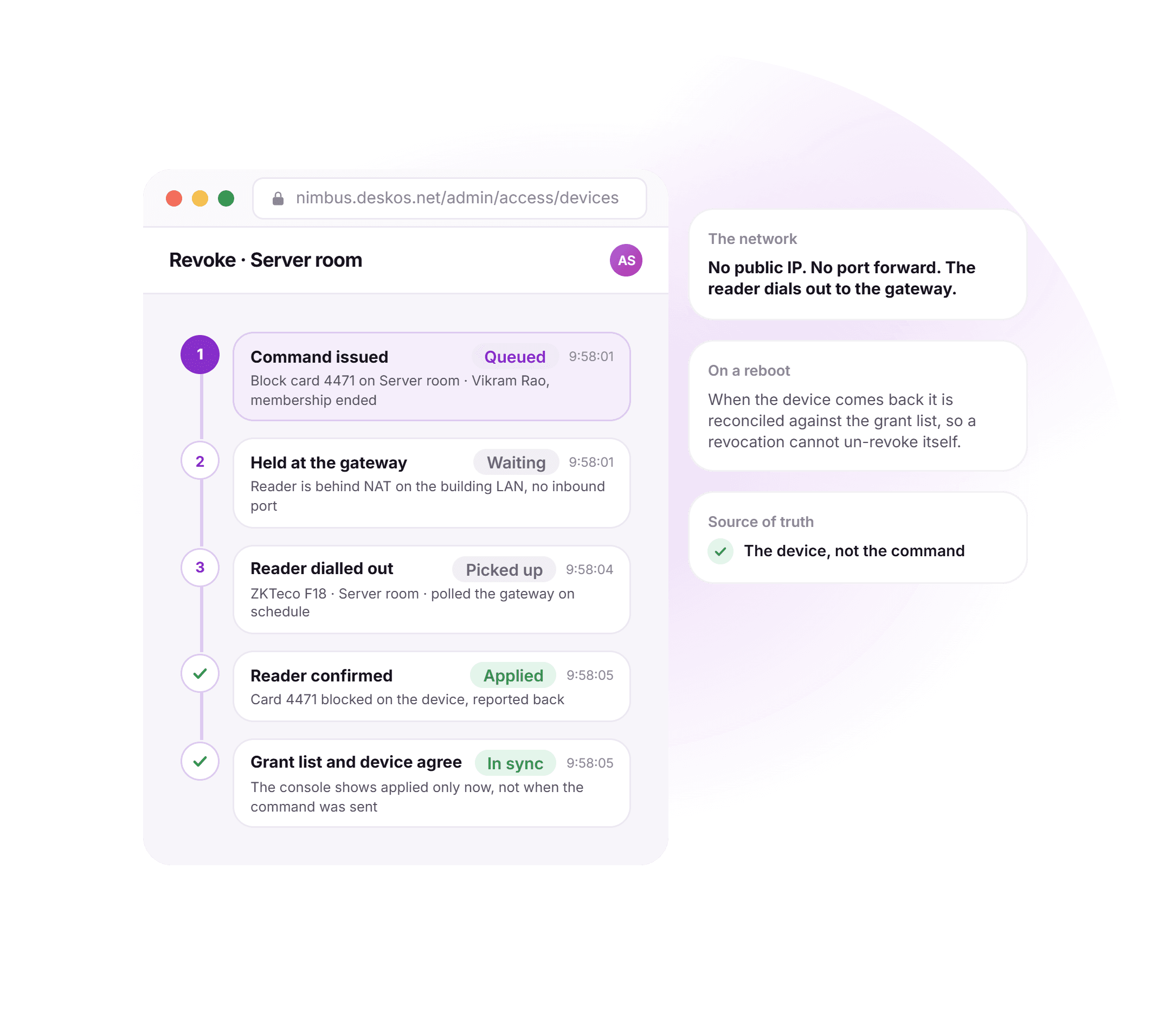
Built for a building with no public IP.
Real buildings do not hand out static addresses or open inbound ports for a door reader. The DeskOS gateway lets every device dial out instead, so a revoke command is queued, picked up by the device on its own schedule, and only marked applied once the device reports back.
- No public IP and no port forwarding required on site
- Commands queue at the gateway until the device is reachable
- Applied means the device confirmed it, not that a command was sent
- A reboot reconciles the device against the grant list before trusting it
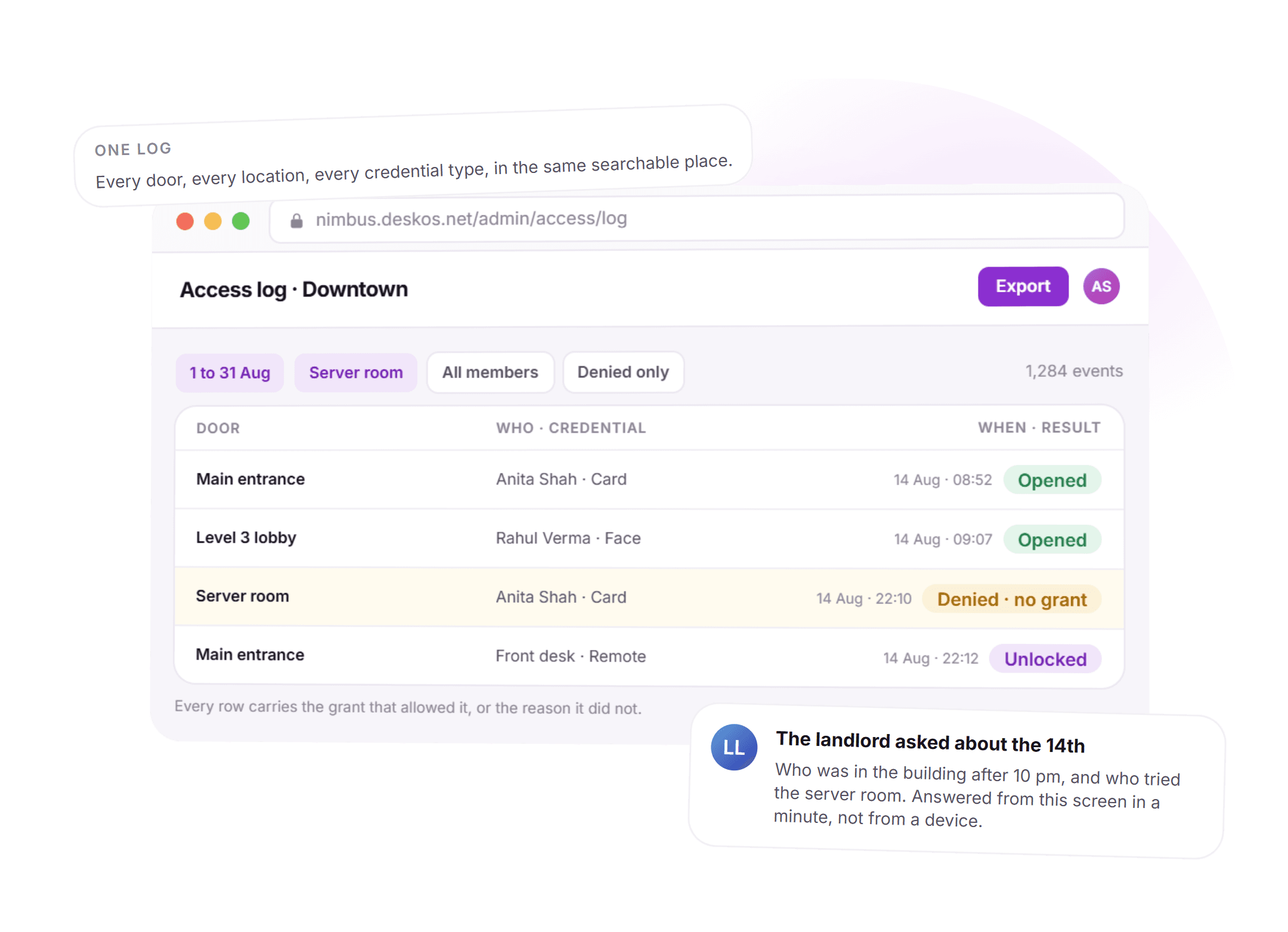
Every unlock, answerable in a minute.
A landlord asking who was in the building after hours used to mean pulling logs off a device by hand. Here it is a filter on one screen: every door, every location and every credential type, in the same searchable log.
- Filter by door, location, member or result
- Denied events kept with the reason, not just the successes
- Export for a landlord, insurer or incident review
- The same log across every door the org runs
See it running on your locations, your readers and your plans.
The safest access list is the one nobody has to maintain.
Access goes stale when it is maintained by hand. Here it is a consequence of the membership, so it is correct by construction.
- The membership issues the grantSell a plan and credentials issue themselves. Give notice and access ends on the last day of the term, prorated the same day.Billing and payments
- A visitor pass is a grant tooTime limited, scoped to the doors a visit needs, and nothing else. It expires without anyone revoking it by hand.Visitor management
- Door events become attendanceEvery unlock feeds presence, so who is in the building is measured, not self reported.Attendance tracking
- Doors belong to locationsGrants are per door and per location, so a member on one floor never ends up holding a key to another site.Space management
Everything in access control.
For the reader who wants the whole feature list on one screen. Every line is something DeskOS does today.
Model
- Doors registered per location and per gateway
- A grant per member, per door, never a whole building at once
- Access matrix view: members down, doors across
- Staff and member access modelled as distinct grant types
- Multiple locations under one organisation, each with its own doors
- A member can hold grants at one location or several
Credentials
- Face, finger, card, PIN and QR on the same grant
- One grant regardless of which credential is enrolled
- Re-enrolling a credential never rebuilds the door list
- Visitor QR passes, time limited and scoped to the visit
- Mixed readers on one site supported without extra setup
- Retired credentials kept in history, not silently dropped
Lifecycle
- Grant issues itself the moment a membership sells
- Access ends on the last day of the term automatically
- Notice logged once drives both the invoice and the door
- Renewals carry the existing grant forward, unchanged
- Mid term seat or plan changes update the door list with them
- Nothing left running for a member who already left
Revocation and network
- Revoke blocks a credential rather than deleting the record
- Devices reconciled against the grant list on reboot or resync
- A controller replacement cannot bring back a blocked credential
- Devices behind NAT with no public IP, no inbound ports required
- Commands queued at the gateway until the device is reachable
- Applied means the device confirmed it, not that a command was sent
Remote and schedules
- Remote unlock from the console, time limited and permission gated
- Every remote unlock logged like any other door event
- Weekday, shift and 24/7 access windows per plan
- Access hours follow what the member bought, without a second schedule
- Existing enrolments matched to a member instead of re-enrolled
- A live site can move onto DeskOS door by door
Audit
- Every unlock logged with who, which door, when and which credential
- Denied attempts kept with a reason, not just the successful ones
- Filter by door, location, member or result
- Export for a landlord, insurer or an incident review
- One log across every door and every location
- Door events feed attendance and presence, not a separate count
Missing something? Ask. It may already be in there.

“DeskOS has been really valuable for us. The visibility helps us make better decisions, while the automation has taken a lot of manual work off our plate.”
Sanjeev Laroia, Spacetime · 3,000+ seats across India
700 invoices in a single click
A full month raised in one action, GST worked out per invoice, and every one delivered on WhatsApp and email the same day.
100 leads a day, nobody typing
Enquiries land, get qualified by workflow and are sent an invitation to come and see the space, without anyone opening a sheet.
Meeting rooms stop being your problem
Members book from the app, credits come off automatically, overages land on the next invoice, and the front desk keeps no diary.
What changes when the door reads from the membership.
A vendor's own controller app and a generic building access system both work, right up to the day someone leaves and keeps their card. This is what the difference looks like day to day.
- Knowing who currently has access to a door
- A vendor's access app tied to one controller
- Whatever was enrolled on that one controller, with no record anywhere else
- A generic building access system
- A general access list, not tied to who is actually paying
- DeskOS
- A grant per member per door, read straight from the membership
- A member leaves
- A vendor's access app tied to one controller
- Someone has to remember to delete them from the reader
- A generic building access system
- A ticket raised with facilities, actioned whenever it is actioned
- DeskOS
- Access ends itself on the last day of the term
- Mixed hardware, face at one door, card at another
- A vendor's access app tied to one controller
- Each controller keeps its own separate list
- A generic building access system
- Depends on the vendor supporting every reader you own
- DeskOS
- One grant per member; the credential is just how the reader recognises them
- Devices behind NAT with no public IP
- A vendor's access app tied to one controller
- Needs a port opened or a VPN into the building network
- A generic building access system
- Often assumed to have a fixed, reachable address
- DeskOS
- The reader dials out to the gateway; nothing inbound required
- A controller reboots or gets swapped
- A vendor's access app tied to one controller
- Local memory only; a credential that should be blocked can still work
- A generic building access system
- Depends on when the next sync happens to run
- DeskOS
- Reconciled against the grant list before anything is trusted
- Answering who opened a door and when
- A vendor's access app tied to one controller
- Pull logs off the device itself, one controller at a time
- A generic building access system
- A report, if the system keeps one at all
- DeskOS
- One searchable log, across every door and every location
- A visitor for the afternoon
- A vendor's access app tied to one controller
- A temporary card someone has to remember to collect back
- A generic building access system
- Not usually supported at all
- DeskOS
- A QR pass scoped to the doors the visit needs, expiring by itself
- Several locations
- A vendor's access app tied to one controller
- A separate system, and a separate login, per site
- A generic building access system
- One account, but doors are not distinguished by location
- DeskOS
- Doors belong to locations; a member holds grants at one or several
Bring the awkward cases. Mixed readers, a private network, a site mid migration.
Simple plans. No per module add-ons.
Basic starts at $59 a month billed yearly, excluding VAT or GST. Every plan includes every module. You pay for seats and locations, nothing else.
Basic
For smaller spaces streamlining operations and getting billing under control.
$59 / month
billed yearly
- Active seats
- Up to 100
- Locations
- 1
Includes
- Space management and utilisation
- Meeting room management
- Billing with automated invoicing
- Helpdesk and service requests
- Web based access for the team
- Most taken
Business
Growing spaces building a community and premiumising what they sell.
Quoted on request
Scoped to your seats and locations
- Active seats
- Up to 200
- Locations
- 2
Everything in Basic, plus
- Visitor management
- Daily check-in management
- Community management
- Leads management CRM
- Payment gateway, receipts and credit notes
- Dedicated relationship manager
Business+
Bigger spaces that want their own apps and their own brand in front of members.
Quoted on request
Scoped to your seats and locations
- Active seats
- Up to 600
- Locations
- 3
Everything in Business, plus
- Whitelabel Android and iOS apps
- Lease management
- Client attendance tracking
- Cafe management
- Advanced reports
- Priority support, 24x7
Running more than three locations or 600 seats? That is Enterprise, quoted once we know your portfolio.
Still tied into another platform? We will buy out your contract. Ask us on the call.
Your doors, mapped by us first.
Before you sign anything, we build your locations and doors in a sandbox and show you a grant issuing, a credential enrolling and a revoke applying on real hardware. The person who maps your doors is the person who answers when you call.
What happens next
- 1
Send us your door list
Fill in the form or message us on WhatsApp. Tell us the readers you already have, the doors on site, and who should hold which.
- 2
We map your doors in a sandbox
Your locations, doors and a few real members, on your hardware. You watch a grant issue, a credential enrol and a revoke apply on a real reader.
- 3
Go live one door at a time
Onboarding brings the existing enrolments across without re-enrolling anyone. The person who mapped your doors is the person who answers when you call.
Questions operators ask about access control.
Which access hardware do you work with?
ZKTeco biometric and card readers are the ones we deploy most, connected through the DeskOS access gateway. Because grants are stored as our own records rather than inside a device, adding another controller family is an integration job rather than a migration.
Our devices sit on a private network behind NAT. Is that a problem?
No. Devices reach out to the gateway rather than the gateway reaching in, so no inbound ports and no public IP are needed. Commands are queued and only marked applied once the device confirms them.
What happens to door access when a member gives notice?
Access ends on the last day of the term automatically, because the grant hangs off the membership. If they extend, it extends with them, and the change is driven by the same notice that reprices the last invoice.
Can we give one member access to some doors but not others?
Yes, that is the default. Access is a matrix of members and doors, so a member can hold their floor and their cabin without holding the whole building.
Does this work across multiple locations?
Yes. Doors belong to locations, and members can hold grants at one location or several depending on what they bought. Staff switch location from the console and only see the doors their permissions cover.
Can front desk unlock a door remotely?
Yes, and it is deliberately narrow. A remote unlock is time limited, gated by permission, and logged in the same audit trail as a card scan or a face match.
Do access hours follow what a member actually bought?
Yes. Weekday plans, shift plans and 24/7 plans each open the door only in the hours that plan covers, without a second schedule to keep in sync by hand.
We already have people enrolled on our readers. Do they need to re-enrol?
No. Existing enrolments on a device can be matched to a member record rather than re-enrolled, so a live site can move onto DeskOS door by door without queuing everyone at the reader.
If we revoke access, could it come back after a reboot or a controller swap?
No. Revoking blocks the credential rather than deleting the record, and the grant list is the source of truth. A device is reconciled against it after any reboot, resync or hardware replacement, so a revocation cannot un-revoke itself.
Can visitors get temporary access without a physical card?
Yes. A visitor pass is a time limited grant scoped to the doors that visit needs, issued as a QR code and expiring on its own once the visit is over.
The rest of the system this plugs into.
- Visitor managementFront desk, kiosk and passesA visitor pass is a time limited grant on the same doors and grants.Visitor management
- Attendance and check-insWho is in, on which day and shiftDoor events feed presence, so attendance is measured, not self reported.Attendance and check-ins
- HardwareReaders, printers, kiosks and panelsThe readers, controllers and gateway that grants apply to.Hardware
- Space managementSeats, floors and live occupancyDoors belong to locations, the same locations seats and floors live in.Space management
Bring one door and one reader.
We will enrol a member, grant a door, end the membership and show the credential stop working. It takes about ten minutes.