Automation software for coworking operators where the recurring work never depends on who remembers.
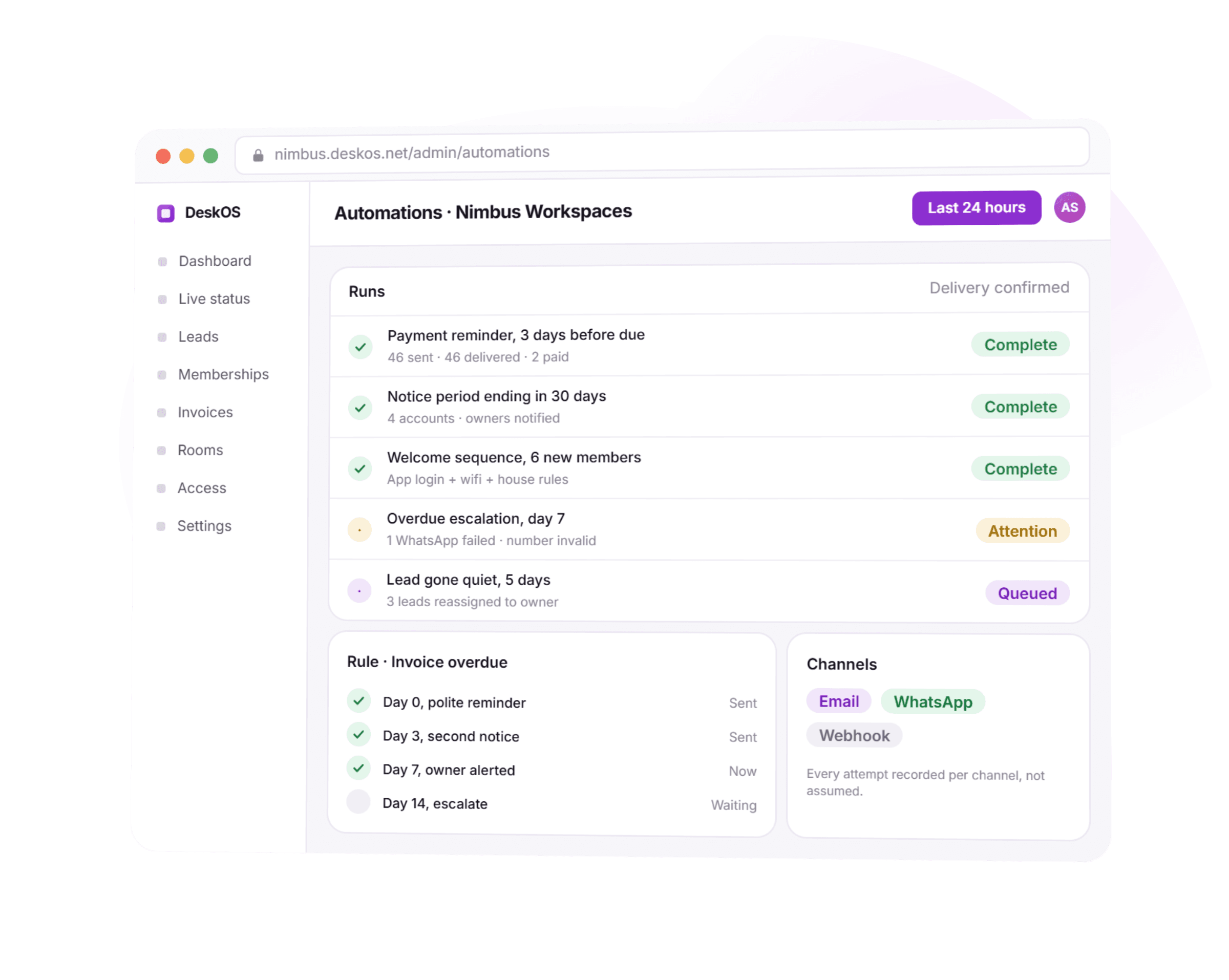
Payment reminders that report whether they landed, renewals and notices that fire off the agreement itself, onboarding that runs the same way every time, and rules over your own events pushed out as webhooks.
- Delivery recorded per channel, per attempt, never assumed
- Renewals and notices read off the agreement, not a calendar
- Any automation paused, previewed and tested on one record
- Webhooks straight into n8n, Zapier or your own endpoint
See a rule run against a real invoice or renewal
A free thirty minute demo with a person, not a recording. Bring a real overdue invoice or an agreement coming up for renewal and watch the rule fire on it while we are still on the call.
Sends on the channels and pushes into the tools you already use


Everything between a due date and a delivery record.
Half the recurring work in a flex space is somebody's memory: chase the invoice, flag the renewal, send the welcome email, update the sheet. When that person is on leave, the work does not happen, and you find out through the bank balance.
- EmailDeliveredWhatsAppFailedRecorded per channel, per attempt
A payment reminder that tells you if it arrived
Before due, on due and after due, on email and WhatsApp, with the result of each attempt recorded per channel. A message that failed to deliver shows up as a failure, not as a customer who did not pay.
- Term expiring18 daysNotice givenLoggedEscalation due1 Oct
Renewals, notices and expiries on schedule
Terms approaching expiry, notices given, escalations coming up and seats about to release are surfaced as work with a date on it, read off the agreement itself, not a calendar entry someone keeps in sync by hand.
Where a renewal date actually comes from - Welcome message sentWifi and house rules sharedApp login + door credentialSame order, every member
The first week runs itself
A new member gets the welcome message, house rules, wifi, app login and door credential in the order and on the channels you configured, per location. Every member gets the same start regardless of who is on shift.
What a welcome sequence actually provisions - Renewal reminder · September212 sent · 84 openedLive dataMerge fields, unsubscribes honoured
Campaigns that never run off a stale list
Build an email or WhatsApp campaign with real merge fields from member data, honour unsubscribes and one-click list headers, and see who opened and who replied, off the same record as everything else.
What a member sees on the other end - Lead gone quiet, 5 daysOnInvoice 7 days overdueOnTicket breaches due timeOn
If this happens, do that
Build rules over your own events: a lead goes cold, an invoice is a week late, a ticket breaches its due time, occupancy at a location drops below a threshold. Each fires a notification, a task or a webhook.
- lead.created200 OKinvoice.paid200 OKagreement.signed200 OK
Webhooks into the stack you already run
Push events out to n8n, Zapier or your own service, and pull leads in from aggregators and your website. For teams that want more, we deploy and run a private automation stack per client.
- WhatsApp send, 9:02 amFailed, number invalidA failure shows up as a failure
Delivery is verified, not assumed
Automations record the actual channel result, and a scheduled job that stops running raises an internal alert rather than failing quietly for a month.
- Overdue escalationPausedPreviewed on 1 test accountPaused, previewed, tested first
You stay in control
Every automation can be paused, previewed and tested on one record before you point it at the whole customer base. Nothing runs against everyone the first time you touch it.
- Reminder sentNotice loggedEscalation queuedOn the customer timeline
Everything lands on the record
Each automated message and action is on the customer timeline, so your team can see what the system already said before they pick up the phone.
Thirty minutes with a person, on a real overdue invoice.
From a due date to a record your team can trust.
Five things happen on one overdue invoice. None of them waits for someone to remember.
- 1Day 0
An invoice goes overdue and a rule picks it up
No person starts the clock. The moment the due date passes, the reminder sequence you configured begins, on the channels you chose.
- 2Per attempt
Every send is recorded, not assumed
Delivered, opened or failed, logged per channel. A WhatsApp number that bounces shows up as a bad contact detail, not a customer who ignored you.
- 3On the agreement
Renewals and notices fire off the record itself
A term expiring, a notice given, an escalation due, each reads off the agreement, so it can never drift out of sync with a calendar someone forgot to update.
- 4When it stalls
A stuck job raises an alert, not silence
Scheduled work is monitored. One that has not run when it should notifies your team internally, rather than quietly not happening for a month.
- 5Always
Every action lands on the same timeline a person would leave
A sent reminder, a logged notice, a queued escalation, each on the customer record your team already looks at, so nothing an automation did is invisible.
What used to depend on someone remembering, handled on the record.
Four things that used to sit in someone's memory or a spreadsheet, and what they look like when a rule is doing the remembering instead.
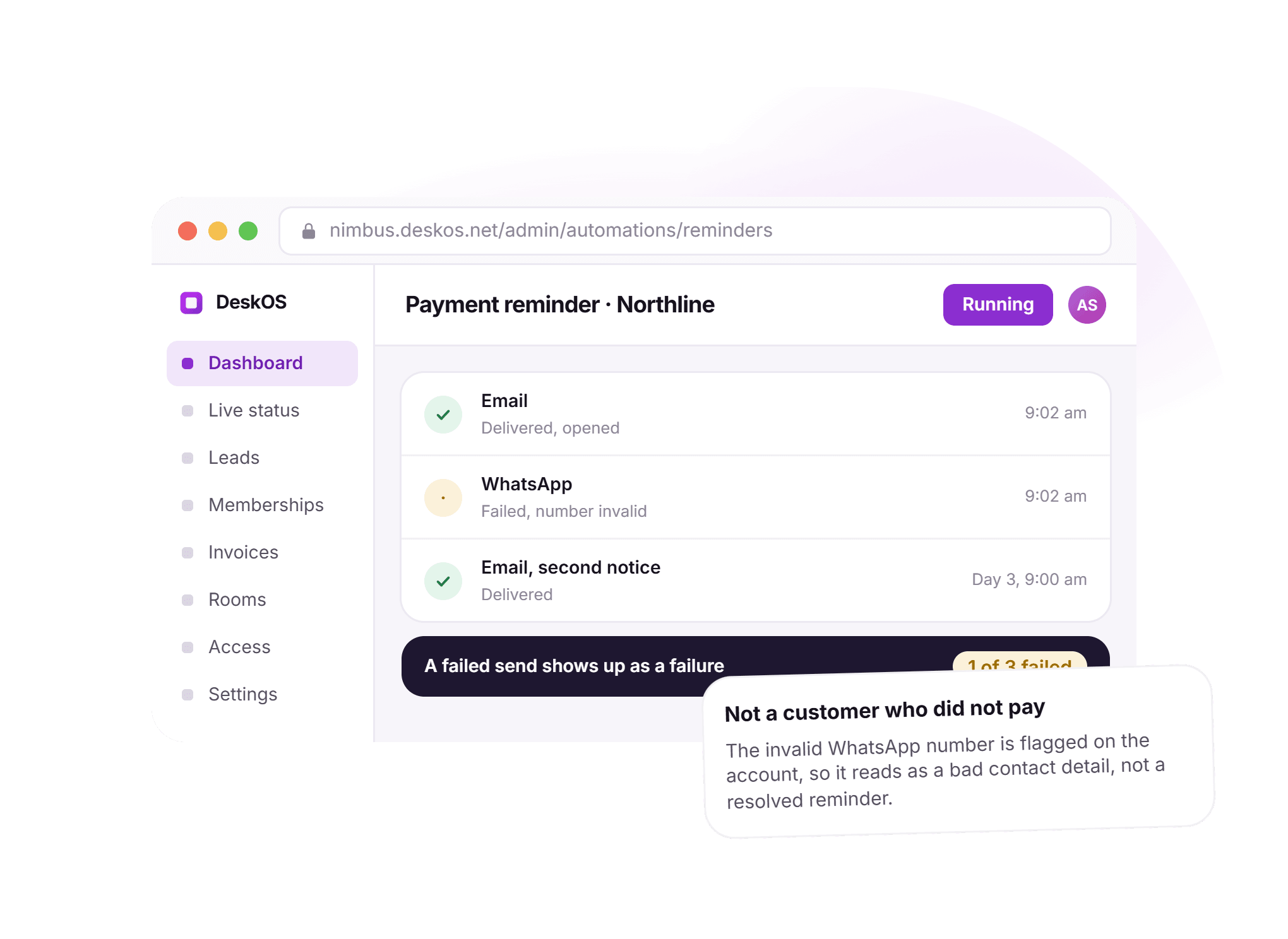
A failed send shows up as a failure.
A payment reminder used to mean one message fired into the dark, with no way to tell a customer who ignored it from a WhatsApp number that was never valid. Here every attempt is recorded per channel, so the two never get confused.
- Before due, on due and after due, on the channels you chose
- Delivered, opened or failed, recorded per attempt
- A bad contact detail flagged as exactly that
- The next channel tried automatically when one fails
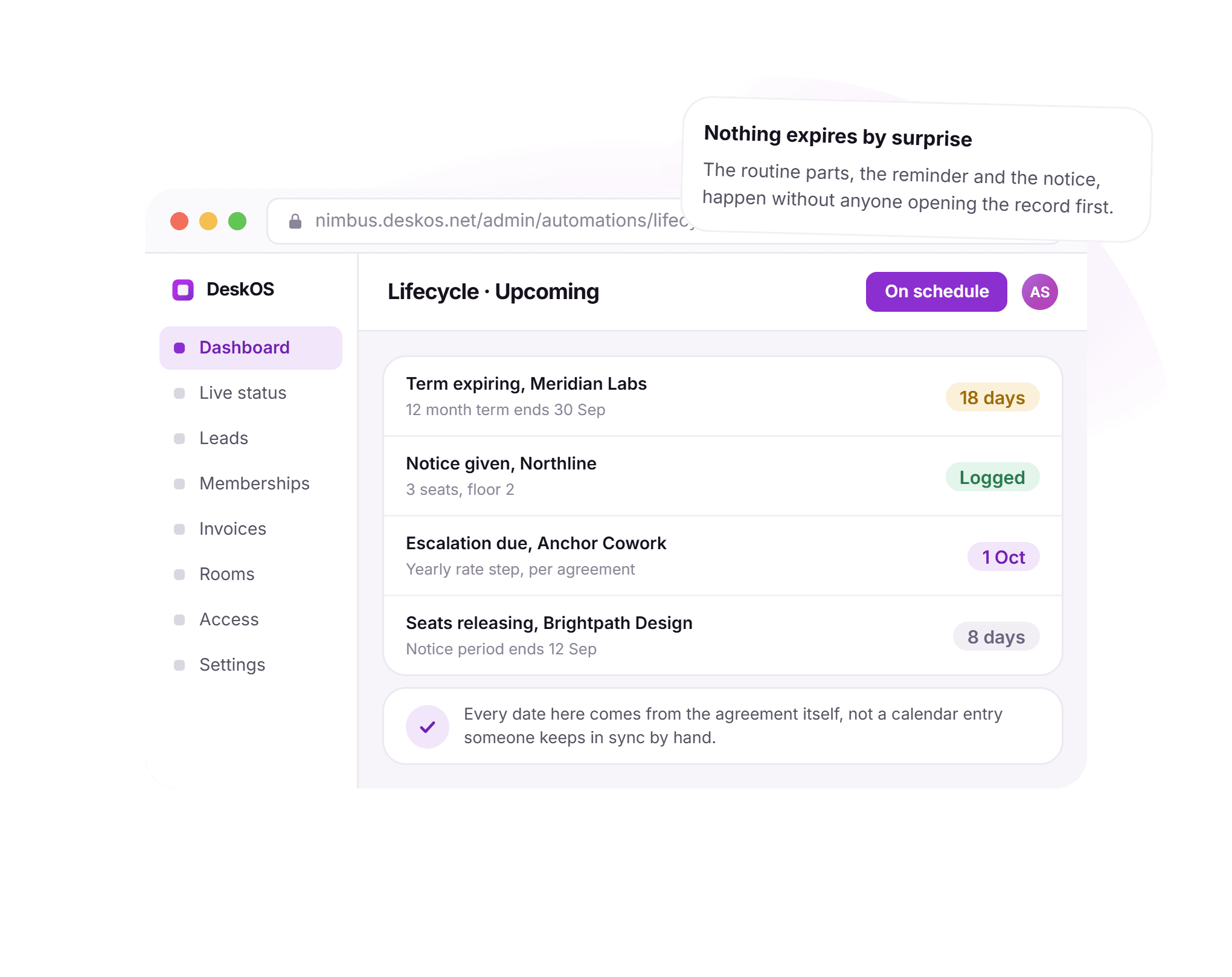
Nothing expires by surprise.
A renewal used to mean someone keeping a spreadsheet of dates in sync with every agreement by hand. Here a term expiring, a notice given, an escalation due and seats about to release are read straight off the agreement, so the date can never quietly drift.
- Every date comes from the agreement, not a calendar entry
- Surfaced as work with a date on it, ahead of time
- A notice logged the moment it is given, not chased down
- An escalation due fires on the agreement’s own schedule
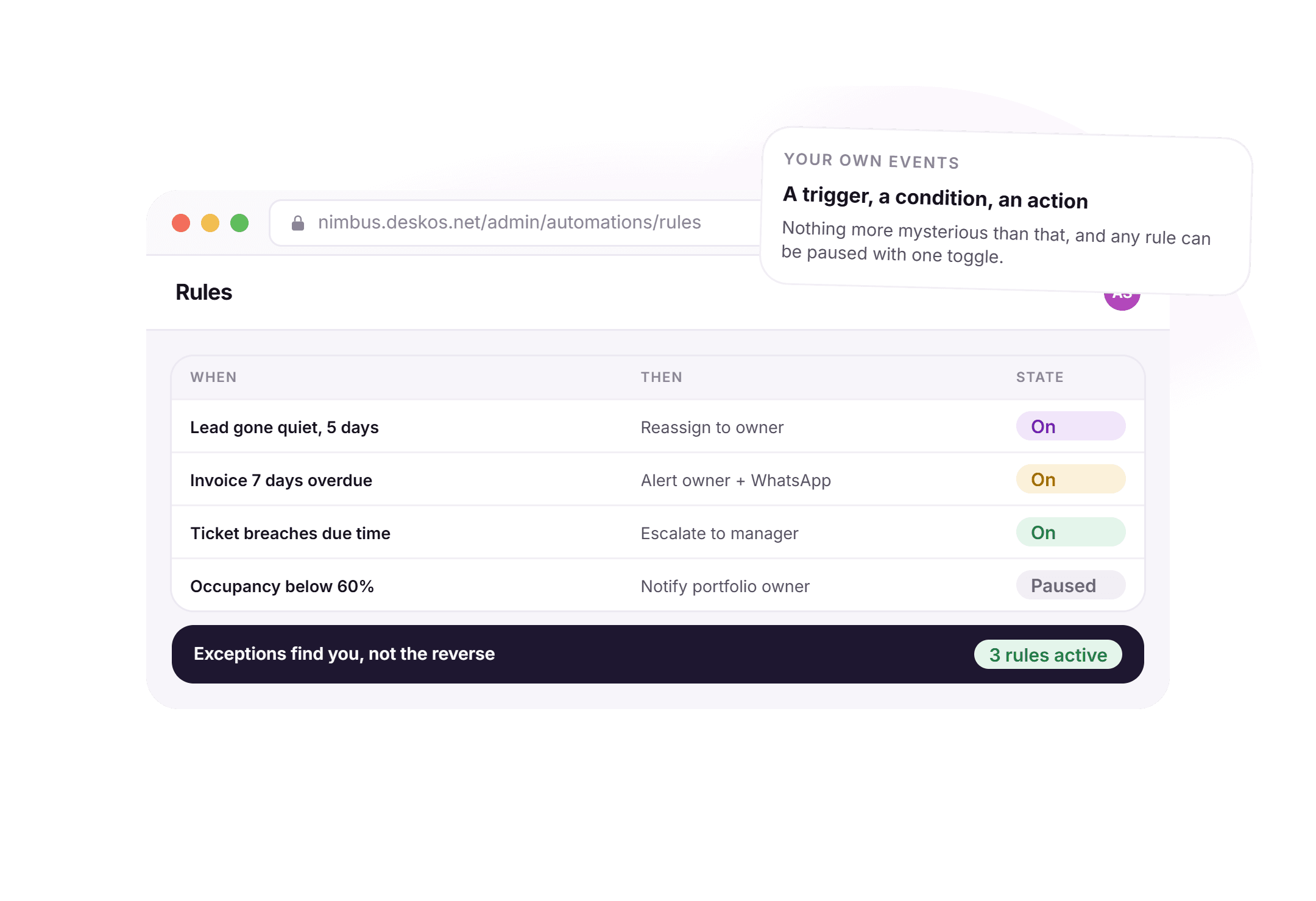
A trigger, a condition, an action.
Exceptions used to mean someone noticing a lead had gone quiet or an invoice had aged past a week, if they happened to look. Here a rule watches for the event itself and fires without anyone opening the record first.
- Built over your own events, not a generic workflow canvas
- A lead gone quiet reassigns itself to its owner
- An overdue invoice alerts the owner on email and WhatsApp
- Any rule paused with one toggle, previewed before it runs wide
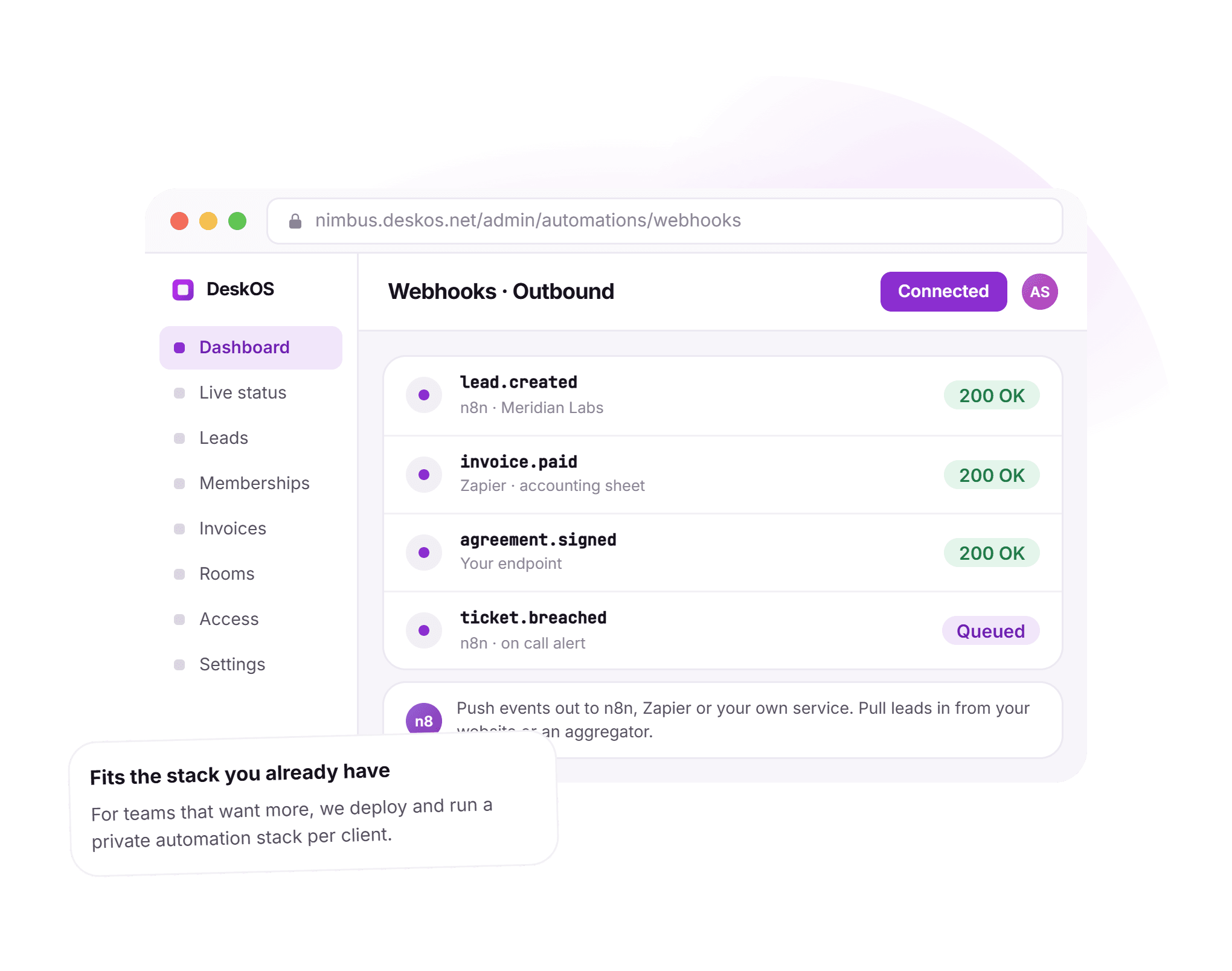
Fits the stack you already run.
Automation used to mean choosing between a workflow tool that cannot see your business or a developer wiring five systems together by hand. Here the events are already real, and they push straight out to the tools your team already has open.
- Events like a new lead or a signed agreement pushed as webhooks
- Connects straight to n8n, Zapier or your own endpoint
- Leads pulled in from your website and aggregators
- A private automation stack, deployed and run for teams that want one
Bring a real invoice or agreement. We will point a rule at it live.
Automation is only as good as the data it triggers on.
A workflow tool bolted onto five disconnected systems automates the copying between them. Here the trigger is the business event itself, the same one your team already works against.
- A reminder fires off real invoice stateThe due date and the paid state a reminder chases are the same ones on the invoice itself, so chasing stops the moment a payment is actually recorded.Billing and payments
- Seats about to release come off the real seat boardA notice ending in the lifecycle picture is the same seat your team would see go vacant on the live floor plan.Space management
- A breached ticket escalates into a real helpdesk itemThe rule that escalates a ticket past its due time hands off to the same helpdesk a member’s own message would raise.Member engagement
- An agent is one more worker in the same layerWhere automation is deterministic, an agent adds judgement on top, reading and writing the same records these rules already watch.AI agents
Everything in automation.
For the reader who wants the whole feature list on one screen. Every line is something a rule does today, on your own data.
Reminders
- Before due, on due and after due, configurable per stage
- Email and WhatsApp, chosen per automation
- Delivery result recorded per channel, per attempt
- A failed send shown as a failure, not assumed as ignored
- Chasing that stops the moment payment is actually recorded
- The next channel tried automatically when one fails
Lifecycle
- Terms approaching expiry surfaced with a date on them
- Notices given logged the moment they are given
- Escalations due read off the agreement’s own schedule
- Seats about to release flagged ahead of time
- Nothing depends on a calendar entry kept in sync by hand
- Every date traceable back to the agreement itself
Onboarding
- Welcome message, house rules, wifi and app login sequenced
- Door credential issued in the order you configured
- Per location channels and order, not one global sequence
- Every new member gets the same start regardless of shift
- Front desk sees what is done and what is still open
- Runs the moment a membership goes live
Outreach
- Email and WhatsApp campaigns with real merge fields
- Built from live member and lead data, never a static export
- Unsubscribes and one-click list headers honoured
- Opens and replies visible per campaign
- Lists that are never out of date because nothing is exported
- The same record leads and members already live on
Rules
- Built over real events: leads, invoices, tickets, occupancy
- A trigger, a condition, an action, nothing more mysterious
- Fires a notification, a task or a webhook
- Any rule paused with one toggle
- Previewed and tested on one record before it runs wide
- Exceptions surfaced without anyone opening the record first
Integrations and oversight
- Webhooks out to n8n, Zapier or your own endpoint
- Leads pulled in from your website and aggregators
- A private automation stack, deployed and run per client
- Scheduled jobs monitored, a stalled one raises an alert
- Every automated action logged on the customer timeline
- Your team sees what the system already said before they call
Missing something? Ask. It may already be one rule away.

“DeskOS has been really valuable for us. The visibility helps us make better decisions, while the automation has taken a lot of manual work off our plate.”
Sanjeev Laroia, Spacetime · 3,000+ seats across India
700 invoices in a single click
A full month raised in one action, GST worked out per invoice, and every one delivered on WhatsApp and email the same day.
100 leads a day, nobody typing
Enquiries land, get qualified by workflow and are sent an invitation to come and see the space, without anyone opening a sheet.
Meeting rooms stop being your problem
Members book from the app, credits come off automatically, overages land on the next invoice, and the front desk keeps no diary.
What changes when the trigger is a real business event.
A generic workflow tool and a spreadsheet someone keeps in sync both work, right up to the week that person is on leave, a WhatsApp number turns out to be wrong, or a scheduled job quietly stops running. This is what the difference looks like day to day.
- A payment reminder
- A generic workflow tool
- One message fired, with no way to tell if it landed
- A person’s memory and a spreadsheet
- A generic workflow tool with no invoice state underneath it
- DeskOS
- Recorded per channel, per attempt, delivered or failed
- A renewal date
- A generic workflow tool
- A spreadsheet kept in sync with every agreement by hand
- A person’s memory and a spreadsheet
- A calendar reminder someone has to set themselves
- DeskOS
- Read straight off the agreement, never drifts
- A new member’s first week
- A generic workflow tool
- Whoever is on shift remembers what to send, if they do
- A person’s memory and a spreadsheet
- A generic sequence with no idea which location it is for
- DeskOS
- The same sequence, per location, every single time
- A campaign to members
- A generic workflow tool
- An exported list that goes stale the day it is downloaded
- A person’s memory and a spreadsheet
- Merge fields that break the moment a record changes
- DeskOS
- Built from live data, never a separate export
- A lead gone quiet
- A generic workflow tool
- Noticed only if someone happens to look at the pipeline
- A person’s memory and a spreadsheet
- A workflow canvas with no real lead behind the trigger
- DeskOS
- Reassigned to its owner the moment it goes quiet
- A scheduled job that stops running
- A generic workflow tool
- Nobody notices until the bank balance says so
- A person’s memory and a spreadsheet
- Fails quietly, with nothing watching the watcher
- DeskOS
- Monitored, and a stall raises an internal alert
- Connecting to the rest of your stack
- A generic workflow tool
- A developer wiring five systems together by hand
- A person’s memory and a spreadsheet
- A workflow tool that cannot see your business events
- DeskOS
- Webhooks on real events, straight into n8n or Zapier
Bring the awkward cases. A number that bounced, a renewal nobody flagged, a job that quietly stopped.
Simple plans. No per module add-ons.
Basic starts at $59 a month billed yearly, excluding VAT or GST. Every plan includes every module. You pay for seats and locations, nothing else.
Basic
For smaller spaces streamlining operations and getting billing under control.
$59 / month
billed yearly
- Active seats
- Up to 100
- Locations
- 1
Includes
- Space management and utilisation
- Meeting room management
- Billing with automated invoicing
- Helpdesk and service requests
- Web based access for the team
- Most taken
Business
Growing spaces building a community and premiumising what they sell.
Quoted on request
Scoped to your seats and locations
- Active seats
- Up to 200
- Locations
- 2
Everything in Basic, plus
- Visitor management
- Daily check-in management
- Community management
- Leads management CRM
- Payment gateway, receipts and credit notes
- Dedicated relationship manager
Business+
Bigger spaces that want their own apps and their own brand in front of members.
Quoted on request
Scoped to your seats and locations
- Active seats
- Up to 600
- Locations
- 3
Everything in Business, plus
- Whitelabel Android and iOS apps
- Lease management
- Client attendance tracking
- Cafe management
- Advanced reports
- Priority support, 24x7
Running more than three locations or 600 seats? That is Enterprise, quoted once we know your portfolio.
Still tied into another platform? We will buy out your contract. Ask us on the call.
Your invoices, tested by us first.
Before you turn anything on, we build a rule against your own data and run it in a sandbox so you can see exactly what fires and what it records. The person who builds the rule is the person who answers when you call.
What happens next
- 1
Tell us which recurring work is the problem
Fill in the form or message us on WhatsApp with which of reminders, lifecycle, onboarding, outreach or rules you want to start with. Most operators start with reminders.
- 2
We build one rule against your own data
Your own invoices, agreements or leads, in a sandbox, so you can see exactly what fires and what it records before anything runs against a real customer.
- 3
Go live on one record, then the rest
Every automation previews and tests on a single record first. You point it at the whole base only once you have watched it run correctly.
Questions operators ask about automation.
How is this different from the AI agents?
Automations are deterministic. You define the trigger and the action and it runs exactly that way every time, which is what you want for invoices and renewals. Agents handle conversation and judgement. Most operators use both, with automation on money and lifecycle and agents on sales and support.
Can we send on WhatsApp as well as email?
Yes. Channels are chosen per automation, and the result of each channel is recorded separately so you can see which one actually reached the customer.
What stops an automation from failing silently?
Scheduled jobs are monitored, and one that has not run when it should raises an internal alert. Delivery results are stored per attempt, so a failed send is visible on the record rather than assumed to have worked.
Can we push events into our own tools?
Yes. Webhooks carry events like a new lead, a signed agreement or a paid invoice into n8n, Zapier or your own endpoint, and leads can be pushed in from your website or an aggregator.
Do we need a developer to set this up?
No for the standard automations, which are configuration. If you want a bespoke workflow across several systems, we run that as a service and build it for you.
What happens when a WhatsApp number turns out to be invalid?
The send is recorded as failed with the reason, on the customer record, rather than treated as a delivered reminder the customer chose to ignore. Your team sees a bad contact detail, not a resolved chase.
Can we test a rule before it runs on every customer?
Yes. Every rule can be previewed and run on a single record first. You only point it at the whole base once you trust what it does.
Does a paused automation lose the schedule it was on?
No. Pausing stops new runs; it does not clear what was already queued or delete the rule. Turning it back on picks up from your own configured trigger, not from the moment you paused it.
Can renewals and notices depend on the lease terms, not just the subscription?
Yes. Where a location carries a lease alongside the subscription, lifecycle automations read off whichever agreement actually governs the date, so a lease-driven escalation fires on the lease’s own schedule.
Who sees what an automation already sent before they call a customer?
Every automated message and action lands on the customer timeline, the same one a person’s call notes would go on, so your team can check what was already said before they pick up the phone.
The rest of the system this plugs into.
- AI agentsLead to signed agreement, on WhatsAppAn agent is one more worker inside the same automation layer.AI agents
- Billing and paymentsInvoices, tax, gateways and collectionsThe invoice state a reminder chases is the one on the ledger itself.Billing and payments
- Member engagementApps, service requests and eventsA breached rule hands off to the same helpdesk a member would raise.Member engagement
- Space managementSeats, floors and live occupancySeats about to release come off the same live seat board.Space management
Send us a real invoice. Watch the rule chase it.
We will point a reminder rule at a real overdue invoice or a renewal coming up, and show delivery get recorded per channel while we are still on the call. It takes about ten minutes.