Coworking space management software that knows what is sold, free and coming back.
DeskOS is coworking space management software for operators of coworking spaces and managed offices. Every seat, cabin and desk sits on a live board that billing, doors and the member app all read from, so what is sold, on notice, held and free is one number on every screen.
- One occupancy number on every screen and report
- Allot a seat and the invoice, the door and the app follow
- What is free on the 1st, answered today
- Every location in one console
See it on your own floor
A free thirty minute demo with a person, not a recording. Bring your seat sheet and we put your floor on the board.
Plays with the doors and tools you already use






Everything between the floor plan and the invoice.
Desk booking software starts at the booking. Here the seat already knows who holds it, until when, and what it costs, so the board, the invoice and the door never disagree.
- Private cabins12 · 68 seats3 floorsDedicated desks118L1 to L3Hot desks402 shiftsMeeting rooms6bookable
Every seat, cabin and desk, typed
Cabins, dedicated desks, hot desks and rooms, per floor, per location. Seat types are yours to define, and every seat has a number, a floor and a price.
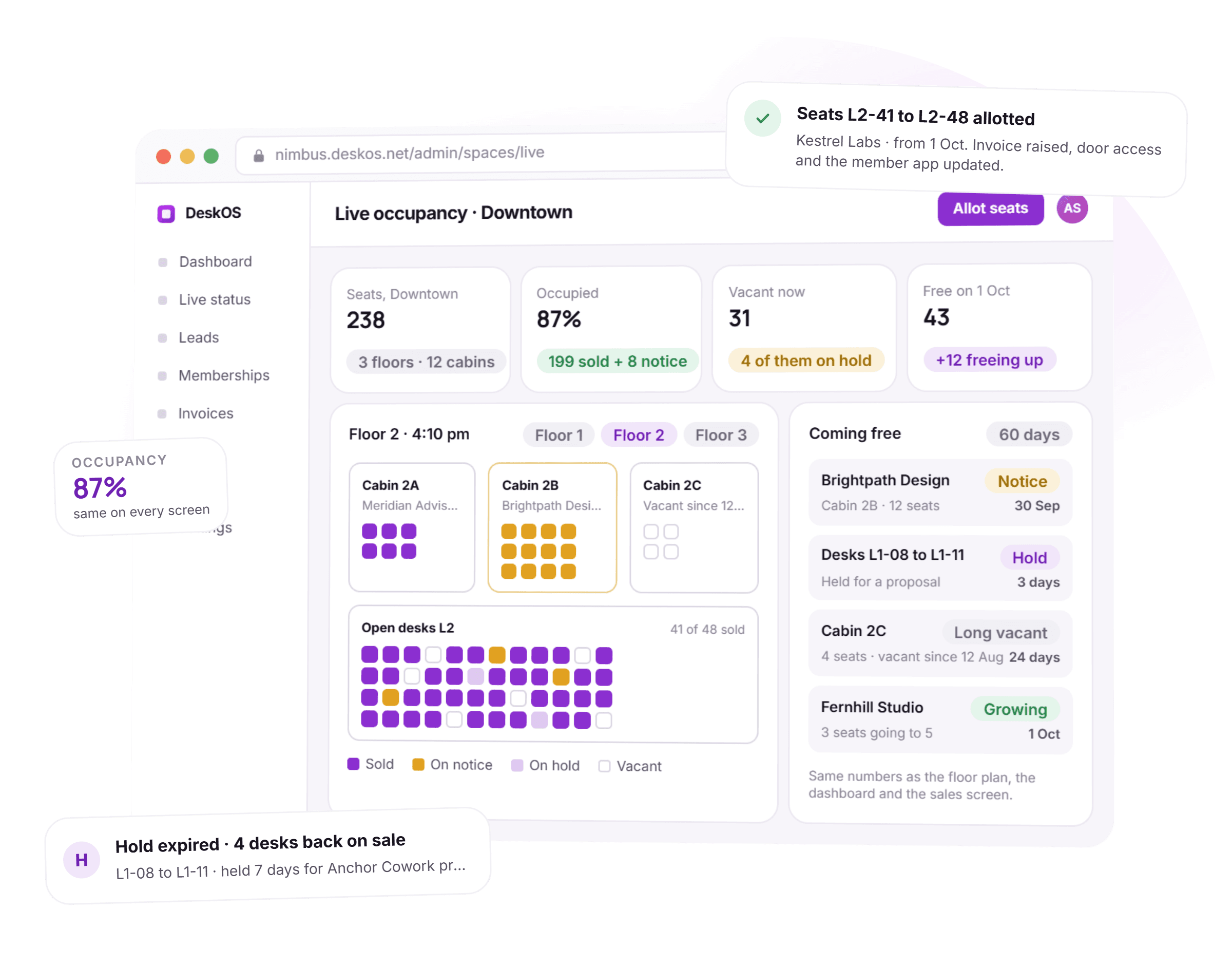
- Occupied87%On notice8Vacant31Sold + notice = occupied. A hold is still vacant.SoldOn noticeOn holdVacant
A live board, not a Friday sheet
Sold, on notice and vacant right now, computed from the same records billing runs on. The number on the wall and the number in the board pack are the same number.
- Kestrel Labs · 8 seatsFrom 1 OctL2-41L2-42L2-43L2-44L2-45L2-46L2-47L2-48+ pick on planInvoice, door access and app followAllot
Allot seats in one action
Pick the seats, pick the company, set the date. The invoice schedule, door access and the member app all follow from that one record.
How the invoice follows the seat - Brightpath Design · 12 seatsOn noticeNotice given 4 SepEnds 30 SepStill occupied, still billedSellable from 1 OctLast invoice prorated to 30 SepDoor access ends 30 Sep, 11:59 pm
Notice periods that run themselves
Log a notice with an end date. The seat shows as coming free, the last invoice prorates itself, and door access ends on the day.
- Floor 1 · desks 08 to 11HeldAnchor Cowork proposalexpires in 3 daysNobody else can be sold these. They still count as vacant.Deal closes: hold becomes an allotment. It lapses: desks go back on sale by themselves.
Holds that expire on their own
Hold seats for a proposal. They show as held on the map, still count as vacant, and go back on sale by themselves when the hold lapses.
Proposals that hold seats - Free on1 Oct48Vacant today31Notice ending by then+13Holds lapsing by then+4Renewals assumed kept199
What is free on the 1st
Ask for any date. Notices, holds and renewals are added up for you, with unconfirmed renewals assumed as staying and flagged for a chase.
- Downtown238 seats · 87%Riverside190 seats · 92%North Park184 seats · 79%612 seats · 86% across 3 locations
Every location in one console
Seats, occupancy and notices per location and the group total on one screen. Members can switch location for the day with a pass.
Occupancy and revenue per location - Floor 2 planDeskWallSpace4 desks selected · Make a space
A floor plan you build yourself
Place desks, draw walls, drop in the PDF of the floor and set the scale from one wall. The same plan runs editing, the live board and the member seat picker.
- Hot desks L2 · 40 seats2 shiftsDay · 8 am to 6 pm9 passes sold todayMonthly 28 · day passes 12Night · 7 pm to 6 am22 passes sold todayMonthly 10 · day passes 30The same desk earns twice: a monthly member by day, a pass by night. Each shift sells only its own quota.
Shifts and day pass quotas
Sell hot desks by shift with a quota for each one, so evening passes never eat into the day and a desk can earn twice.
Thirty minutes with a person, on your own floor plan.
From the floor plan to the member, without a sheet in between.
Five things happen to a seat over its life. None of them needs a spreadsheet open.
- 1Once, at setup
The inventory is built
Floors, seat types and the plan, imported from your sheet or drawn in the builder. Every seat gets a number, a type and a price before anything is sold.
- 2When a deal closes
Seats are allotted to the company
Pick them on the map or from the list. The seats turn sold from the start date, and the hold the proposal was sitting on is used up, not forgotten.
- 3The same moment
Billing, doors and the app follow
The invoice schedule starts, door access opens on the start date and the member sees the desk in the app. Nothing is retyped anywhere.
- 4When a member gives notice
The seat shows as coming free
On notice counts as occupied until the end date, then the seat goes back on sale by itself. The last invoice prorates to the day.
- 5Any day
Forward availability is a question, not a meeting
Pick a date. Notices, holds and renewals add up to what is free. Renewals nobody has confirmed are assumed and flagged so someone chases them.
A month on the floor, with the admin done.
Four things that used to take a meeting, and what they look like when the system answers them.
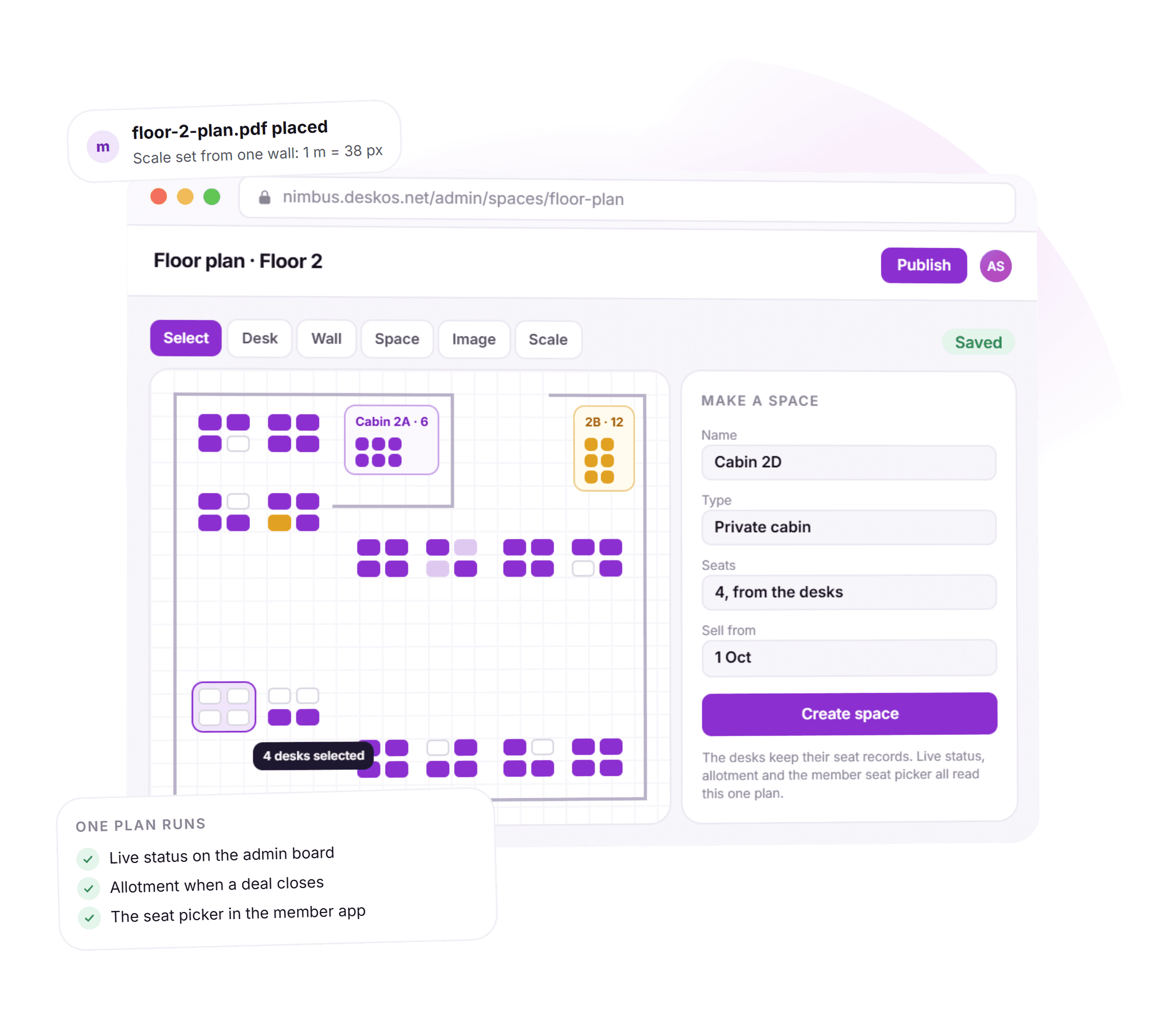
Draw the floor once, use it everywhere.
Drop in the PDF of the floor, set the scale from one wall you know the length of, and place desks over it. Draw walls, select a few desks and make a cabin out of them. The plan you draw is the plan the live board shows and the plan members pick a desk on.
- Desks, walls and spaces placed by hand, on top of your own drawing
- Scale set from a single measured wall, so distances are real
- A cabin is made from desks, so its seats are counted like any other
- One renderer for editing, the live board and the seat picker
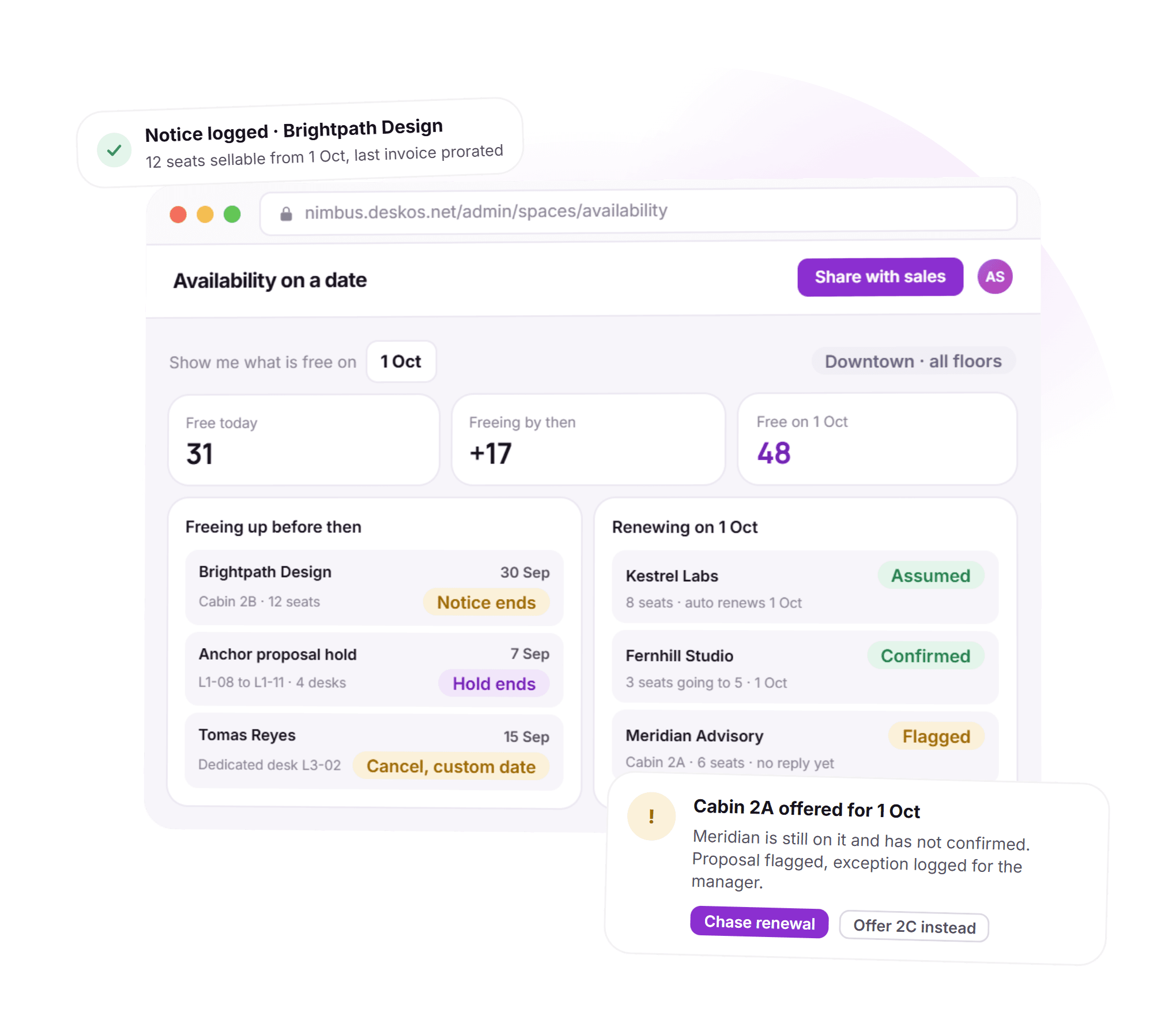
What is free on the 1st, answered today.
A tour asks for twelve seats from next month. Instead of a huddle over the sheet, you pick the date and get the number. Notices ending before then are added, holds are counted, and renewals nobody has confirmed are assumed to stay and flagged, so the answer is honest and the chase is on someone’s list.
- Free today, freeing by then and free on the date, side by side
- Renewals assumed, confirmed or flagged, each with a reason
- A seat offered for a date it may not be free on raises an exception
- Offer a different cabin or chase the renewal from the same card
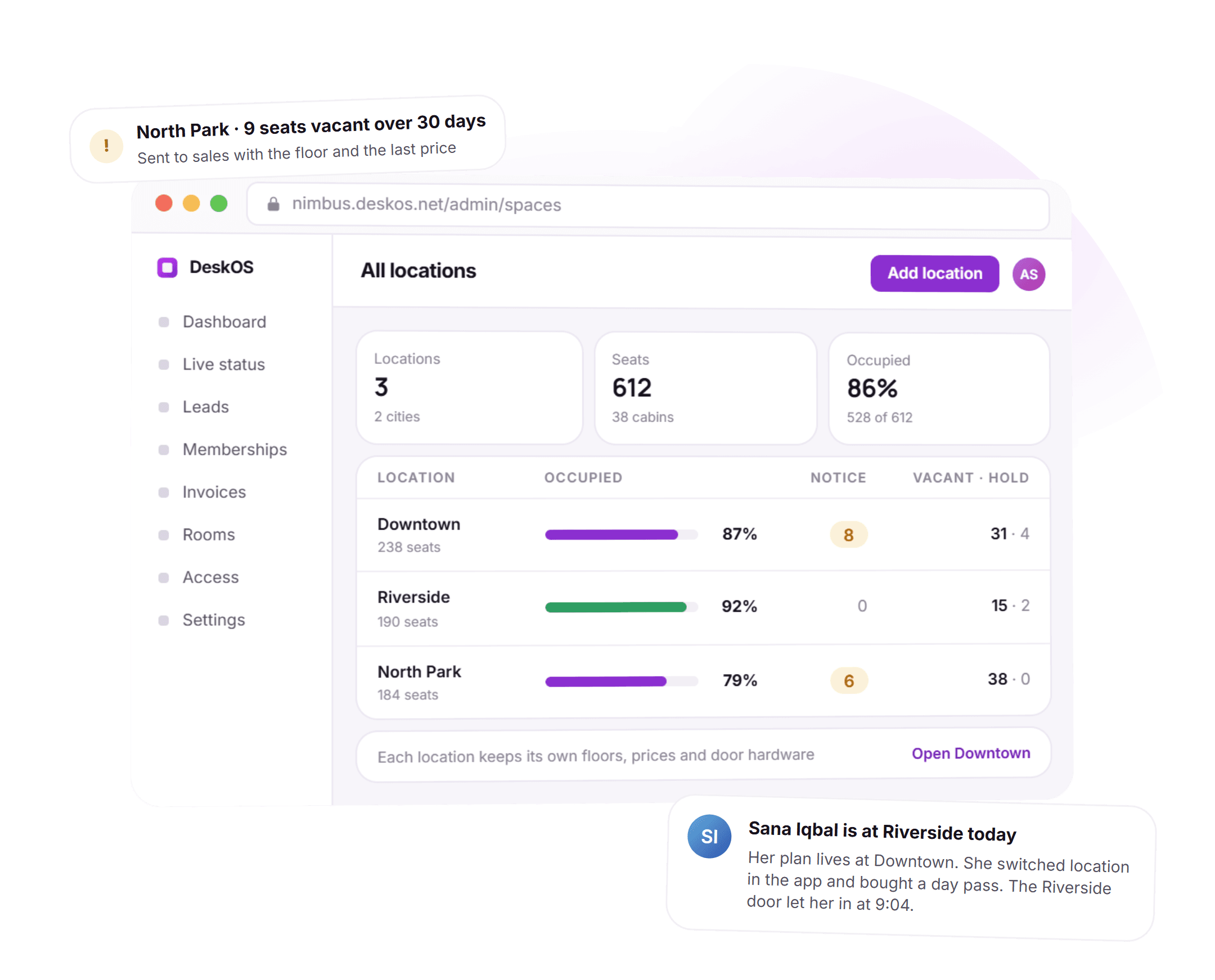
Three locations, one number.
Each location keeps its own floors, seats, shifts and staff, and the group sees all of them on one line each. A member of one location can take a day pass at another and be let in at the door. Seats vacant for over a month at any location surface without a report being run.
- Seats, occupancy, notice and vacancy per location and for the group
- Staff switch location at the top of the console, permissions decide who sees which
- Members switch location in the app, with a pass where the rule needs one
- Long vacant seats flagged per location
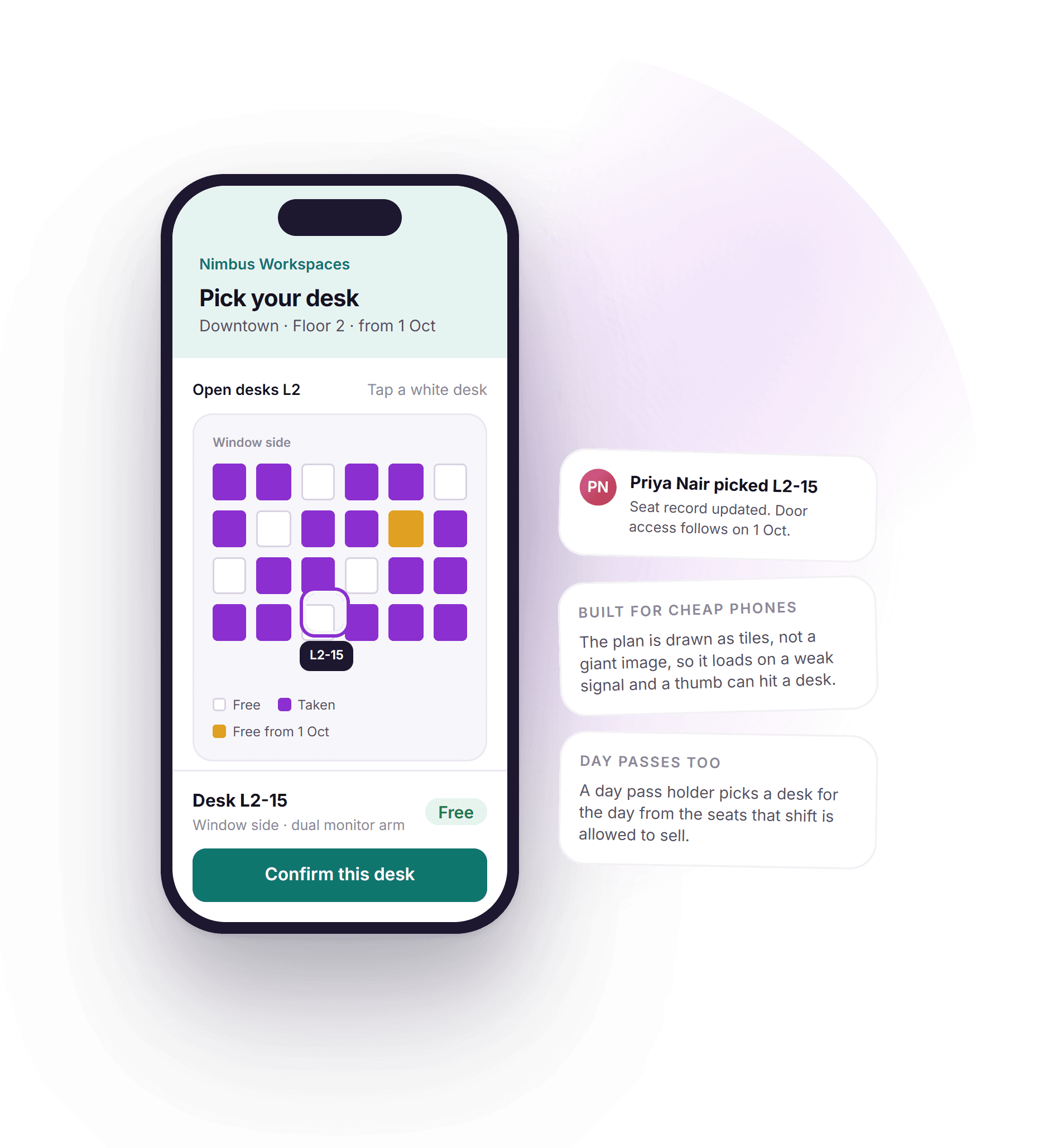
The member picks the desk, on any phone.
When a plan lets the member choose, they see the floor in the app, tap a free desk and confirm. It works on cheap phones over slow connections because that is what most members carry. Day pass holders pick a desk the same way, only from the seats their pass allows.
- The same floor plan the staff see, sized for a phone
- Only the seats the plan or pass allows are tappable
- The pick lands on the live board the moment it is confirmed
- Built and tested on low end phones, not just the latest one
See it running on your floors, your seat types and your locations.
The seat is upstream of the invoice, the door and the report.
Everything else in DeskOS reads from the seat record, so a change on the floor shows up everywhere without being retyped.
- The seat sets the invoiceAllot, change or cancel a seat and the subscription reprices. Every invoice is raised from the seats a company holds.Billing and payments
- The seat opens the doorAccess starts on the allotment date and ends on the notice date, on the doors of the location the seat is in.Access control
- Proposals hold seatsA proposal puts a hold on the seats it offers, expiring on its own, and turns into an allotment when it is signed.Proposals and agreements
- Occupancy per locationOccupancy, vacancy and churn per location are read from the same seat records, never from a second count.Analytics
Everything in space management.
For the reader who wants the whole feature list on one screen. Every line is something DeskOS does today.
Inventory
- Locations, floors and areas under one organisation
- Cabins, dedicated desks, hot desks and rooms as seat types you define
- A number, a floor and a price on every seat
- Floor plan builder with desks, walls and spaces made from desks
- PDF or image of the plan as a base layer, scale set from one wall
- Area and capacity view per floor and per location
Live board
- Sold, on notice and vacant right now, per floor and per location
- Occupied is sold plus notice; a hold counts as vacant, everywhere
- Coming free list with the date each seat returns
- Vacant over thirty days flagged per location
- Check-in tracked separately from occupancy, never confused with it
- The same numbers in the console, the reports and the member app
Allotment and changes
- Allot from the map or the list, for a date
- Invoice schedule, door access and the app follow the allotment
- Mid term seat changes reprice the subscription themselves
- Upgrades and downgrades on a chosen date
- Cancellation on any date with the scheduled end shown on the record
- Member seat picker in the app, for plans that allow it
Notices and holds
- Notice periods per plan, with the end date on the seat
- Last invoice prorated to the day the notice ends
- Door access ends on the day, by itself
- Soft holds for proposals, with an expiry
- Held seats shown on the map and counted as vacant
- A hold used up by the allotment, not left behind
Forward availability
- What is free on any date, from notices, holds and renewals
- Unconfirmed renewals assumed as staying and flagged
- Exceptions when a seat is offered for a date it may not be free on
- Chase the renewal or offer another seat from the exception
- Hot desks and day passes capped per shift
- Shift quotas so evening and day passes never collide
Locations and group
- Every location on one screen with the group total
- Staff switch location, permissions decide which they see
- Members entitled at home, or across the group by rule
- Day pass at another location, let in at that door
- Inventory imported from your sheet or plans at onboarding
- Live occupancy for the meeting room and access products to build on
Missing something? Ask. It may already be in there.

“DeskOS has been really valuable for us. The visibility helps us make better decisions, while the automation has taken a lot of manual work off our plate.”
Sanjeev Laroia, Spacetime · 3,000+ seats across India
700 invoices in a single click
A full month raised in one action, GST worked out per invoice, and every one delivered on WhatsApp and email the same day.
100 leads a day, nobody typing
Enquiries land, get qualified by workflow and are sent an invitation to come and see the space, without anyone opening a sheet.
Meeting rooms stop being your problem
Members book from the app, credits come off automatically, overages land on the next invoice, and the front desk keeps no diary.
What changes when the seat knows about billing and the door.
A spreadsheet and a desk booking tool both work, right up to the month two people sell the same cabin or a notice never reaches the door list. This is what the difference looks like day to day.
- Knowing what is free right now
- A spreadsheet and a floor plan PDF
- Whatever the sheet said the last time somebody updated it
- Generic desk booking software
- Bookable desks only; cabins and dedicated seats live elsewhere
- DeskOS
- Sold, notice and vacant per seat, live, from the records billing uses
- Two people selling the same cabin
- A spreadsheet and a floor plan PDF
- Happens, and the argument is settled by whoever emailed first
- Generic desk booking software
- Not covered; cabins are not a booking
- DeskOS
- A hold for the proposal, visible to everyone, expiring on its own
- What is free on the 1st
- A spreadsheet and a floor plan PDF
- A meeting with the sheet, the notices and a guess at renewals
- Generic desk booking software
- Bookings on that date, nothing about notices or renewals
- DeskOS
- One date picker; notices, holds and renewals added up and flagged
- A member gives notice
- A spreadsheet and a floor plan PDF
- Change the colour in the sheet, remember the last invoice, tell the door
- Generic desk booking software
- Cancel the booking; billing and doors are somebody else’s tool
- DeskOS
- One notice: seat shows as coming free, invoice prorates, access ends
- A seat changes mid term
- A spreadsheet and a floor plan PDF
- Retype the invoice and hope the door list gets updated
- Generic desk booking software
- Not a booking concept
- DeskOS
- Move the seat; the subscription reprices and the door follows
- The floor plan
- A spreadsheet and a floor plan PDF
- A PDF from the fit out, out of date since the first change
- Generic desk booking software
- A generic grid you fill in by hand
- DeskOS
- Your own drawing, desks and walls placed over it, one plan for staff and members
- Occupancy in the board pack
- A spreadsheet and a floor plan PDF
- A number somebody worked out, and a different one from finance
- Generic desk booking software
- Utilisation of bookable desks, not of the space you sell
- DeskOS
- One definition, the same number on every screen and report
- Several locations
- A spreadsheet and a floor plan PDF
- One sheet per location, a third sheet to add them up
- Generic desk booking software
- One account per location, no group view
- DeskOS
- Every location on one screen, a member switching between them with a pass
Bring the awkward cases. A half sold cabin, a hold, a notice mid month.
Simple plans. No per module add-ons.
Basic starts at $59 a month billed yearly, excluding VAT or GST. Every plan includes every module. You pay for seats and locations, nothing else.
Basic
For smaller spaces streamlining operations and getting billing under control.
$59 / month
billed yearly
- Active seats
- Up to 100
- Locations
- 1
Includes
- Space management and utilisation
- Meeting room management
- Billing with automated invoicing
- Helpdesk and service requests
- Web based access for the team
- Most taken
Business
Growing spaces building a community and premiumising what they sell.
Quoted on request
Scoped to your seats and locations
- Active seats
- Up to 200
- Locations
- 2
Everything in Basic, plus
- Visitor management
- Daily check-in management
- Community management
- Leads management CRM
- Payment gateway, receipts and credit notes
- Dedicated relationship manager
Business+
Bigger spaces that want their own apps and their own brand in front of members.
Quoted on request
Scoped to your seats and locations
- Active seats
- Up to 600
- Locations
- 3
Everything in Business, plus
- Whitelabel Android and iOS apps
- Lease management
- Client attendance tracking
- Cafe management
- Advanced reports
- Priority support, 24x7
Running more than three locations or 600 seats? That is Enterprise, quoted once we know your portfolio.
Still tied into another platform? We will buy out your contract. Ask us on the call.
Your floor, put on the board by us first.
Before you sign anything, we build your inventory in a sandbox and show you the live board with your seats on it. The person who sets up your floors and seat types is the person who answers when you call.
What happens next
- 1
Send us your seat sheet
Fill in the form or message us on WhatsApp. Send the sheet or plan you run the space on today, with the awkward bits: a cabin half sold, a hold for a deal, a notice mid month.
- 2
We build your inventory in a sandbox
Your floors, seat types and current members, on your plan. You see the live board, what is free next month and the member picker, with your seats in it.
- 3
Go live with the seats already in
Onboarding brings the members, their seats and their billing dates across. The person who built your inventory is the person who answers when you call.
Questions operators ask about seats and occupancy.
How is occupancy actually calculated?
Occupied is sold plus on notice. A seat under a soft hold for an open proposal still counts as vacant, because it has not been sold yet. Every screen and every report uses that same definition, so the number on the dashboard and the number in the board meeting are the same number.
Can we manage several locations from one login?
Yes. Locations sit under one organisation. Staff switch location from the top of the console, and permissions decide who can see which. Members can be entitled at their home location or across the whole group depending on the rule you set, and can take a day pass at another location.
What happens to billing when a member changes seats?
The subscription, the invoice schedule and the seat allotment are the same record, so a mid term change reprices all of them. There is no second place to remember to update, and door access follows the new seat.
Do you support hot desks and day passes alongside dedicated seats?
Yes. Seat types are configurable per location, and day pass inventory can be capped separately, including per shift if you sell mornings and evenings differently. A day pass can carry its own list of areas the holder may use.
Can we import our existing seat map?
Yes. Onboarding builds the seat inventory from your existing plans or spreadsheet, along with current members, their seats and their billing dates. A PDF or image of the floor can be dropped into the builder as the base layer.
How does the floor plan builder work?
You place desks and draw walls over your own drawing, set the scale from one wall you know the length of, and group desks into a cabin or a space. The plan you draw is the same plan the live board and the member seat picker use, so there is nothing to keep in sync.
Can members pick their own desk?
Yes, where the plan allows it. The member sees the floor in the app, taps a free desk and confirms. Only the seats their plan or pass allows are tappable, and the pick lands on the live board the moment it is confirmed. It is built to work on low end phones.
Can we hold seats for a proposal without selling them?
Yes. A hold blocks the seats on the map for a set period and shows who they are held for. Held seats still count as vacant. When the deal closes the allotment uses up the hold; if it does not, the hold expires and the seats go back on sale by themselves.
How do you work out what is free on a future date?
Pick the date. DeskOS adds the seats free today, the notices ending before then and the holds, and looks at the renewals due before that date. A renewal nobody has confirmed is assumed as staying and flagged, so the number is honest and the chase is visible. Offering a seat for a date it may not be free on raises an exception.
Is check-in the same as occupancy?
No. A seat being sold and a person being in the building are different facts. DeskOS tracks both and never confuses one for the other, so occupancy does not drop on a quiet Friday.
The rest of the system this plugs into.
- Meeting roomsBookings, credits and room panelsRooms are part of the same inventory, booked against the same members.Meeting rooms
- Access controlDoors, biometrics and credentialsThe seat decides which doors open, from the allotment date to the notice date.Access control
- Billing and paymentsInvoices, tax, gateways and collectionsEvery invoice is raised from the seats a company holds.Billing and payments
- AnalyticsOccupancy, revenue and churnOccupancy, vacancy and churn per location, read from the same seat records.Analytics
Bring your seat sheet.
We will build your floors and seats in a sandbox and show you the live board, what is free next month and the member picker, with your seats in it.