Attendance tracking software for coworking spaces that finally answers who is actually in the building.
DeskOS is attendance tracking software for coworking spaces and managed offices: check-ins from doors, QR and the member app, day passes that cannot be oversold, shift based access for twenty four hour sites, and the attendance reports your corporate accounts keep asking for.
- Presence measured from door, kiosk and app events
- A day pass cap enforced at checkout, not the door
- Shift based access, each with its own quota
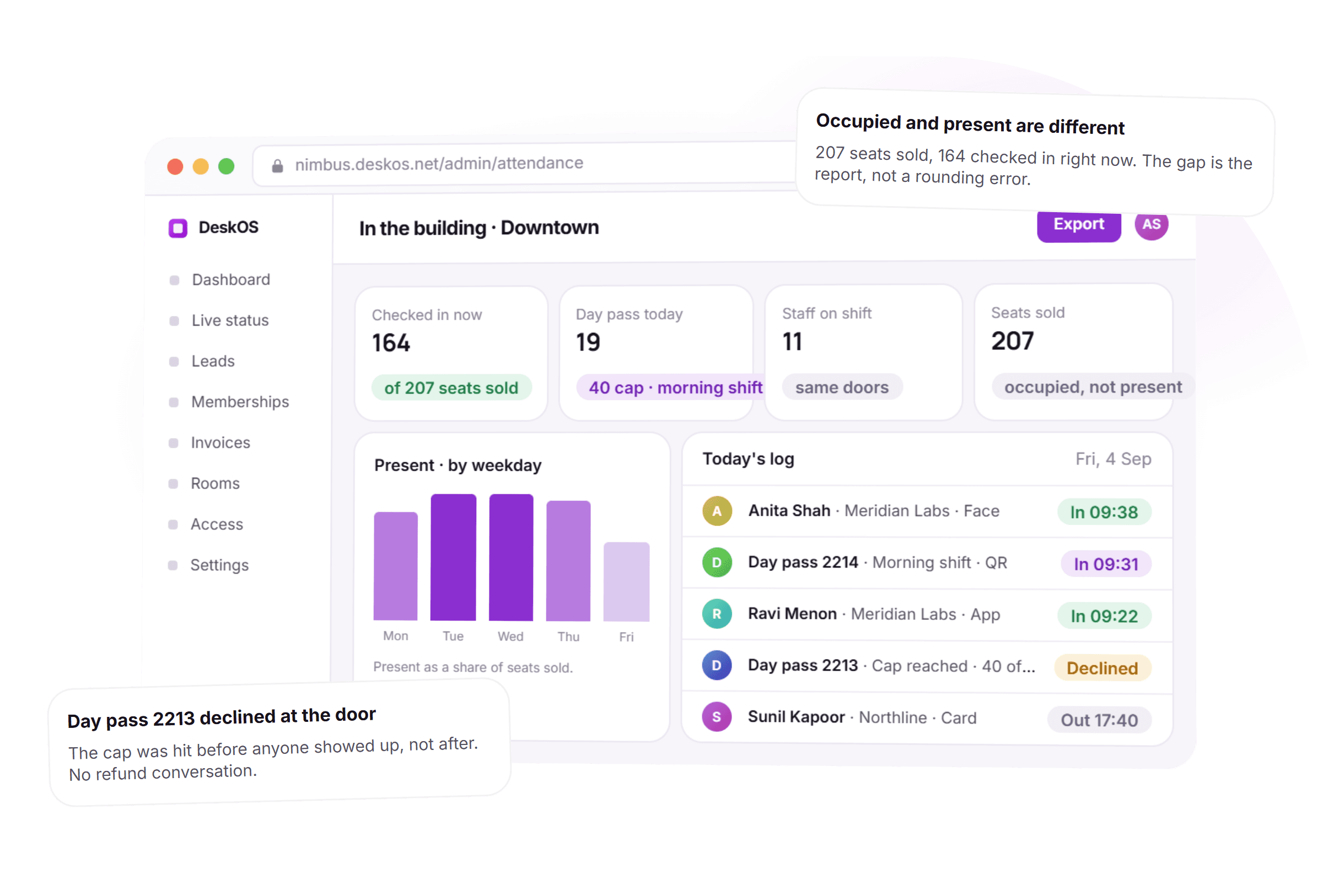
- Occupied and present, reported side by side
See it on your own doors, not a demo of ours
A free thirty minute demo with a person, not a recording. Bring your own shifts and day pass rules and we will show a cap get enforced live.
Reads from the door hardware and messaging tools you already use




Everything between a door event and a renewal conversation.
A badge count only knows who was last seen at the door. Here the door, the kiosk and the app all feed one presence record, because attendance is a fact, not a guess collected at the end of the week.
- DoorFace, card, PINKioskDay pass QRAppSelf check-inAll three write one presence record
Presence measured, not self reported
A door event, a QR scan at the kiosk or a tap in the member app all create the same check-in record. Attendance stops being a sheet someone fills in from memory at the end of the week.
- Morning shift40 of 40Sale 41 blocked before checkout
Day pass usage that cannot be oversold
Sell day passes against a real cap for the day, and per shift if mornings and evenings are sold separately. Sale forty one is blocked at the till before anyone reaches the door.
How a day pass cap protects the floor - Day shift6a to 2pEvening shift2p to 10pNight shift10p to 6a
Twenty four hour operations, priced by shift
Define shifts per location and sell against them, so a night shift card opens the door at night and stops working at the hour the shift ends, with no second schedule to keep in sync.
- Meridian Labs · September36.9 hours · 4 visits1 no showSent monthlyor pulled anytime
Attendance reports your corporate accounts ask for
Filter to one company and one period and send it, off the same door and kiosk events DeskOS already logged. No exporting a door log into a spreadsheet and cleaning it by hand.
- Front desk · Priya N.In 08:50Facilities · Deepak R.In 09:02Same readers, same log, a different grant type
Your own team, on the same doors
Staff check in on the same readers and the same records as members, with roles and locations respected, so front desk and facilities are not running a second attendance product for eight people.
- MonTueWedThuFriPresent as a share of seats sold
Present by weekday, not just occupied
A bar chart of who actually showed up, by day, sitting next to what was sold. That shape is where a pricing decision or a layout decision actually starts.
How presence reaches the analytics dashboard - Occupied207Present164A sales number and a fact, both true at once
Occupied and present, never confused
Occupied is what you sold. Present is who is in the building right now. DeskOS keeps the two numbers next to each other instead of letting one stand in for the other.
- Checked invia appQR at the kiosk works tooSame presence record either way
Works without a single reader
No biometric hardware in the building yet is not a blocker. QR at the kiosk and check-in from the member app produce the same presence record a door event would.
How a door event becomes an attendance record - Front desk · Who is in the buildingScopedManager · Plus per member reportsScopedLandlord view · Counts only, no namesScoped
Privacy scoped by role
Front desk sees who is in right now. A manager sees the full record. A landlord sees an aggregate, never a name. Who can see individual attendance is a permission, not a default.
Thirty minutes with a person, on the doors you already own.
From a shift set once to a report sent without being asked twice.
Five things happen over one day of operation. None of them needs someone counting heads at the door.
- 1Before the day
Shifts and day pass caps are set once, per location
A day shift, an evening shift and a night shift, each with its own door hours and its own quota, configured once and left alone.
- 2At the door
A door, a kiosk or the app, all the same record
However presence is captured, it lands as one check-in event, tagged by channel and by member or day pass.
- 3At the cap
A sold out day pass is blocked before the door
Once a shift reaches its quota the next sale is declined at the till. Nobody arrives to find there is no seat.
- 4Through the day
Present, occupied and staff on shift, live
The building board updates from the same events, so who is actually in never has to be estimated from a badge count.
- 5At reporting
A client report and a utilisation gap, on demand
A corporate account gets a per company summary. Everyone else gets the gap between seats sold and seats used, by location.
What used to be a headcount at the door, handled by the record itself.
Four things that used to mean someone standing at the entrance or exporting a log by hand, and what they look like when presence is measured instead of counted.
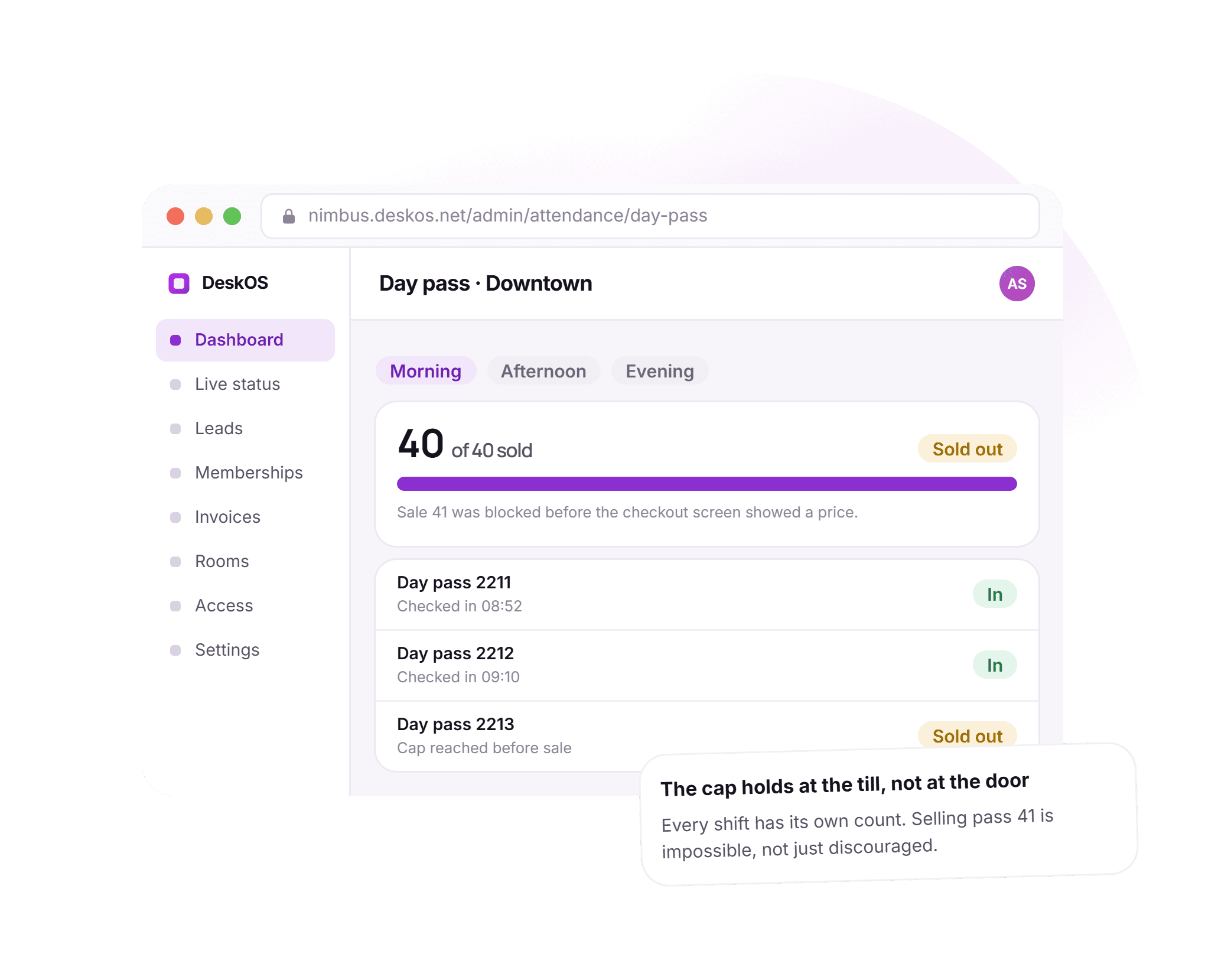
A sold out day is a sold out day, at the till.
A day pass cap used to mean counting heads at the door and turning someone away in front of everyone else. Here the fortieth sale is simply not offered, on the checkout screen, before it becomes an awkward conversation at the entrance.
- A real inventory cap, per day and per shift
- The decline happens at checkout, not at the door
- Holders already checked in are unaffected by the cap
- No refund conversation, because no oversold pass existed
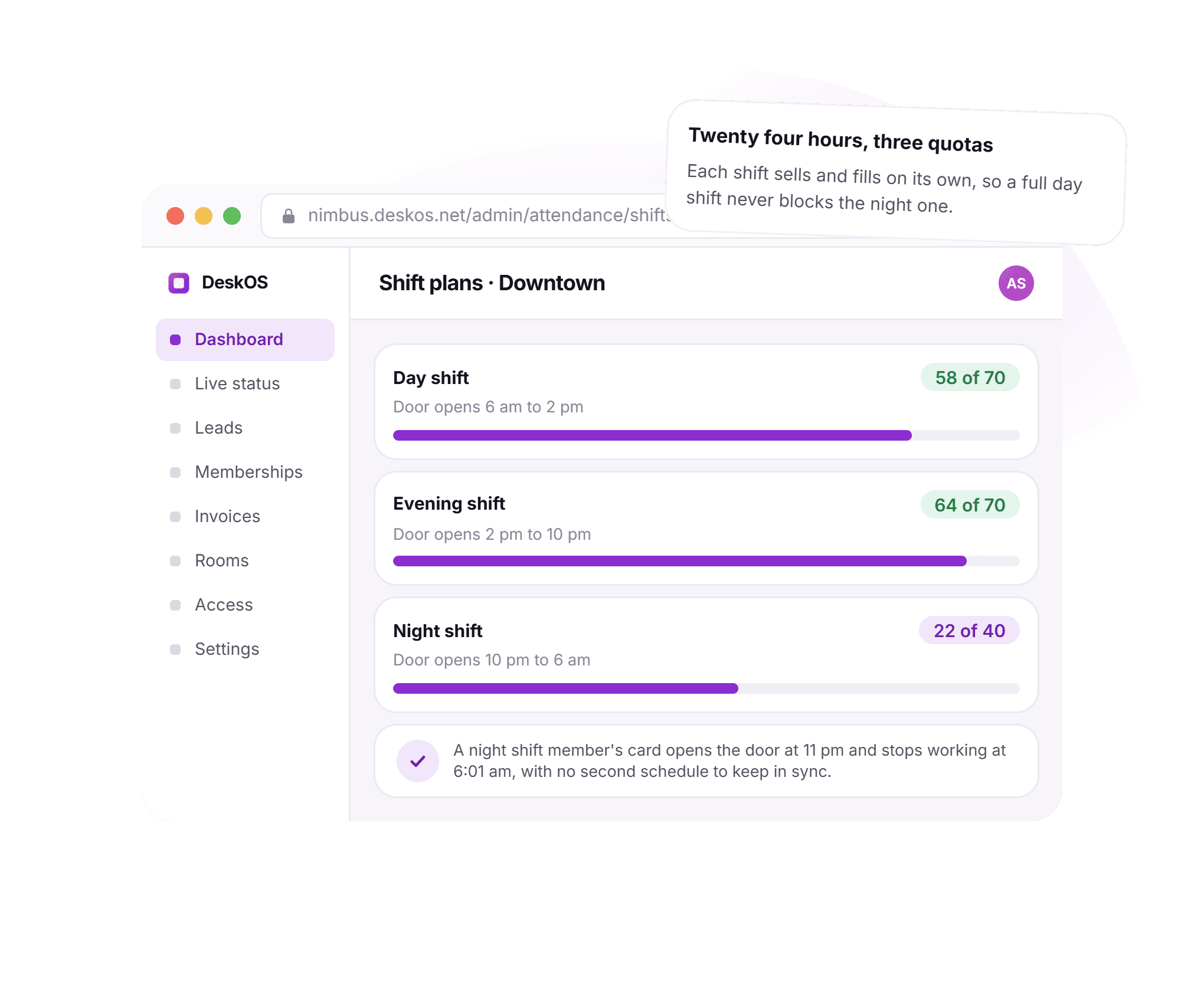
Twenty four hours, three quotas that never collide.
Running a night shift used to mean a second schedule someone had to keep in sync with the door. Here each shift sells and fills on its own, and a card that works at 11pm simply stops working at 6:01am with nothing else to configure.
- Day, evening and night shifts, each with its own cap
- The door opens only in the hours a shift actually covers
- A full day shift never blocks the night shift from selling
- One membership record, three windows of access
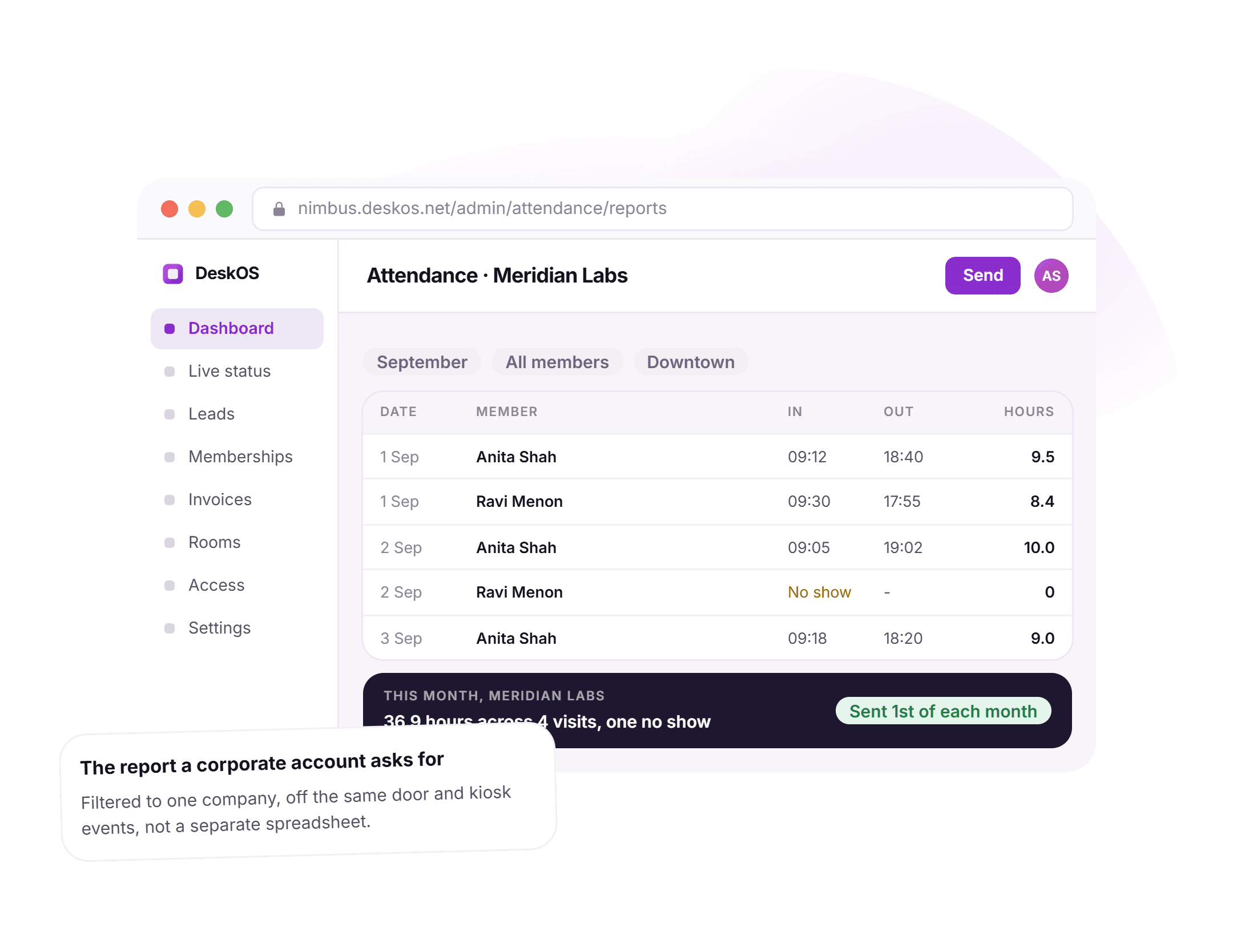
The report a corporate account actually asks for.
A per company attendance summary used to mean exporting a door log and cleaning it by hand before it was fit to send. Here the same door and kiosk events roll up into a filtered report by company and period, ready to send from the screen it was read on.
- Filtered to one company, off the events already logged
- In and out times, hours, and a no show flagged plainly
- A monthly total a renewal conversation can point to
- Sent on a schedule, not assembled by hand each time
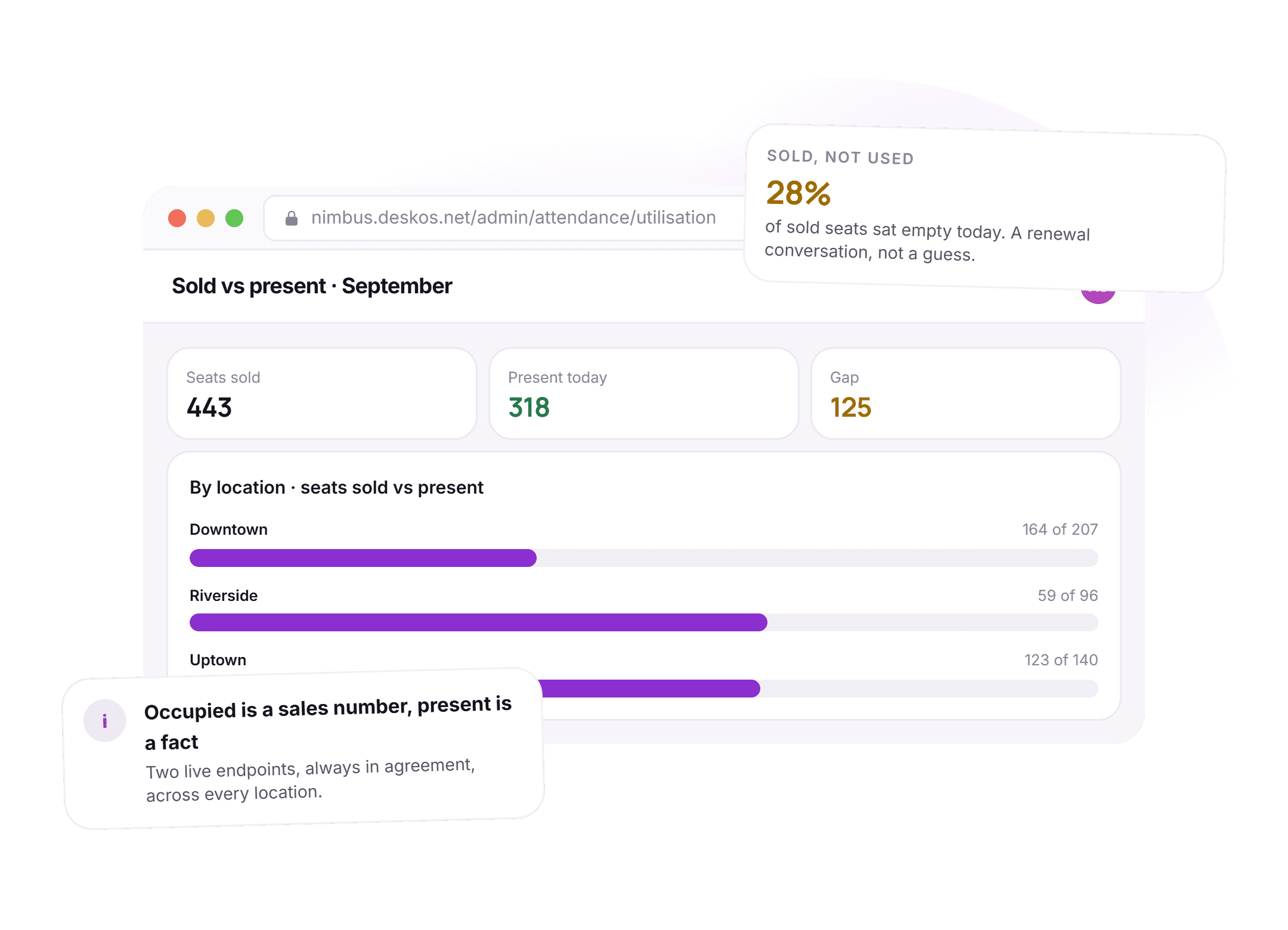
Occupied is a sales number. Present is a fact.
A portfolio used to report one occupancy figure and stop there. Here seats sold and seats present sit side by side by location, so a location running at 88 percent sold and 61 percent present is a renewal conversation, not a rounding error.
- Seats sold and present today, compared by location
- The gap stated as a percentage, not buried in two tabs
- Two live endpoints that always agree with each other
- The number behind a pricing or a layout decision
See it running on your own locations, your own shifts and your own day passes.
Attendance is only useful sitting next to what was sold.
A standalone attendance tool gives you timestamps and stops there. Attached to the seat that was sold, the same timestamps become a pricing decision, a staffing decision and a renewal conversation.
- A door event becomes attendance for freeEvery unlock already feeds presence, so attendance is a consequence of access control rather than a second system to enrol into.Access control
- A day pass is a scoped, time limited passThe same cap and check-in logic that protects a day pass sale is the pass logic visitor management already runs.Visitor management
- Occupied and present both belong to the seatOccupied is a seat sold. Present is a seat used right now. Both numbers live against the same seat record, never two systems.Space management
- The sold versus present gap reaches reportingPresence by day and by location sits in the same dashboard as revenue per seat, not in a spreadsheet only one person reads.Analytics
Everything in attendance tracking.
For the reader who wants the whole feature list on one screen. Every line is something DeskOS does today.
Check-in
- A door event, a QR scan or an app check-in, one record
- Presence measured passively, never self reported
- Every check-in tagged by channel and by member or pass
- A live board of who is checked in right now
- Check-out captured the same way as check-in
- Works at every location on the same system
Day passes
- A real inventory cap for the day
- A separate cap per shift where shifts are sold
- The decline happens at checkout, not at the door
- Holders already inside are unaffected by a later cap
- A pass is checked in and consumed, not counted on trust
- No refund conversation, because no oversold pass existed
Shifts
- Shifts defined per location, with their own door hours
- Access follows the shift a member actually bought
- A quota per shift, sold and tracked independently
- A full shift never blocks another shift from selling
- The door stops working the moment a shift ends
- One membership, several windows of access
Client reports
- Filtered to one company and one period
- Built off the same door and kiosk events, not a fresh export
- In and out times, hours worked and no shows, per member
- A monthly total stated plainly
- Sent on a schedule or on demand
- No spreadsheet cleaning between the door log and the client
Staff
- Staff attendance on the same readers as members
- Roles and locations respected the same way
- One system instead of a second product for a small team
- Staff on shift shown next to members checked in
- Attendance available for payroll without a separate export
- No duplicate enrolment for staff versus members
Utilisation
- Seats sold and seats present, reported side by side
- A gap stated by location, not buried across two tabs
- Present by day of week, to see the pattern, not just today
- Occupied never mistaken for present, anywhere in the product
- The same numbers a portfolio review or a renewal call uses
- Data drawn from events already logged, nothing separately entered
Missing something? Ask. It may already be in there.

“DeskOS has been really valuable for us. The visibility helps us make better decisions, while the automation has taken a lot of manual work off our plate.”
Sanjeev Laroia, Spacetime · 3,000+ seats across India
700 invoices in a single click
A full month raised in one action, GST worked out per invoice, and every one delivered on WhatsApp and email the same day.
100 leads a day, nobody typing
Enquiries land, get qualified by workflow and are sent an invitation to come and see the space, without anyone opening a sheet.
Meeting rooms stop being your problem
Members book from the app, credits come off automatically, overages land on the next invoice, and the front desk keeps no diary.
What changes when attendance is measured instead of counted.
A sign in sheet and a generic access log both work, right up to the day a day pass gets oversold, a corporate client asks for a report, or someone finally asks whether a location is actually used. This is what the difference looks like day to day.
- Knowing who is in the building right now
- A sign in sheet at the front desk
- A sign in sheet at the front desk, updated by hand
- A generic access log
- A door log with no view of who is a member
- DeskOS
- A live board built from door, kiosk and app events
- Selling a day pass near capacity
- A sign in sheet at the front desk
- Counted at the door and turned away in person
- A generic access log
- Rarely tracks a cap by shift at all
- DeskOS
- Blocked at checkout, before anyone arrives
- Running a night shift
- A sign in sheet at the front desk
- A second schedule kept in sync by hand
- A generic access log
- One access window for the whole building
- DeskOS
- Its own door hours and its own quota, on the membership
- A corporate client asks for their team attendance
- A sign in sheet at the front desk
- An export of the door log, cleaned in a spreadsheet
- A generic access log
- Not offered, or billed as a separate report
- DeskOS
- Filtered by company and period, ready to send
- Tracking your own staff
- A sign in sheet at the front desk
- A punch clock or a spreadsheet, apart from members
- A generic access log
- Not covered by the access product at all
- DeskOS
- The same readers and the same records as members
- Knowing whether a location is actually used
- A sign in sheet at the front desk
- One occupancy number, and a guess about the rest
- A generic access log
- Attendance and occupancy shown as the same figure
- DeskOS
- Sold and present, compared by location and by day
- A building with no biometric hardware
- A sign in sheet at the front desk
- Attendance is not tracked at all
- A generic access log
- Requires a reader before it works
- DeskOS
- QR at the kiosk and app check-in work the same day
- Deciding who can see individual attendance
- A sign in sheet at the front desk
- Whoever has the export, sees everyone
- A generic access log
- Usually all or nothing, for every role
- DeskOS
- Scoped by role, aggregate by default
Bring the awkward cases. A shift that runs overnight, a client asking for a report, a location nobody trusts the occupancy number for.
Simple plans. No per module add-ons.
Basic starts at $59 a month billed yearly, excluding VAT or GST. Every plan includes every module. You pay for seats and locations, nothing else.
Basic
For smaller spaces streamlining operations and getting billing under control.
$59 / month
billed yearly
- Active seats
- Up to 100
- Locations
- 1
Includes
- Space management and utilisation
- Meeting room management
- Billing with automated invoicing
- Helpdesk and service requests
- Web based access for the team
- Most taken
Business
Growing spaces building a community and premiumising what they sell.
Quoted on request
Scoped to your seats and locations
- Active seats
- Up to 200
- Locations
- 2
Everything in Basic, plus
- Visitor management
- Daily check-in management
- Community management
- Leads management CRM
- Payment gateway, receipts and credit notes
- Dedicated relationship manager
Business+
Bigger spaces that want their own apps and their own brand in front of members.
Quoted on request
Scoped to your seats and locations
- Active seats
- Up to 600
- Locations
- 3
Everything in Business, plus
- Whitelabel Android and iOS apps
- Lease management
- Client attendance tracking
- Cafe management
- Advanced reports
- Priority support, 24x7
Running more than three locations or 600 seats? That is Enterprise, quoted once we know your portfolio.
Still tied into another platform? We will buy out your contract. Ask us on the call.
Your doors, tested by us first.
Before you sign anything, we load your own shifts and day pass rules into a sandbox and show a cap get enforced at checkout, live, against your own location. The person who sets it up is the person who answers when you call.
What happens next
- 1
Tell us your doors, shifts and day passes
Fill in the form or message us on WhatsApp with how presence is captured today and whether you sell shifts or day passes.
- 2
We build your attendance board in a sandbox
Your own location, your own shifts if you run them, and a few real check-ins. You watch a day pass hit its cap and a client report get filtered live.
- 3
Go live on your existing readers
Attendance switches on against the doors, kiosk and app you already have, with someone from DeskOS on the first day.
Questions operators ask about attendance tracking.
Do we need biometric hardware for this?
No. If you have readers, door events feed attendance automatically. If you do not, QR scanning at the kiosk and check-in from the member app produce the same records the same day.
Can we give a corporate client a report of their own team attendance?
Yes. Attendance is attached to the member and their company, so a per company report for any period is filtered off events already logged rather than assembled by hand.
How do day passes work with limited capacity?
Day pass inventory is capped for the day and can be capped per shift. Once a cap is reached the pass cannot be sold, so the decline happens at checkout rather than at the door.
Can we run a night shift with different access hours?
Yes. Shifts are defined per location, and both the door hours and the attendance record follow the shift a member actually bought, with no second schedule to maintain.
Is attendance the same thing as occupancy?
No, and keeping them separate matters. Occupied is what you have sold, and it drives revenue. Present is who is physically in, and it drives layout, staffing and pricing. DeskOS reports both without conflating them.
Who can see an individual member attendance record?
Whoever a permission says can. Front desk typically sees who is in right now, a manager sees the full record, and roles further up usually see an aggregate rather than a name.
Does this work across more than one location?
Yes. Check-in, shifts, day pass caps and reporting are all scoped per location, and a portfolio view compares sold against present across every location at once.
What happens when a day pass is declined at the door?
It should not happen, because the cap is enforced at checkout before a sale completes. A pass already sold and checked in is never affected by a cap reached afterward.
Can staff attendance run on the same system as members?
Yes. Staff check in on the same readers as members, with their own roles and locations, so a small team does not need a second attendance product.
How often can attendance reports go out to a corporate account?
On whatever schedule the account expects, commonly monthly, or generated on demand for any period when a renewal conversation needs one.
The rest of the system this plugs into.
- Access controlDoors, biometrics and credentialsA door event becomes attendance without a second enrolment.Access control
- Visitor managementFront desk, kiosk and passesA day pass is the same scoped, time limited pass logic.Visitor management
- Space managementSeats, floors and live occupancyOccupied and present both belong to the same seat record.Space management
- AnalyticsOccupancy, revenue and churnSold versus present reaches the same dashboard as revenue per seat.Analytics
Bring your shifts and one busy morning.
We will show a day pass cap get enforced at checkout, a client report get filtered by company, and occupied and present sit side by side, live. It takes about ten minutes.