Visitor management software for coworking spaces that notifies the host before the guest even sits down.
DeskOS is visitor management software for coworking spaces and managed offices. Guests are pre-registered or checked in on a kiosk, QR or the front desk, the host is notified in seconds, and a door pass scoped to the visit expires on its own.
- Kiosk, QR or front desk check-in, one record
- Host notified in seconds, on WhatsApp or the app
- A door pass that expires without anyone revoking it
- Every visit searchable across every location
See it on your own front desk
A free thirty minute demo with a person, not a recording. Bring your busiest morning and we will show a guest checked in, a host notified and a pass issued, live.
Plays with the doors and tools you already use






Everything between the gate and the guest sitting down.
A paper register only knows a name was written down. Here the visit is connected to the host, the doors and the record, because it is one system rather than a book at the desk.
- Interview panelPre-registered3 guests · Studio · 3:30 pmPass and directions sent by WhatsApp
A guest is expected before they arrive
A member invites a guest from the app and reception sees the day ahead. The guest gets a pass with directions and a QR code, so arriving is scanning something rather than spelling a name.
- KioskQRDeskAll three write the same visit
Kiosk, QR or the front desk, one record
A tablet at the entrance handles self check-in for walk-ins, a QR handles a pre-registered guest, and your team can check somebody in by hand. All three write the same visit.
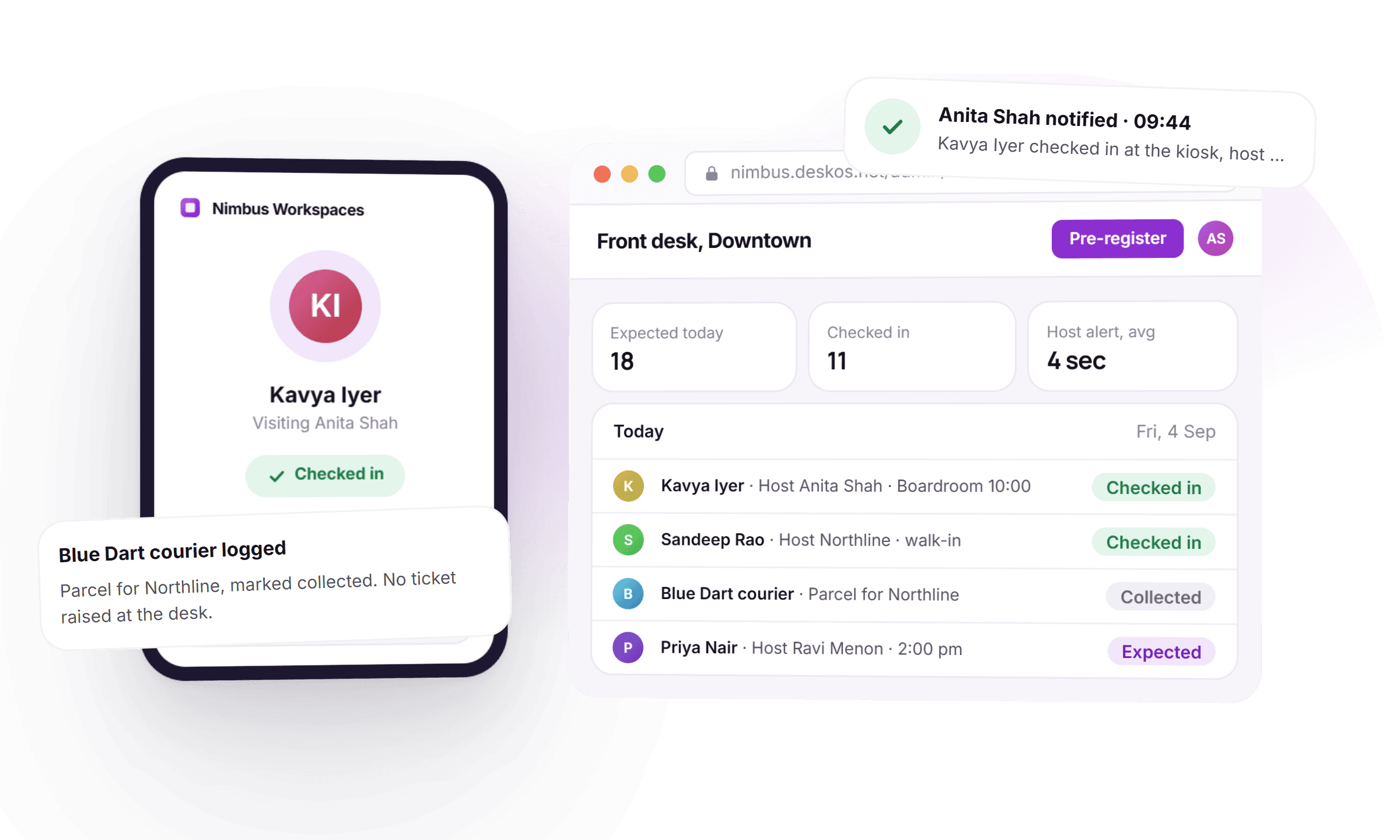
- Anita Shahnotified 9:44 amKavya Iyer has arrived for you at reception.
The host knows before the guest sits down
The member is notified the moment their guest checks in, on the channel they actually read, including WhatsApp. No shouting across the floor, no guest waiting in a lobby wondering if anyone was told.
- Kavya Iyer · passMain entranceAllowedAll other doorsBlockedExpires 1:00 pm, on its own
A door pass that expires on its own
A visitor gets a QR or PIN valid for the doors that visit needs and the hours it needs them, then stops working by itself. Guest access stops being a person propping a door open.
How a visitor pass is a real grant - Photo capturedOnID numberOnNDA signedOn
Photo, ID and NDA, if your building needs them
Capture what a location requires: a photo, an ID number, the reason for the visit, an NDA or a safety acknowledgement. Turn each one on per location rather than for the whole organisation.
- Kavya IyerDowntownSandeep RaoDowntownPriya NairRiverside
Every visit, searchable in a minute
Every visit, host, check-in and check-out time in one searchable log across locations, exportable for a landlord or an incident review. Deliveries are logged the same way, not in a different notebook.
Visitor reporting and anomalies - Sandeep RaoChecked inNo invite, no pre-registrationHost chosen at the kioskSame record, same pass
Walk-ins are first class, not an exception
Most visitors are not expected. The kiosk handles an unannounced guest in a few taps, matches them to a host, and still writes the same record as a pre-registered one.
- Blue Dart courierParcel for NorthlineCollected 2:40 pm
Deliveries and couriers, not a different notebook
Log a parcel against a member, notify them, and mark it collected. The front desk stops doubling as a lost property office with its own paper trail.
- Farhan QureshiFlagged at every locationDenied before a pass issued
A blocklist that works at every location
A person you do not want on site is flagged at check-in before a pass is issued, at every location the organisation runs, not just the one where it happened.
Thirty minutes with a person, on your busiest morning.
From an invite to a door that stops working, without a second list.
Five things happen to a visit over its life. None of them needs someone at the desk to remember.
- 1Before the visit
A guest is pre-registered
A member invites a guest from the app, or reception adds one manually. The guest gets a pass with directions before they leave home.
- 2At the gate
Check-in happens wherever it happens
Kiosk for a walk-in, QR for a pre-registered guest, or the front desk by hand. Whichever it is, it writes the same visit record.
- 3The moment they check in
The host is notified
On the channel they actually read, including WhatsApp, with who arrived and where to find them.
- 4For the visit
A pass issues itself
A door grant scoped to exactly the doors and hours that visit needs, on the same model as a member credential.
- 5After the visit
It closes and expires on its own
Nobody collects a card back and nobody revokes anything. The pass simply stops working when the visit is over.
What used to be a book at the desk, handled by the record itself.
Four things that used to mean texting a host or reading handwriting, and what they look like when the visit is one record.
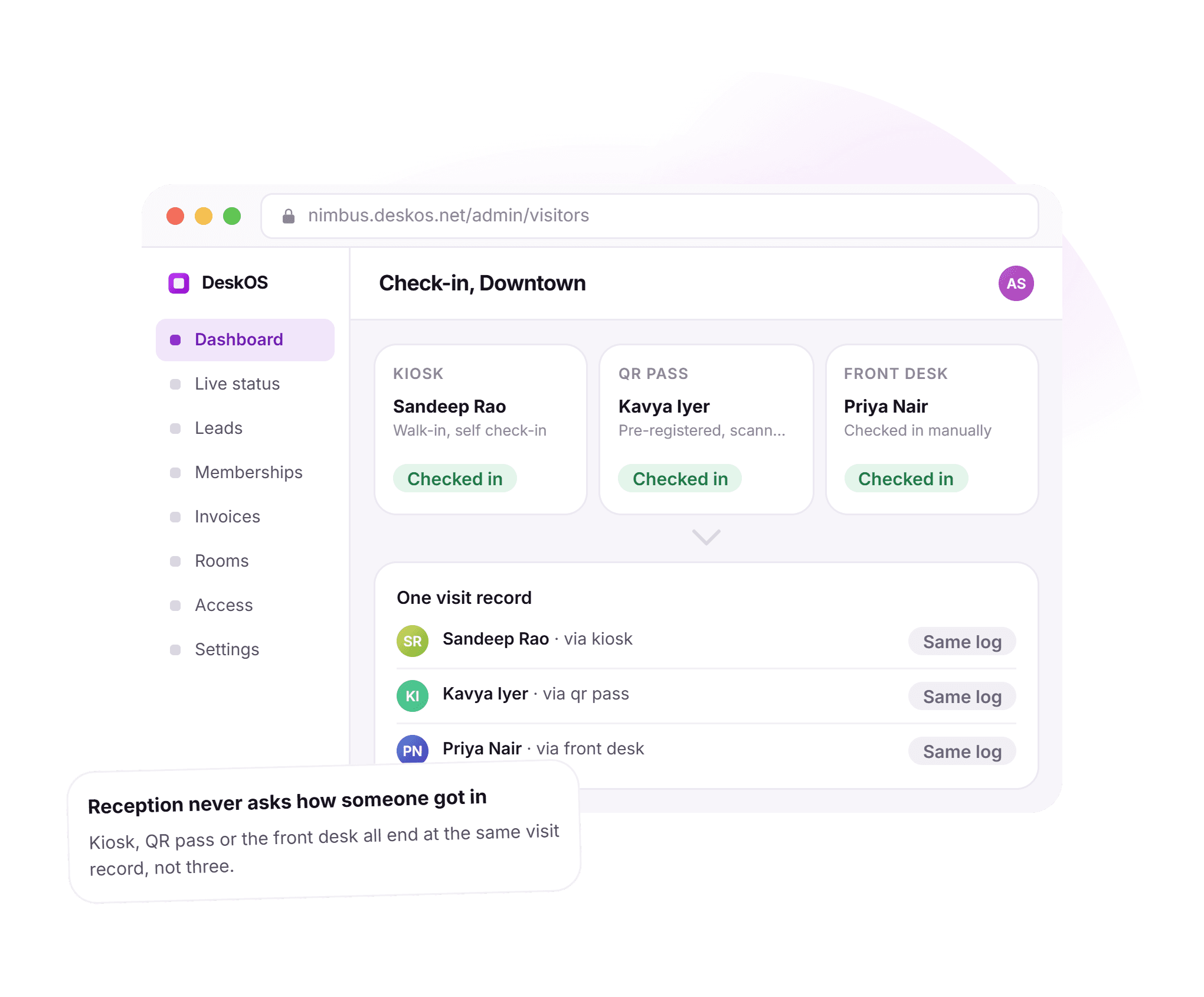
Three ways in, one visit record.
Reception used to ask how someone got in, because a kiosk log, a QR list and a front desk book were three different places. Here a walk-in, a pre-registered guest and a manual check-in all end at the same record, filterable by host, location or channel.
- Kiosk handles a walk-in in a few taps
- QR handles a guest who was pre-registered from the app
- Front desk can still check someone in by hand
- All three write to the same searchable visit
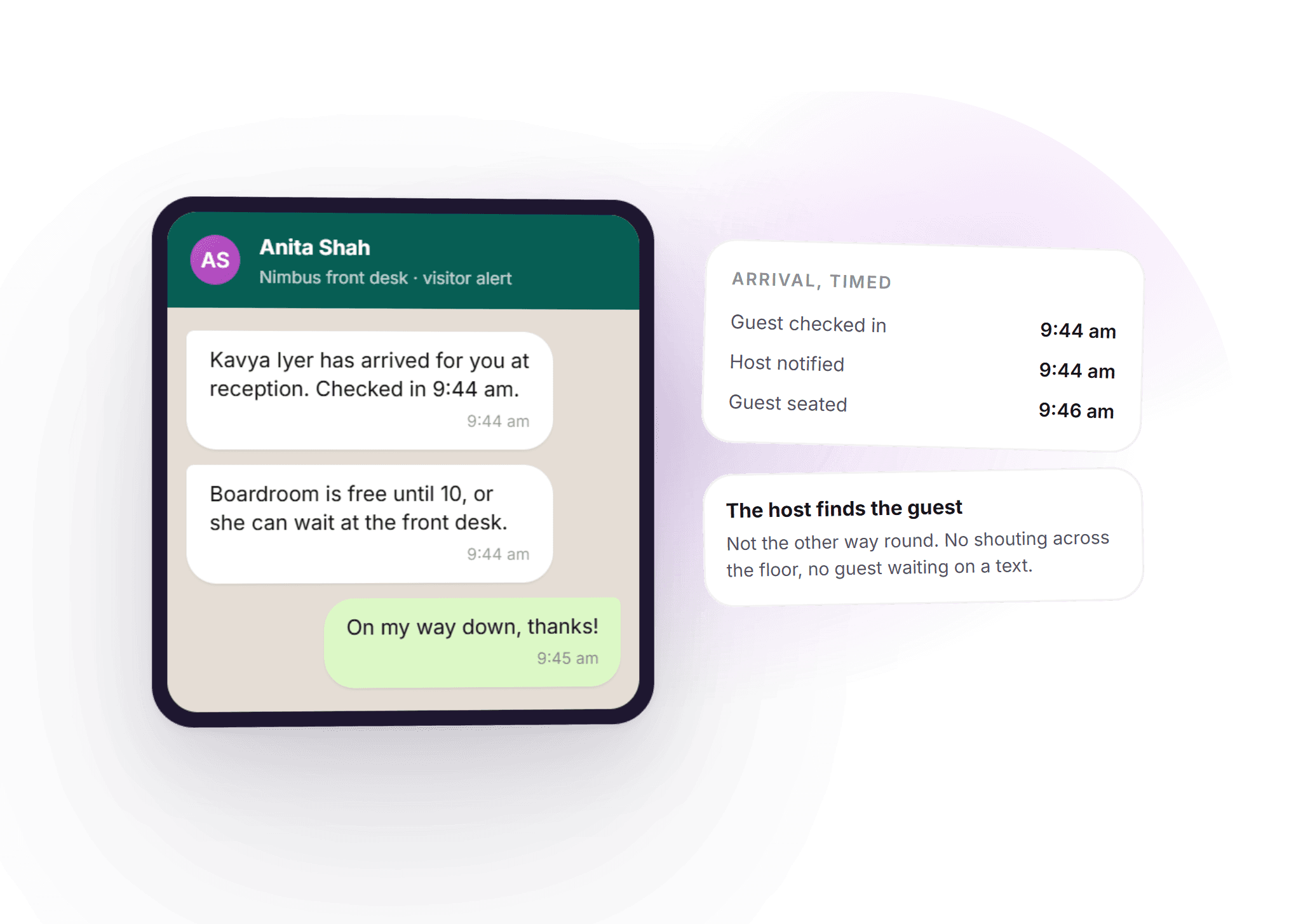
The host finds the guest, not the other way round.
A guest used to sit in a lobby texting their host to ask if anyone knew they had arrived. Now the notification goes out the moment the guest checks in, on WhatsApp or the app, with a timeline that shows exactly how fast it happened.
- Host notified in seconds, on the channel they read
- The message names who arrived and where they are waiting
- A timed record of check-in, notification and seating
- No shouting across the floor to find the right person
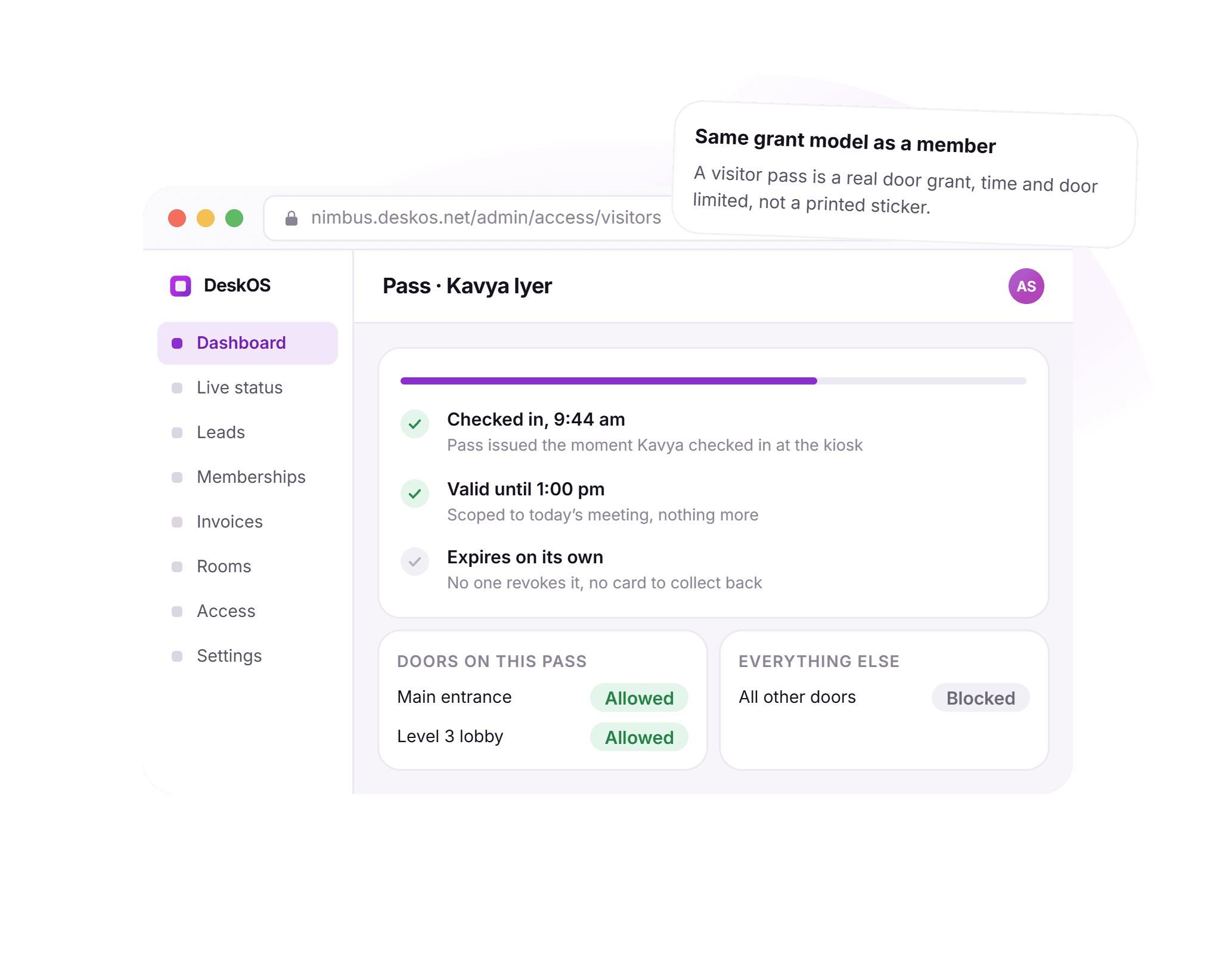
A pass on the same model as a member.
A visitor badge used to mean a card someone had to remember to collect back. Here a visitor pass is the same kind of grant a member holds, scoped to the doors and hours a single visit needs, and it stops working the moment it should without anyone touching it.
- Issued the moment the guest checks in
- Scoped to exactly the doors that visit needs
- Valid only for the hours of the visit
- Expires on its own, nothing to revoke or collect
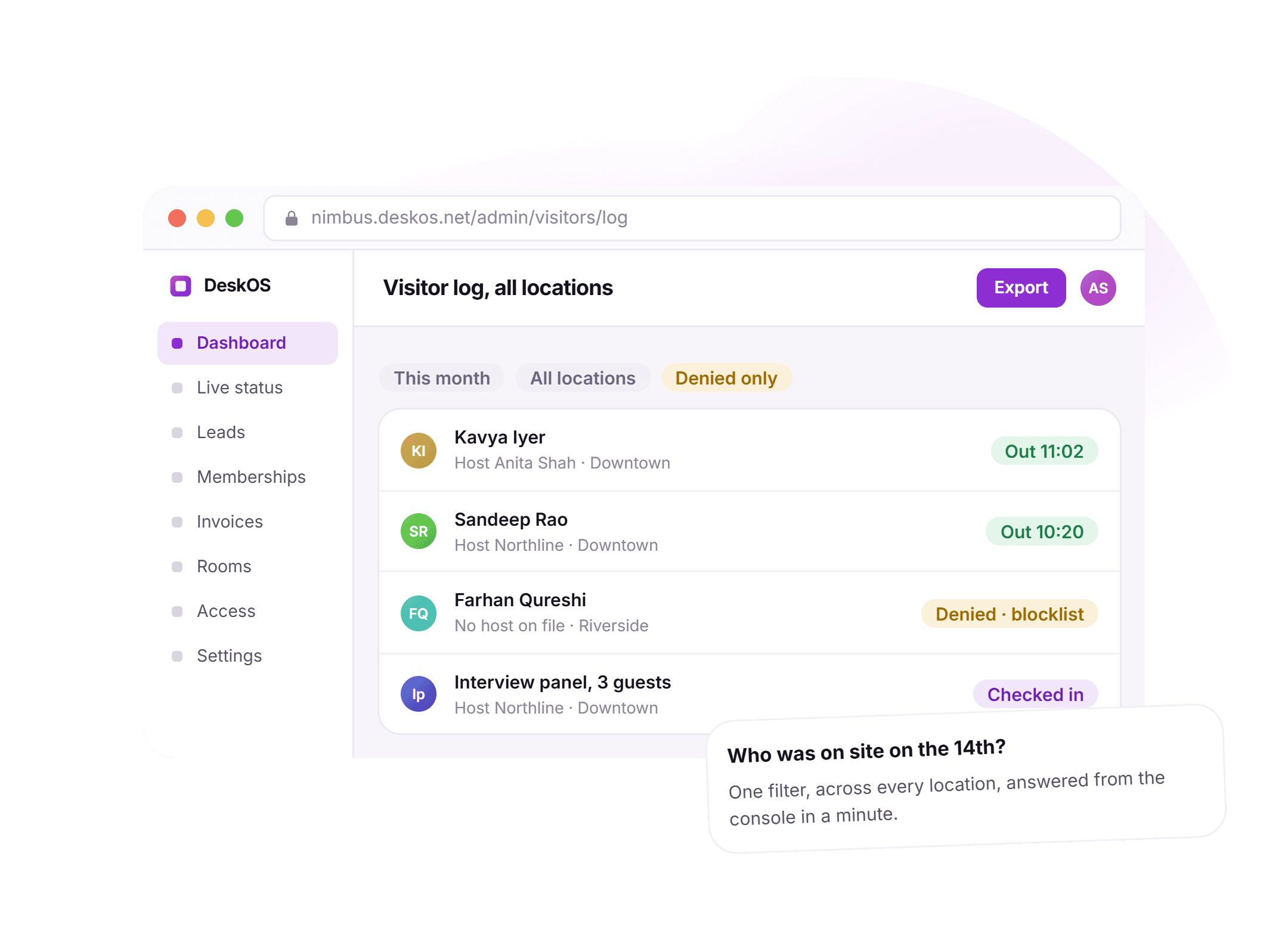
Who was here on the 14th, answered in a minute.
A landlord or an incident question used to mean reading handwriting in a book for an afternoon. Here it is a filter on one screen: every visit, every host, every location and every result, searchable and exportable.
- Filter by location, host, member or result
- Denied visits kept with the reason, including blocklist hits
- Deliveries and couriers logged the same way
- Export for a landlord, insurer or incident review
See it running on your front desk, your hosts and your doors.
A visitor is a guest, a door grant and a booking, all at once.
A standalone visitor app ends at the badge. Here the visit is connected to everything that made it happen.
- A visitor pass is a grant tooTime limited, scoped to the doors a visit needs, and nothing else. It expires without anyone revoking it by hand.Access control
- Guests arrive already on the listExternal attendees on a room booking are pre-registered from the booking itself, with the room and time attached.Meeting rooms
- The member invites the guestA guest is added from the app, not a call to the front desk, so reception sees the day before it starts.Member engagement
- Every visit becomes a presence eventWho is in a building includes guests, not just members, because a check-in and a door open are the same kind of record.Attendance tracking
Everything in visitor management.
For the reader who wants the whole feature list on one screen. Every line is something DeskOS does today.
Registration
- Members invite guests from the app
- Reception can pre-register a guest manually
- Guest gets a pass with directions and a QR before arriving
- External attendees on a room booking pre-register from the booking
- A blocklist flags a person before a pass is issued
- Blocklist applies at every location, not just where it was added
Check-in
- Self check-in on a tablet kiosk at the entrance
- QR check-in for a pre-registered guest
- Manual check-in from the front desk
- Walk-ins handled without prior registration
- Deliveries and couriers logged against a member
- All channels write to the same visit record
Notification
- Host notified the moment their guest checks in
- Delivered on the channel the host actually reads
- WhatsApp and the member app both supported
- Message names who arrived and where they are waiting
- Timed record of check-in through to seating
- Delivery notifications separate from guest notifications
Passes
- A visitor pass is a real, time limited door grant
- Scoped to exactly the doors a visit needs
- Issued the moment a guest checks in
- Expires on its own once the visit is over
- Nothing for staff to revoke or collect back
- Same grant model a member credential uses
Compliance
- Photo capture at check-in, where required
- ID number capture, where required
- NDA or safety acknowledgement, where required
- Each capture turned on per location, not globally
- Captured data attached to the visit record
- Meets building rules without a paper form
Log and reporting
- Every visit, host, check-in and check-out time logged
- Denied visits kept with a reason
- Filter by location, host, member or result
- Export for a landlord, insurer or incident review
- One searchable log across every location
- Deliveries and couriers logged the same way
Missing something? Ask. It may already be in there.

“DeskOS has been really valuable for us. The visibility helps us make better decisions, while the automation has taken a lot of manual work off our plate.”
Sanjeev Laroia, Spacetime · 3,000+ seats across India
700 invoices in a single click
A full month raised in one action, GST worked out per invoice, and every one delivered on WhatsApp and email the same day.
100 leads a day, nobody typing
Enquiries land, get qualified by workflow and are sent an invitation to come and see the space, without anyone opening a sheet.
Meeting rooms stop being your problem
Members book from the app, credits come off automatically, overages land on the next invoice, and the front desk keeps no diary.
What changes when the visit is connected to everything else.
A paper register and a generic visitor app both work, right up to the moment a guest needs a door, a host needs a warning in seconds, or someone needs to answer for the 14th. This is what the difference looks like day to day.
- A guest arrives unannounced
- A paper register at the front desk
- A name scrawled in a book nobody reads back
- A generic visitor management app
- Not really designed for a walk-in at all
- DeskOS
- Handled at the kiosk in a few taps, same record as anyone else
- The host finding out a guest arrived
- A paper register at the front desk
- However fast someone can shout across the floor
- A generic visitor management app
- A generic push notification, if there is one at all
- DeskOS
- Notified in seconds, on the channel they actually read
- Giving a guest door access
- A paper register at the front desk
- A key or a card someone has to remember to collect back
- A generic visitor management app
- Rarely supported, or bolted onto a separate access system
- DeskOS
- A real, time and door limited grant that expires by itself
- Several locations
- A paper register at the front desk
- A separate register per building
- A generic visitor management app
- One account, but visits are not distinguished by location
- DeskOS
- One log across every location, filterable by site
- A landlord or insurer asking who was on site
- A paper register at the front desk
- Reading someone else’s handwriting for an afternoon
- A generic visitor management app
- A report, if the system keeps one at all
- DeskOS
- One search, exportable in a minute
- A courier or delivery
- A paper register at the front desk
- A different notebook, or no record at all
- A generic visitor management app
- Not modelled as a visit
- DeskOS
- Logged against the member, notified, marked collected
- A person you do not want on site
- A paper register at the front desk
- Depends on whoever is on the desk remembering
- A generic visitor management app
- Not usually supported
- DeskOS
- Flagged at check-in, at every location, before a pass issues
- Guests on a meeting room booking
- A paper register at the front desk
- A separate list the room owner keeps by hand
- A generic visitor management app
- Not connected to the booking at all
- DeskOS
- Pre-registered straight from the booking, ready before the meeting
Bring the awkward cases. Walk-ins, couriers, a person you never want back.
Simple plans. No per module add-ons.
Basic starts at $59 a month billed yearly, excluding VAT or GST. Every plan includes every module. You pay for seats and locations, nothing else.
Basic
For smaller spaces streamlining operations and getting billing under control.
$59 / month
billed yearly
- Active seats
- Up to 100
- Locations
- 1
Includes
- Space management and utilisation
- Meeting room management
- Billing with automated invoicing
- Helpdesk and service requests
- Web based access for the team
- Most taken
Business
Growing spaces building a community and premiumising what they sell.
Quoted on request
Scoped to your seats and locations
- Active seats
- Up to 200
- Locations
- 2
Everything in Basic, plus
- Visitor management
- Daily check-in management
- Community management
- Leads management CRM
- Payment gateway, receipts and credit notes
- Dedicated relationship manager
Business+
Bigger spaces that want their own apps and their own brand in front of members.
Quoted on request
Scoped to your seats and locations
- Active seats
- Up to 600
- Locations
- 3
Everything in Business, plus
- Whitelabel Android and iOS apps
- Lease management
- Client attendance tracking
- Cafe management
- Advanced reports
- Priority support, 24x7
Running more than three locations or 600 seats? That is Enterprise, quoted once we know your portfolio.
Still tied into another platform? We will buy out your contract. Ask us on the call.
Your front desk, set up by us first.
Before you sign anything, we set up your locations and a kiosk in a sandbox and show you a guest checking in, a host getting notified and a pass issuing on a real tablet. The person who sets it up is the person who answers when you call.
What happens next
- 1
Tell us your front desk
Fill in the form or message us on WhatsApp. Tell us your visitor volume, your locations, and anything your buildings require at check-in.
- 2
We set up a kiosk in a sandbox
Your locations and a few real hosts, on a real tablet. You watch a guest check in, a host get notified and a pass issue, live.
- 3
Go live at your front desk
Onboarding configures the kiosk and the compliance capture your buildings need. The person who set it up is the person who answers when you call.
Questions operators ask about visitor management.
Do we need a special kiosk device?
No. The kiosk runs on a standard tablet at the entrance. A badge printer is optional and only needed if a building requires printed passes.
Can visitors get door access?
Yes. A visitor pass can carry a QR or PIN valid only for the doors that visit needs and only for the hours it needs them, and it stops working on its own afterwards.
How are hosts notified, and how fast?
On whichever channel your operation uses, including the member app and WhatsApp, typically within seconds of check-in. The notification includes who has arrived and where they are waiting.
Does this work with meeting room bookings?
Yes. External attendees on a room booking can be pre-registered as visitors straight from the booking, so reception has the guest list before the meeting starts.
Can we run different visitor rules at different locations?
Yes. What is captured at check-in, whether an NDA is required, and whether passes are printed, are all set per location.
What happens when someone shows up without being pre-registered?
The kiosk handles a walk-in in a few taps: the guest picks or types their host, checks in, and the host is notified the same way as for a pre-registered guest.
Can we stop a specific person from being let in?
Yes. Adding someone to the blocklist flags them at check-in before a pass is issued, and the flag applies at every location the organisation runs, not only the one that added it.
How are deliveries and couriers handled?
A parcel is logged against the member it is for, the member is notified, and it is marked collected once picked up. It is a visit record, not a separate notebook at the desk.
Do we need a badge printer?
No. Most sites run entirely on QR and kiosk passes. A printer is supported for buildings that specifically require a printed badge.
Can we export the visitor log for a landlord or an audit?
Yes. The log is searchable by date, location, host or result, and exports in one action for a landlord, insurer or incident review.
The rest of the system this plugs into.
- Access controlDoors, biometrics and credentialsA visitor pass is a time limited grant on the same doors and grants.Access control
- Meeting roomsBookings, credits and room panelsGuests on a booking are pre-registered before the meeting starts.Meeting rooms
- Attendance and check-insWho is in, on which day and shiftA check-in feeds presence, so who is on site is measured, not self reported.Attendance and check-ins
- Space managementSeats, floors and live occupancyVisits belong to locations, the same locations seats and floors live in.Space management
Bring one guest and one host.
We will pre-register a guest, check them in, notify the host and issue a pass, live. It takes about ten minutes.