Meeting room booking software that books, bills and shows on the door.
DeskOS is meeting room booking software for coworking spaces and managed offices. Members book from the app, credits and paid slots settle themselves, the panel outside the room shows what is true right now, and hours beyond the plan land on the invoice, so nobody keeps a room diary.
- Members book in the app, under rules you set once
- Credits pooled across locations or kept per location
- Paid rooms held while paying, released if not
- Overage on the next invoice, a panel on any tablet
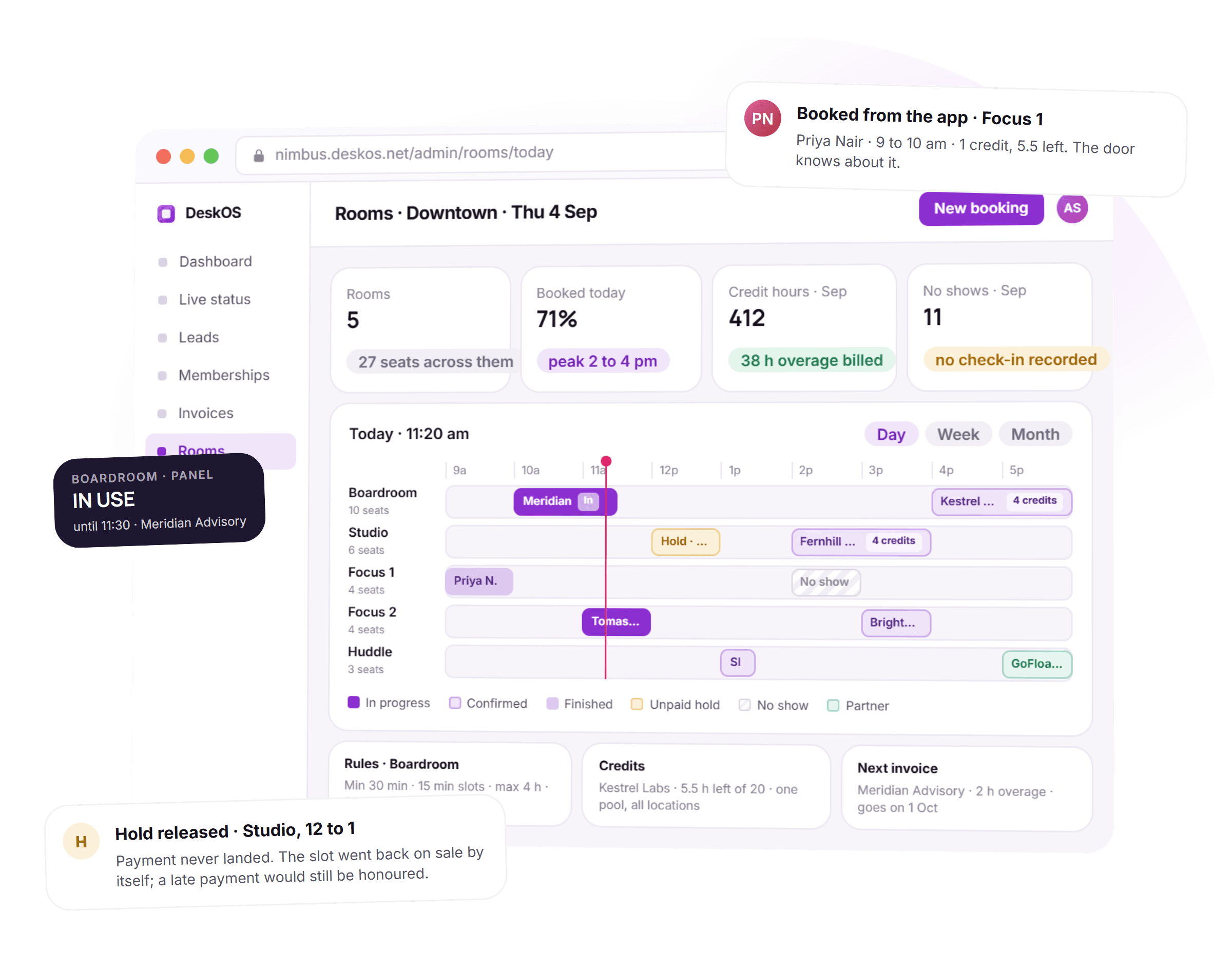
See it on your own rooms
A free thirty minute demo with a person, not a recording. Bring your rooms and your rules and we set them up in front of you.
Plays with the calendars and rails you already use



Everything between the booking and the invoice.
A room booking app stops at the booking. Here the booking already knows whose credits it used, whether it is paid, which door to open and which invoice the overage belongs on.
- Boardroom · Thu10 seats1:001:151:301:452:002:152:302:453:003:153:303:45Priya N. · 2 to 3 pm2 credits · nothing to pay
Members book from the app
Pick a room, tap the slots, confirm. The app shows what is free right now, what the plan allows and what it will cost in credits or money before the member commits.
What else members do in the app - Rules · Boardroomone definitionMin 30 min15 min slotsMax 4 hours30 days aheadCredits allowedStudio needs approvalMembers onlyFree for Business+The app, the console and the panel all read these. Nothing lives in someone’s memory.
Rules set once, kept everywhere
Minimum and maximum length, slot size, how far ahead, who may book and whether a room needs approval. The app, the console and the panel all read the same definition.
- Kestrel Labs · SepOne pool · 3 locations14.5 of 20 hresets 1 OctSpent at Riverside1 h · same poolBeyond 20 hOverage, next invoice
Credits, pooled or per location
Hours included in a plan, spent at any of your locations from one pool or kept separate per location, your choice. Every booking shows what it used and what is left.
- 11:40:12Studio 12 to 1 booked · pay by card11:40:14Slot held while paying11:41:42No payment · slot releasedevery 10 minGateway rechecked · late payments honoured
Paid rooms held while paying
A paid slot is held for a short time while the member pays, then released by itself if the money never lands. The gateway is rechecked, so a late payment is still honoured.
How payments reconcile - Boardroom · 10 seatsIN USEuntil 11:30 · Meridian AdvisoryNext · 4:00 pm Kestrel Labs Focus 2 free now
A panel on every door
In use, free, next booking and a code to book on the spot, on any tablet, in your colours. It follows your opening hours and holidays and locks behind an admin PIN.
- In at 9:58Boardroom · 10:00Meridian AdvisoryIn at 11:04Focus 2 · 11:00Tomas ReyesNo showFocus 1 · 14:00Brightpath DesignOut at 15:40Studio · 14:00Fernhill Studio
Check-in, check-out and no shows
Who turned up, when they left and who never came, recorded on the booking. The no show list per company is a report, not a hunch.
- Invoice · 1 Oct · Kestrel LabsDraft8 dedicated desks · October$3,200Room credits · 20 h included$0Room overage · 2 h × $24$48Taxper your entityShown in dollars; you bill in your currency.
Overage on the next invoice
Hours beyond the plan are priced at the room rate and go on the company’s next invoice with tax worked out for the billing entity. Nobody pays at the desk and claims it back.
How the invoice is built - PushedGoogle CalendarConnected · Priya NairPushedOutlookConnected · Tomas ReyesDownload.ics fileAny calendar, no connectionA booking lands in the member’s own calendar. Unpaid holds never do.
In their own calendar
A confirmed booking is pushed to the member’s Google or Outlook calendar, or comes as an .ics for anything else. Unpaid holds never sync, so nothing phantom lands in a diary.
- Booking from GoFloatersConfirmedHuddle · 5 to 6 pm · arrived over the partner API, on the same calendarPublic booking pagePaid up frontnimbus.deskos.net/rooms · non member rate · no membership neededOne calendar decides what is free, whoever is asking.
Partners and the public
Sell rooms to non members at their own rate, paid up front, and take bookings from partner platforms over the API. One calendar decides what is free, whoever is asking.
Every integration
Thirty minutes with a person, on your own rooms and rules.
From the tap in the app to the line on the invoice.
Five things happen to a booking over its life. None of them needs a diary or a whiteboard.
- 1Once, at setup
Rooms and rules are defined
Each room gets a capacity, amenities, a credit rate, a money rate and rules: slot size, minimum and maximum length, how far ahead, who may book, whether it needs approval.
- 2When a member books
The rules are checked and the price is settled
The app only offers what is free and allowed. Credits come off the pool, or a paid slot is held while the member pays. A room that needs approval waits for a yes.
- 3While the meeting runs
The door, the panel and the phone agree
Door access follows the booking. The panel outside shows in use and until when. The member gets a push before it starts, and check-in is recorded on the booking.
- 4When it ends
The room is free again
Check-out is recorded, a push says the meeting has ended, and the panel goes back to available with the next booking shown.
- 5On the 1st
Overage and the report
Hours beyond the plan land on the company’s invoice at the room rate. Utilisation, booked versus used and the no show list are ready per room and per location.
A month of meetings, with the admin done.
Four things that used to need a person at reception, and what they look like when the system answers them. Shown in dollars; DeskOS bills in your currency.
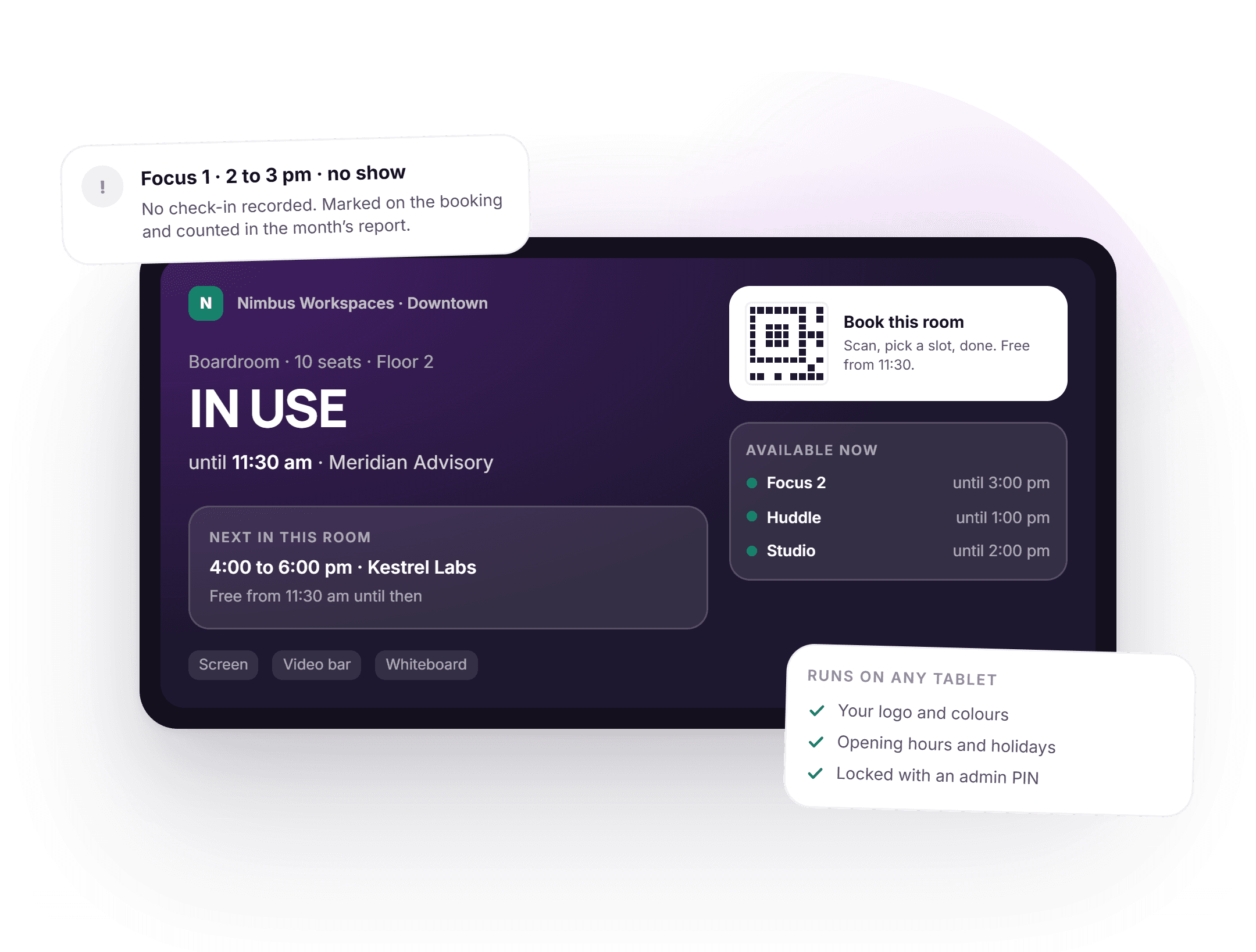
The door tells the truth, on a tablet you already own.
Outside every room a panel shows what is happening right now: in use and until when, who is next, which other rooms are free this minute. A code on the screen books the room on the spot. It runs on any standard tablet, in your logo and colours, follows your opening hours and holidays, and locks behind an admin PIN.
- In use, free and next booking, read from the same calendar the app uses
- Other rooms available now, so a walk up finds a room without asking
- Instant booking by scanning the code on the panel
- Any tablet, your branding, opening hours and holidays respected
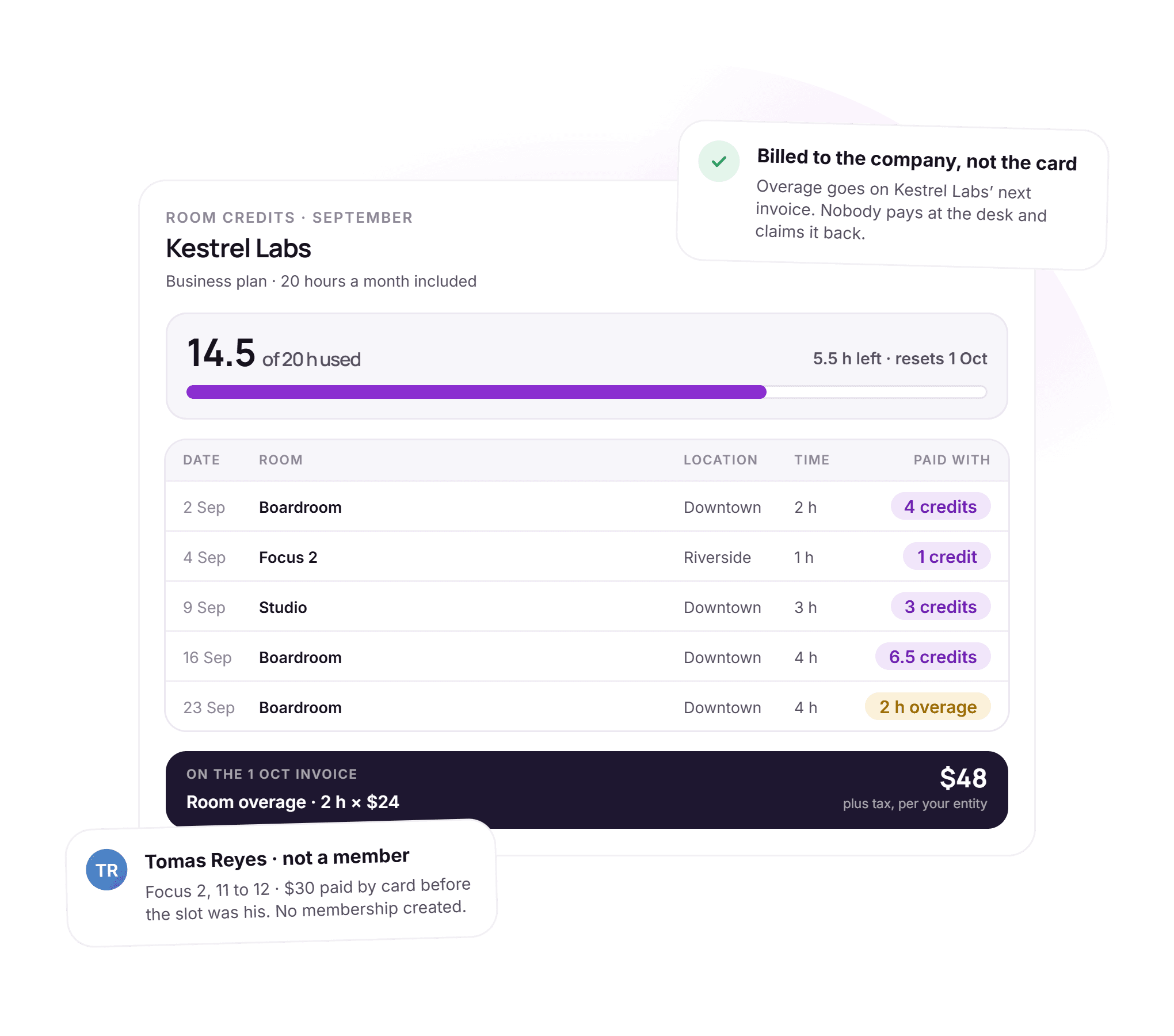
Twenty hours a month, spent anywhere, billed once.
A plan includes room hours. A company spends them at any of your locations from one pool, or per location if you prefer, and every booking shows what it used and what is left. Hours beyond the plan are priced at the room rate and go on the next invoice, billed to the company rather than to whoever booked. A non member pays up front at their own rate and no membership is created.
- One pool across locations or one per location, by setting
- Every booking shows credits used and credits left
- Overage at the room rate, on the company’s next invoice
- Non members pay by card up front at a separate rate
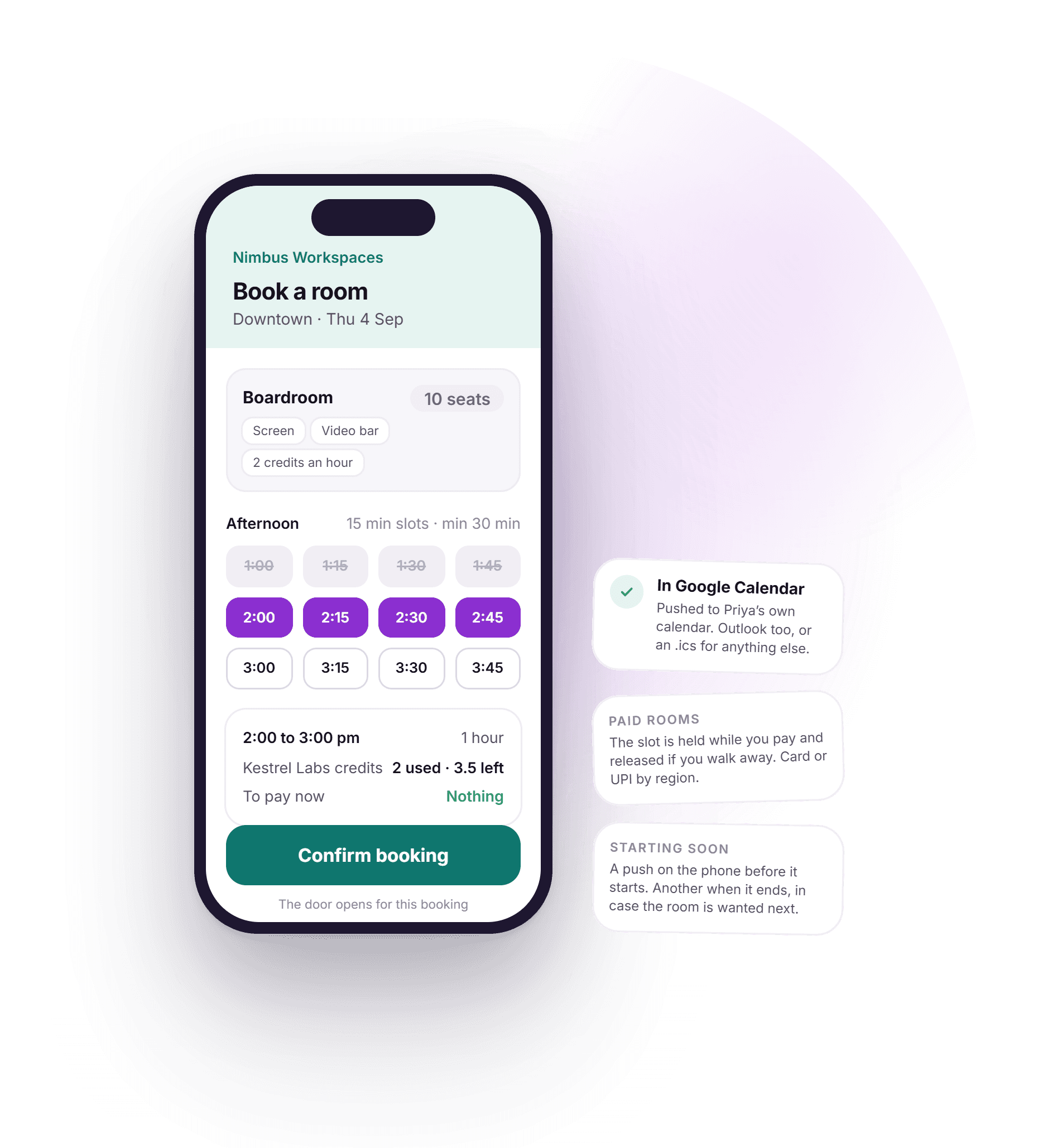
Book a room in the time it takes to walk to it.
The member opens the app, picks a room, taps the slots and confirms. Only what is free and allowed is offered, the cost in credits or money is shown before confirming, and the booking is pushed to their own calendar. A push arrives before the meeting starts and another when it ends. Paid rooms are held while the member pays and released if they walk away.
- Slot size, minimum length and how far ahead, all enforced in the app
- Credits used and credits left shown before confirming
- Pushed to Google Calendar or Outlook, or an .ics for anything else
- A push before the meeting starts and one when it ends
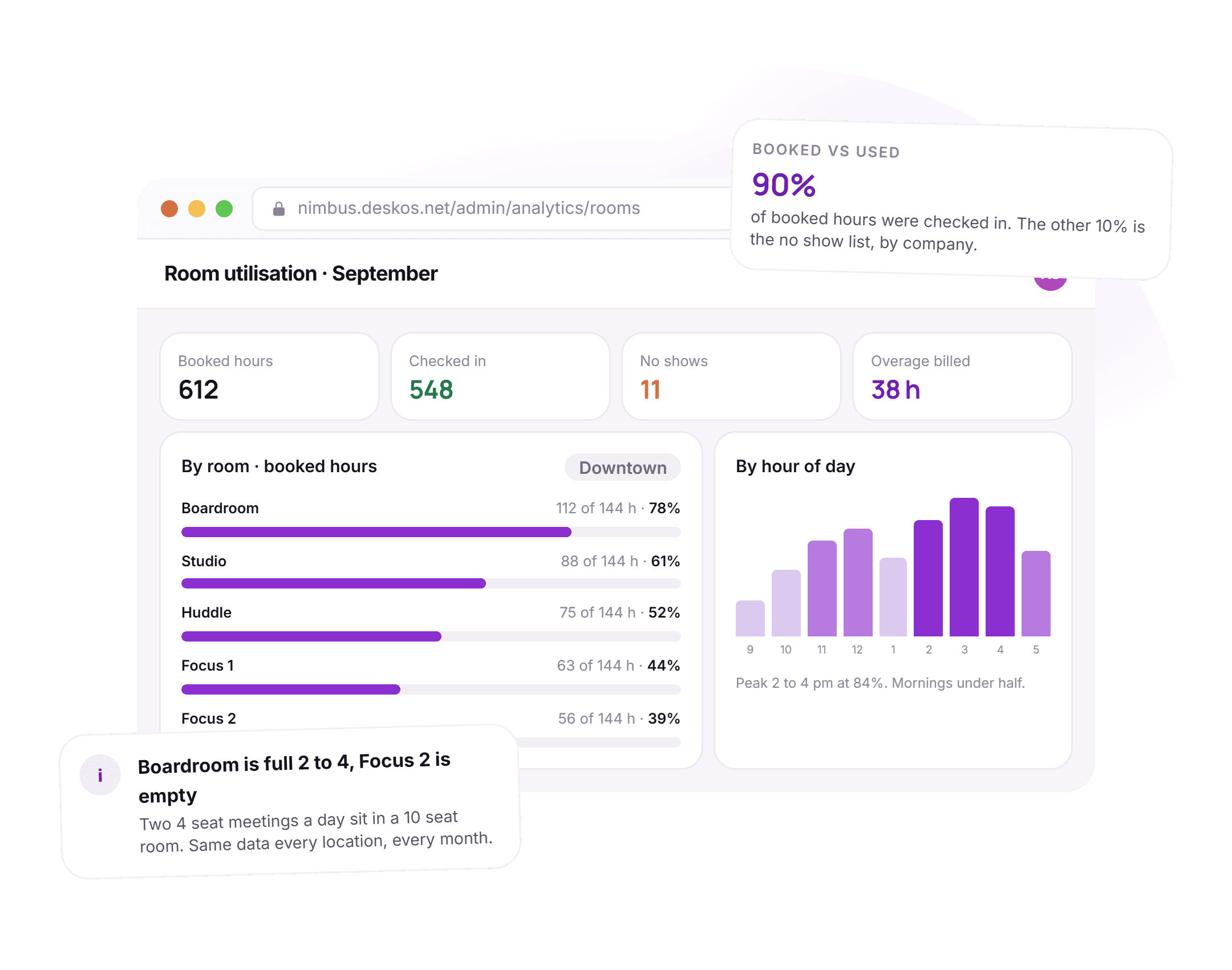
Which rooms earn, which sit empty, which are the wrong size.
Booked hours, checked in hours, no shows and overage per room and per location, with the hour of day the rooms fill up. When the ten seat boardroom is full every afternoon with four person meetings while the small rooms sit empty, the report says so, and so does the case for one more small room.
- Booked versus checked in per room, so utilisation is what happened
- Hour of day, so peaks and quiet mornings are visible
- No shows by company, from the check-in record
- Overage hours billed, per location and per month
See it running on your rooms, your plans and your tablets.
The booking is upstream of the door, the invoice and the report.
Everything else in DeskOS reads from the booking, so a room used beyond the plan shows up on the invoice with VAT or GST worked out, and a member paying by card or bank transfer is matched to their slot without anyone watching a gateway.
- Overage lands on the invoiceHours beyond the plan are priced at the room rate and go on the company’s next invoice with tax for the entity.Billing and payments
- The booking opens the doorDoor access follows the booking for the booked time, on the doors of the location the room is in.Access control
- Rooms are part of the inventoryA room sits on the same floor plan as the seats, under the same location, booked by the same members.Space management
- Utilisation next to occupancyBooked, checked in and no show hours per room are read from the bookings, never from a second count.Analytics
Everything in meeting room management.
For the reader who wants the whole feature list on one screen. Every line is something DeskOS does today.
Rooms and rules
- Rooms as part of the same inventory as seats, per floor and location
- Capacity and amenities on every room
- Slot size, minimum and maximum length per room
- How far ahead a room may be booked
- Members only, or open to the public at a non member rate
- Rooms that need approval before a booking is confirmed
Booking
- Members book from the app, staff from the console
- Only free and allowed slots offered, the cost shown before confirming
- A booking status separate from where it sits on the clock
- Cancel with a reason, kept on the record
- Pushed to Google Calendar or Outlook, or an .ics download
- A push before the meeting starts and one when it ends
Credits and payment
- Room hours included in a plan, per plan
- One credit pool across locations or one pool per location
- Credits used and credits left shown on every booking
- Paid slots held while paying, released by themselves if not paid
- The gateway rechecked so a late payment is still honoured
- Non members pay by card or wallet up front
Panel and the door
- Room panel on any standard tablet, in your branding
- In use, free, next booking and other rooms available now
- Instant booking by scanning the code on the panel
- Opening hours and holidays shown on the panel
- Admin PIN, room selection and a force refresh
- Door access follows the booking through your access control
Check-in and no shows
- Check-in and check-out recorded on the booking
- Bookings with no check-in recorded as no shows
- No show list per company, per month
- Booked versus checked in, per room
- Cancelled, expired and no show kept apart in the numbers
- Approval queue for rooms that need a yes
Billing, reports and partners
- Overage at the room rate on the company’s next invoice
- Tax on room charges worked out for the billing entity and country
- Room charges on the company account when bill to account is on
- Utilisation per room and per location, by hour of day
- Bookings from partner platforms over the API, on the same calendar
- Bookings read by the DeskOS MCP server and the AI assistant
Missing something? Ask. It may already be in there.

“DeskOS has been really valuable for us. The visibility helps us make better decisions, while the automation has taken a lot of manual work off our plate.”
Sanjeev Laroia, Spacetime · 3,000+ seats across India
700 invoices in a single click
A full month raised in one action, GST worked out per invoice, and every one delivered on WhatsApp and email the same day.
100 leads a day, nobody typing
Enquiries land, get qualified by workflow and are sent an invitation to come and see the space, without anyone opening a sheet.
Meeting rooms stop being your problem
Members book from the app, credits come off automatically, overages land on the next invoice, and the front desk keeps no diary.
What changes when the booking knows about credits, the door and the invoice.
A shared calendar and a standalone booking app both work, right up to the month somebody books and never pays, or the overage never reaches the invoice. This is what the difference looks like day to day.
- Is the boardroom free at 2?
- A shared calendar and a whiteboard
- Check the calendar, then check the whiteboard, then ask reception
- A standalone room booking app
- Yes, if the app was the only place anyone booked it
- DeskOS
- One calendar for the app, the console, the panel and partners
- How many hours does Kestrel Labs have left?
- A shared calendar and a whiteboard
- A tally in a sheet, updated when somebody remembers
- A standalone room booking app
- Per room or per location, rarely across the group
- DeskOS
- Credits on the plan, one pool or per location, shown on every booking
- A member books, then never pays
- A shared calendar and a whiteboard
- The slot is blocked all week
- A standalone room booking app
- Depends on the app; often a manual cancel
- DeskOS
- Held while paying, released by itself, late payment still honoured
- Hours beyond the plan
- A shared calendar and a whiteboard
- Somebody adds a line to the invoice at month end, or forgets
- A standalone room booking app
- Charged to the card of whoever booked
- DeskOS
- Priced at the room rate and on the company’s next invoice, with tax
- Outside the room
- A shared calendar and a whiteboard
- A paper sign or nothing
- A standalone room booking app
- A branded panel, at a per screen price
- DeskOS
- A panel on any tablet you own, in your colours, with instant booking
- Nobody turned up
- A shared calendar and a whiteboard
- The room sat empty and nobody knows
- A standalone room booking app
- Sometimes a check-in, rarely a report
- DeskOS
- Check-in recorded, no shows listed per company, utilisation is what happened
- The door
- A shared calendar and a whiteboard
- A key at reception
- A standalone room booking app
- A separate system, a separate list
- DeskOS
- Door access follows the booking through the access control DeskOS runs
- A booking from a partner platform
- A shared calendar and a whiteboard
- An email that somebody retypes
- A standalone room booking app
- Not on the same calendar
- DeskOS
- Arrives over the API, sits on the same calendar, blocks the same slot
Bring the awkward cases. A room that needs approval, hours spent at another location, a walk up with no membership.
Simple plans. No per module add-ons.
Basic starts at $59 a month billed yearly, excluding VAT or GST. Every plan includes every module. You pay for seats and locations, nothing else.
Basic
For smaller spaces streamlining operations and getting billing under control.
$59 / month
billed yearly
- Active seats
- Up to 100
- Locations
- 1
Includes
- Space management and utilisation
- Meeting room management
- Billing with automated invoicing
- Helpdesk and service requests
- Web based access for the team
- Most taken
Business
Growing spaces building a community and premiumising what they sell.
Quoted on request
Scoped to your seats and locations
- Active seats
- Up to 200
- Locations
- 2
Everything in Basic, plus
- Visitor management
- Daily check-in management
- Community management
- Leads management CRM
- Payment gateway, receipts and credit notes
- Dedicated relationship manager
Business+
Bigger spaces that want their own apps and their own brand in front of members.
Quoted on request
Scoped to your seats and locations
- Active seats
- Up to 600
- Locations
- 3
Everything in Business, plus
- Whitelabel Android and iOS apps
- Lease management
- Client attendance tracking
- Cafe management
- Advanced reports
- Priority support, 24x7
Running more than three locations or 600 seats? That is Enterprise, quoted once we know your portfolio.
Still tied into another platform? We will buy out your contract. Ask us on the call.
Your rooms, set up by us first.
Before you sign anything, we set up your rooms, rates and rules in a sandbox and show you a booking from the app, the panel changing and the overage on a draft invoice. The person who sets up your rooms is the person who answers when you call.
What happens next
- 1
Send us your rooms and your rules
Fill in the form or message us on WhatsApp. Tell us the rooms, what each plan includes, what a non member pays and the awkward bits: a room that needs approval, hours spent at another location.
- 2
We set them up in a sandbox
Your rooms, rates and rules, with a few of your companies on their plans. You book from the app, watch the panel change and see the overage land on a draft invoice.
- 3
Go live with the panels on the doors
Onboarding brings rooms, plans and members across, and the panel runs on the tablets you already have. The person who set up your rooms is the person who answers when you call.
Questions operators ask about room booking.
How do members book a meeting room?
From the member app or the web portal. They pick a room, tap the slots and confirm. Only free and allowed slots are offered, and the cost in credits or money is shown before they commit. Staff can also book for a company from the admin console.
Can credits be shared across our locations?
Yes. Room credits are either one pool a company can spend at any of your locations, or a separate pool per location. It is a setting on your organisation, and every booking shows what it used and what is left.
What happens when a paid booking is not paid?
A paid slot is held for a short time while the member pays, a minute or two by default and configurable. If the money does not land the hold is released and the slot goes back on sale by itself. DeskOS rechecks the payment gateway every few minutes, so a payment that arrives late is still matched to the booking.
How are hours beyond the plan billed?
At the room rate, on the company’s next invoice, with tax worked out for the billing entity and country. They are billed to the company, not to the card of whoever booked. Non members pay up front at a separate rate.
What are the booking rules we can set?
Per room: slot size, minimum and maximum length, how far ahead a booking may be made, whether members may pay with credits, whether the room is free to use, whether non members may book and at what rate, and whether a booking needs approval before it is confirmed.
Do we need special hardware for the room panel?
No. The panel runs on any standard tablet. It shows your logo and colours, follows the opening hours and holidays you set, offers instant booking by scanning a code, and locks behind an admin PIN.
Can we sell meeting rooms to people who are not members?
Yes. A room can carry a non member rate and be booked by the public, paid by card or wallet before the slot is theirs. No membership is created, and the booking sits on the same calendar as everything else.
Does a booking open the door?
Yes, where DeskOS runs your access control. Door access follows the booking, so the member is let into the room for the booked time, and a room with a lock does not need a key at reception.
How do we track no shows?
Check-in and check-out are recorded on the booking. A booking with no check-in is recorded as a no show, and the report lists them per company and per month alongside booked versus checked in hours per room.
Do bookings sync to the member’s calendar?
Yes. A member connects Google Calendar or Outlook once and confirmed bookings are pushed to their own calendar. An .ics file is available for any other calendar. Unpaid holds never sync, so nothing phantom lands in a diary.
The rest of the system this plugs into.
- Space managementSeats, floors and live occupancyRooms sit on the same floor plan as the seats, under the same location.Space management
- Access controlDoors, biometrics and credentialsDoor access follows the booking for the booked time.Access control
- Billing and paymentsInvoices, tax, gateways and collectionsOverage is priced at the room rate and lands on the company’s next invoice.Billing and payments
- Member engagementApps, service requests and eventsMembers book rooms in the same app they use for everything else.Member engagement
Bring your rooms and your rules.
We will set them up in a sandbox and show you a booking from the app, the panel on the door and the overage on a draft invoice, with your rooms in it.