Cafe management software for coworking spaces where the counter stops shouting orders across the floor.
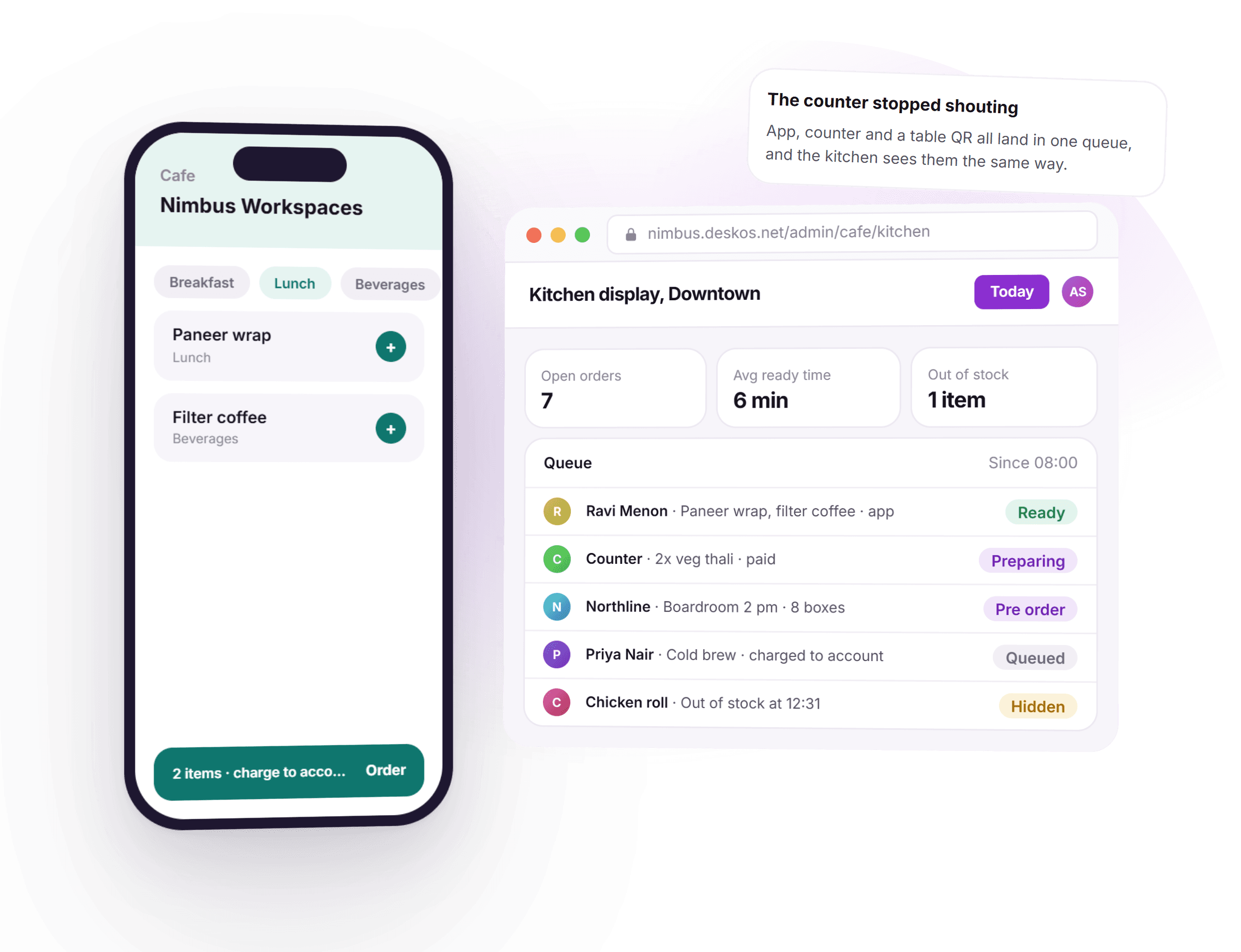
DeskOS is cafe management software for coworking spaces and managed offices: a menu, a kitchen display and orders from the app, the counter or a table QR, with member charges rolling onto the next invoice and stock depleting by recipe instead of a guess at month end.
- One kitchen queue from the app, counter and table QR
- Charge to account, settled on the next invoice
- Recipe level stock with a real goods receipt
- Sales, cost of goods and margin, next to occupancy
See your own menu, not a demo of ours
A free thirty minute demo with a person, not a recording. Bring your own menu and we will show an order move from the app to the kitchen display, live.
Settles with the payment and messaging tools you already use


Everything the pantry needs to run like a business.
A notebook behind the counter only knows what someone remembered to write down. Here the menu, the order, the charge and the stock it used are the same system, because it is one queue rather than a shout across the floor.
- BreakfastLunchBeveragesChicken rollHiddenAvailability toggles the moment it runs out
A menu per location, priced and scheduled
Categories, items, variants and add-ons, with a breakfast menu that turns into a lunch menu on its own. Availability toggles the moment something runs out, so nobody orders what the kitchen cannot make.
- AppCounterQROne kitchen queue, not three
One queue, three ways to order
Members order from the app, walk-ins order at the counter, and a table QR covers the rest. All three land in the same kitchen queue instead of three lists to reconcile.
- Cold brew$4.20Charged to accountRolls onto the next invoice, correct tax included
Charge to account, settle on the invoice
A member can pay by card on the spot, or put it on their account. Account charges roll onto the next invoice with the correct tax, so the cafe is not running its own private credit book.
How an account charge reaches the invoice - Preparing3 ordersReady4 ordersNotified on app and WhatsApp when ready
A kitchen display instead of a shouted order
Orders move through preparing and ready on a screen, and notify the member on app and WhatsApp when it is time to collect. The counter stops being an interruption driven job.
- MilkLowBreadStockedDepletes by recipe, not a monthly guess
Recipe level stock, not a guess at month end
Define what goes into each item and stock depletes as orders are made. Raw materials arrive against a goods receipt with a vendor and a rate, so a shortage shows up before the lunch rush, not after.
- Cost of goods$210Margin63%Next to occupancy and revenue per seat
The cafe P&L next to the seat P&L
Sales, cost of goods and margin by item and by day, in the same reporting as the rest of the location. You find out whether the pantry makes money or buys goodwill.
How cafe margin sits next to occupancy - Counter, wifi droppedOrder 219 queued locallySynced on reconnect
Works through a wifi drop
The counter keeps taking orders locally through a network outage and syncs the moment it reconnects. Lunch does not stop because the router did.
- Boardroom, 2 pmNorthline · 8 boxesOrdered against the booking, billed together
Catering ordered against the booking
Food for a meeting or an event is placed against that booking rather than shouted across the floor, and billed to the same account as the room.
How catering lands on the same invoice as the room - DowntownPrice overrideRiversidePrice overrideOne menu master, priced per location
One menu master, many locations
Share a menu across locations and override price or availability per location, instead of maintaining five near identical menus by hand.
Thirty minutes with a person, on your own menu.
From the menu going live to the margin sitting in the report.
Five things happen over one day of service. None of them needs a clipboard or a guess at close.
- 1Before service
The menu is set once, per location
Categories, items and pricing are configured per location, and a breakfast menu can turn into a lunch menu on a schedule without anyone touching it.
- 2At order time
App, counter or table QR, one queue
However the order arrives, it lands on the same kitchen display, in the same queue, next to a pre order for a meeting room.
- 3In the kitchen
The display replaces the shout
An order moves through preparing and ready, and the member is notified on app and WhatsApp the moment it is ready to collect.
- 4At settlement
Paid now, or charged to the invoice
A card payment settles immediately. An account charge rolls onto the member’s next invoice with the correct tax, automatically.
- 5At close
Stock depletes, margin is already there
Every sale draws down recipe level stock, and sales, cost of goods and margin are sitting in the report before anyone asks for them.
What used to run on a notebook and a shout, handled by the system itself.
Four things that used to need a person watching the counter, and what they look like when the system answers them. The today picture is shown in dollars; DeskOS bills in your currency.
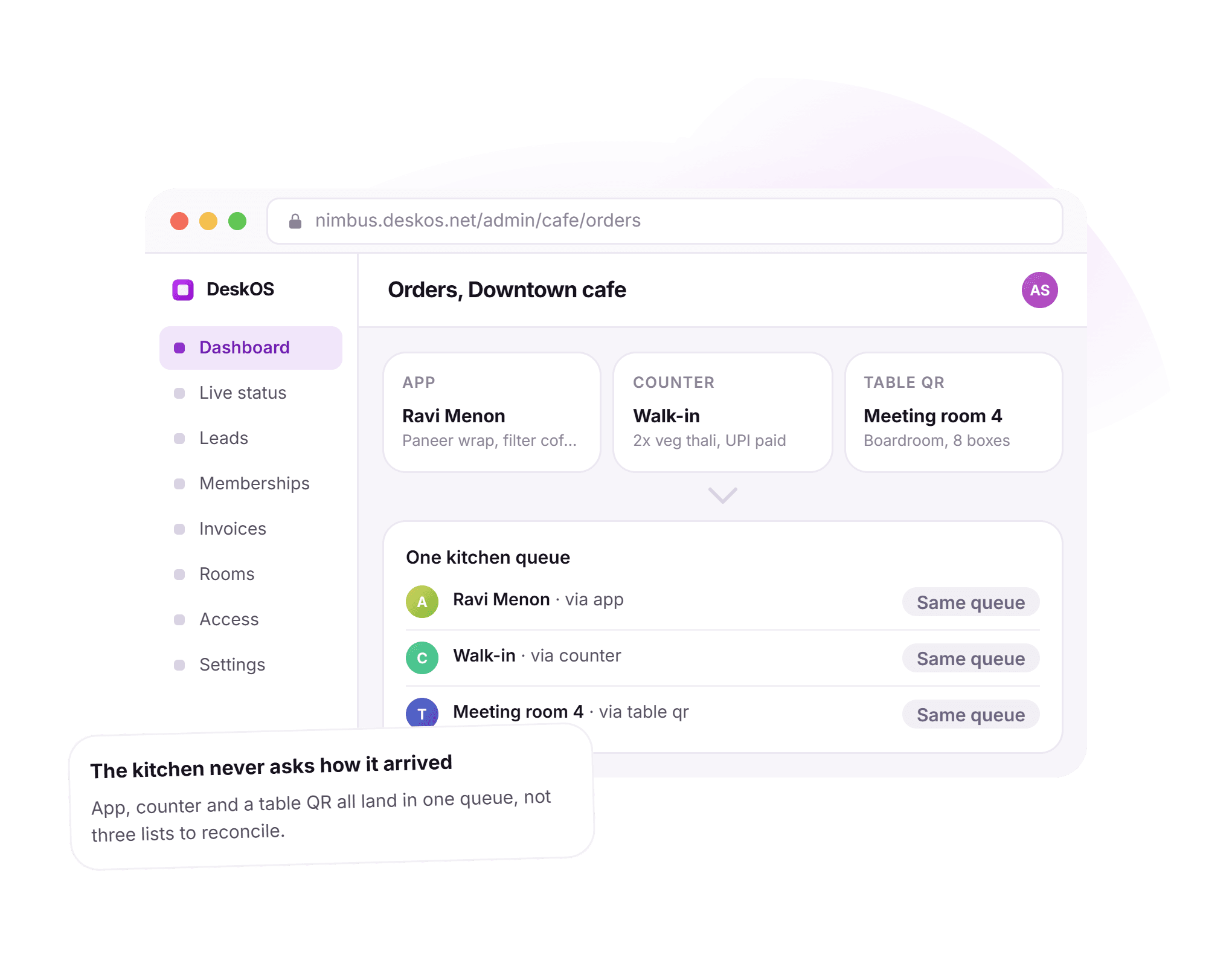
The kitchen never asks how an order arrived.
An order used to mean three different habits: a member on the app, a walk-in at the counter, a boardroom calling ahead. Here all three land in one kitchen queue, tagged by channel, so the kitchen sees one list instead of reconciling three.
- App, counter and table QR all feed one queue
- A pre order for a room is placed against the booking
- No order arrives as a shout across the floor
- The kitchen sees who ordered and how, in one place
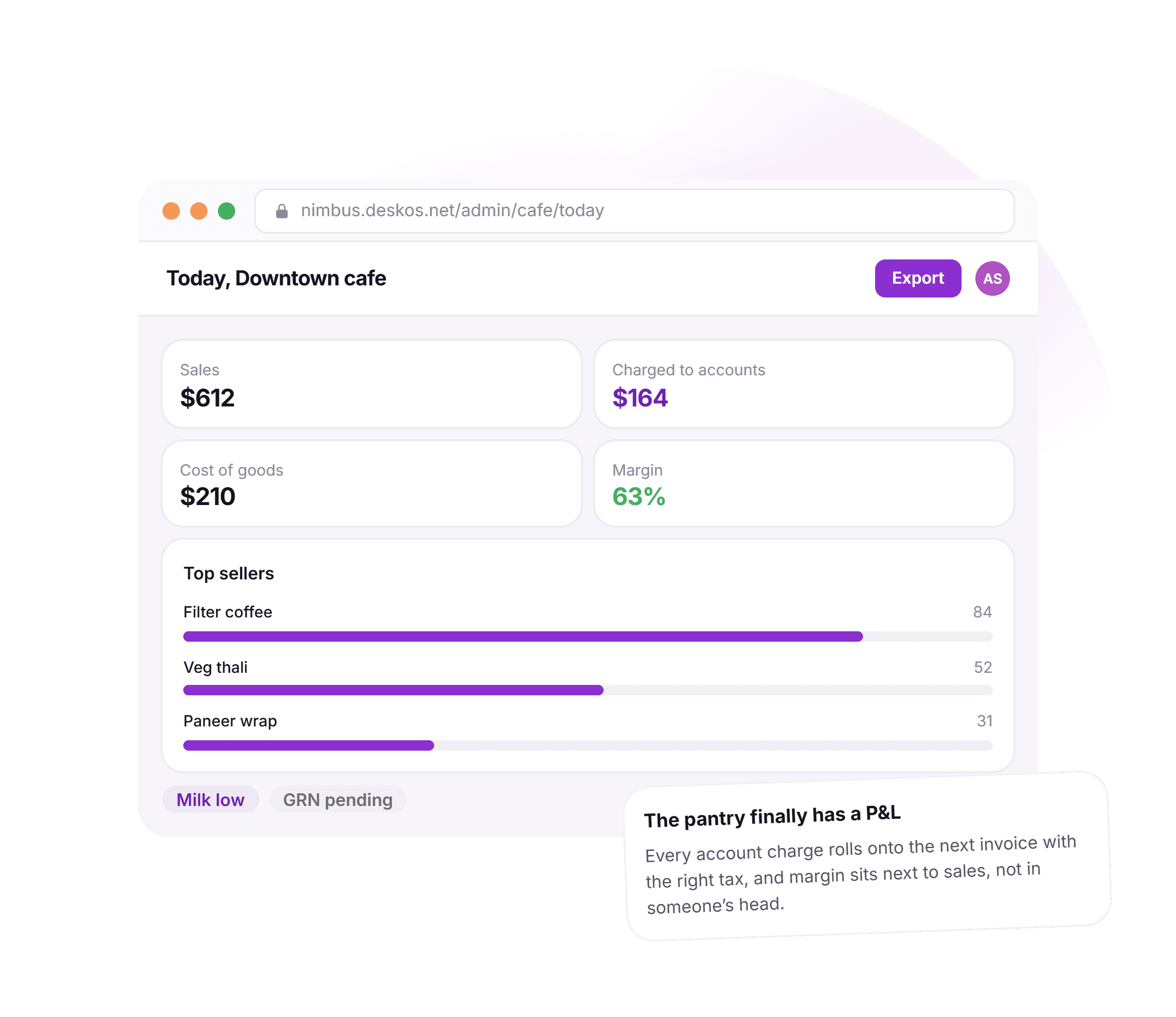
The pantry finally has a P&L.
A cafe used to close its books with a guess: sales counted on a notepad, cost of goods estimated at month end. Here sales, account charges, cost of goods and margin sit on one screen, drawn from the same orders the kitchen already worked.
- Sales and account charges shown side by side
- Cost of goods drawn from recipe level stock
- Margin by item, updated as orders come in
- Low stock and a pending goods receipt flagged on the same screen
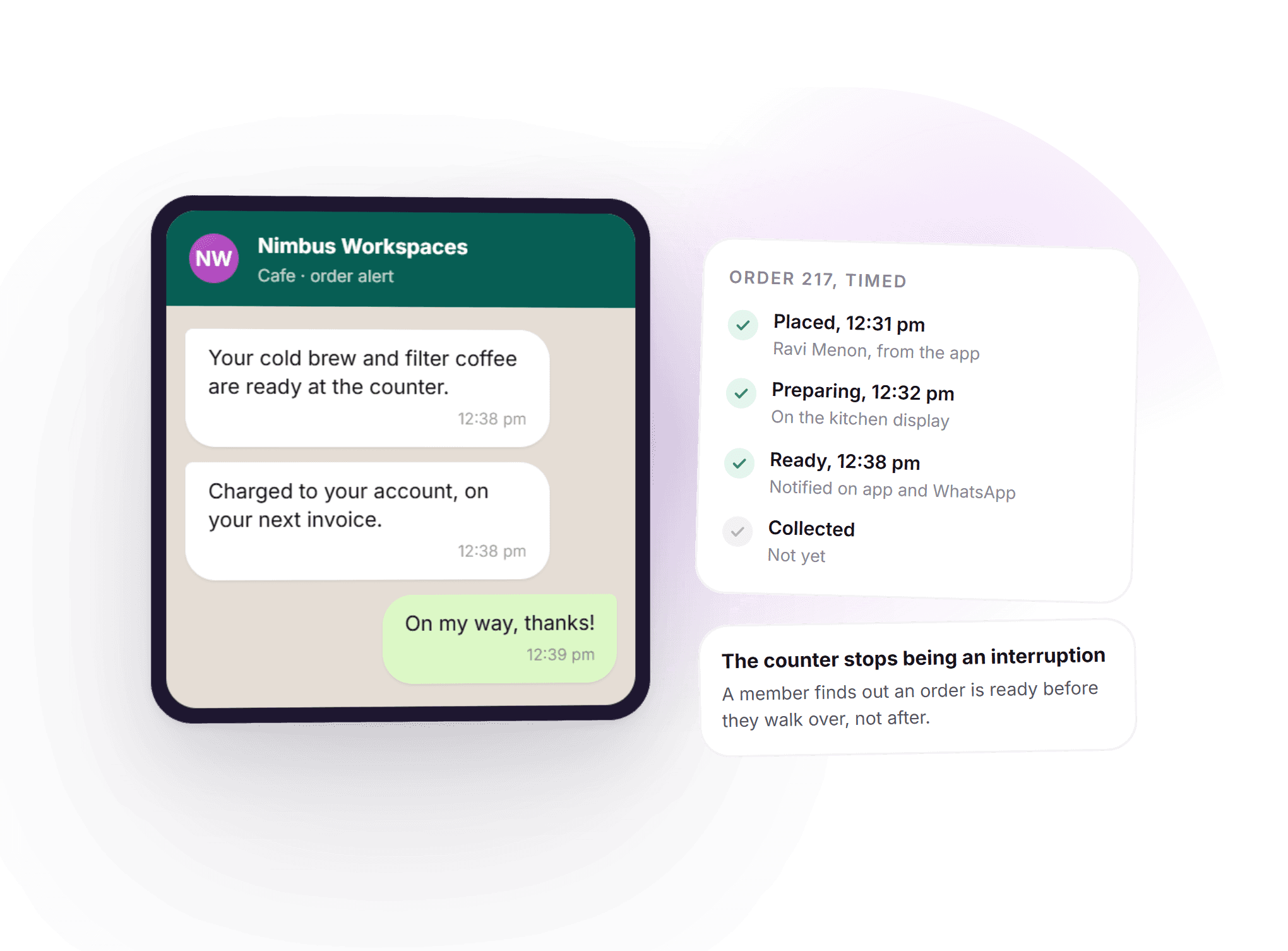
The counter stops being an interruption.
Collecting an order used to mean hovering near the counter or getting shouted at across the room. Here a WhatsApp message tells the member the moment their order is ready, with the timeline behind it showing exactly when each step happened.
- Placed, preparing and ready, timestamped
- A WhatsApp notification the moment it is ready
- Charged to account is stated on the same message
- A member finds out before they walk over, not after
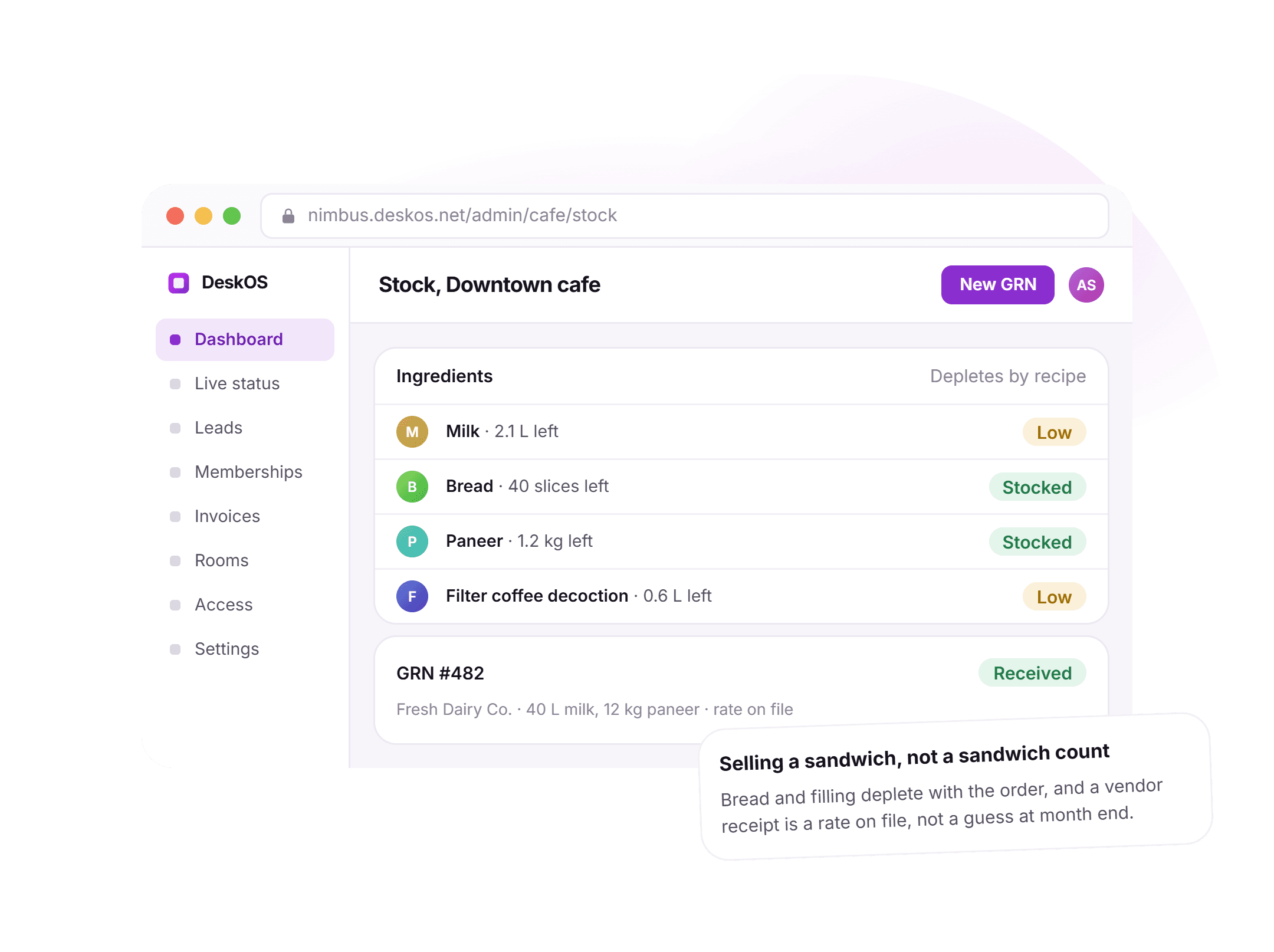
Selling a sandwich, not a sandwich count.
Stock used to mean counting boxes on a shelf once a week and hoping the number was close. Here bread and filling deplete with the order that used them, and a vendor receipt arrives as a rate on file, not a number someone remembers at month end.
- Ingredients deplete automatically, by recipe
- Low stock flagged before the lunch rush, not after
- A goods receipt records vendor, quantity and rate
- Wastage shows up as a variance instead of a feeling
See it running on your own menu, your own counter and your own team.
A coffee is a charge on a membership, not a transaction in a different app.
A standalone POS gives you a day’s sales and stops there. Attached to the member, the same coffee carries VAT or GST the same way accounts sees it, and a member paying by card or bank transfer is matched to their invoice without anyone watching a gateway.
- A member orders from the same app they already useOrdering lunch sits next to booking a room and paying an invoice, in the one app under your own brand.Member engagement
- An account charge is a real invoice lineA cafe order charged to account posts to the same ledger accounts sees, with tax worked out the same way.Billing and payments
- Catering is ordered against the bookingFood for a meeting is placed against that room and billed together, instead of arriving as a separate charge.Meeting room management
- Cafe margin sits in the same report as occupancySales, cost of goods and margin appear next to revenue per seat, not in a spreadsheet only the kitchen sees.Analytics
Everything in cafe management.
For the reader who wants the whole feature list on one screen. Every line is something DeskOS does today.
Menu
- Categories, items, variants and add-ons
- A schedule that switches breakfast to lunch on its own
- Availability toggles the moment something runs out
- One menu master shared across locations
- Price and availability overridden per location
- No order placed for an item the kitchen cannot make
Ordering
- Ordered from the app, the counter or a table QR
- All three channels land in the same kitchen queue
- A pre order placed against a room or event booking
- Order history kept per member and per location
- Cancel or edit an order before it starts preparing
- No order arrives as a shout across the floor
Payment
- Pay by card, UPI or cash on the spot
- Charge to the member account instead
- Account charges roll onto the next invoice automatically
- The correct tax applied at the time of charge
- No separate credit book kept behind the counter
- Settlement visible to accounts the same day
Kitchen
- A kitchen display screen, not a shouted order
- Orders move through preparing and ready
- Member notified on app and WhatsApp when ready
- Average ready time tracked per location
- Open order count visible at a glance
- Out of stock items hidden the moment they run out
Stock
- Recipe level ingredients defined per menu item
- Stock depletes automatically as orders are made
- Goods receipts record vendor, quantity and rate
- Low stock flagged before it runs out
- Wastage shows up as a variance, not a guess
- A real food cost, not an estimate at month end
Money
- Sales, cost of goods and margin by item and by day
- Account charges shown next to card and cash sales
- Cafe margin sits next to occupancy and revenue per seat
- Top sellers ranked by volume
- Works offline through a wifi drop, syncs on reconnect
- One report, not a separate spreadsheet for the pantry
Missing something? Ask. It may already be in there.

“DeskOS has been really valuable for us. The visibility helps us make better decisions, while the automation has taken a lot of manual work off our plate.”
Sanjeev Laroia, Spacetime · 3,000+ seats across India
700 invoices in a single click
A full month raised in one action, GST worked out per invoice, and every one delivered on WhatsApp and email the same day.
100 leads a day, nobody typing
Enquiries land, get qualified by workflow and are sent an invitation to come and see the space, without anyone opening a sheet.
Meeting rooms stop being your problem
Members book from the app, credits come off automatically, overages land on the next invoice, and the front desk keeps no diary.
What changes when the cafe is connected to everything else.
A notebook behind the counter and a generic POS both work, right up to the moment a member wants to charge lunch to their account, a room needs catering, or someone finally asks whether the cafe makes money. This is what the difference looks like day to day.
- A member orders lunch
- A notebook and a shout
- Walk to the counter and hope there is no queue
- A generic POS
- A generic order screen, disconnected from the member
- DeskOS
- Ordered from the app or the counter, into one kitchen queue
- A member wants to charge it to their account
- A notebook and a shout
- A notebook behind the counter, reconciled by hand
- A generic POS
- Rarely supports charging to an account at all
- DeskOS
- Rolls onto the next invoice with the correct tax, automatically
- The kitchen needs to know an order is ready
- A notebook and a shout
- Someone shouts across the floor
- A generic POS
- A printed ticket, if the printer is working
- DeskOS
- A kitchen display and a WhatsApp message the moment it is ready
- Catering for a meeting
- A notebook and a shout
- A separate phone call to the kitchen
- A generic POS
- Not connected to the room booking at all
- DeskOS
- Ordered against the booking, billed with the room
- Tracking stock
- A notebook and a shout
- A count on a clipboard once a week
- A generic POS
- Tracks sales, rarely raw materials
- DeskOS
- Recipe level depletion with every order, GRN with a real rate
- Knowing whether the cafe makes money
- A notebook and a shout
- A figure at month end that nobody trusts
- A generic POS
- A separate report, if there is a report at all
- DeskOS
- Sales, cost of goods and margin, updated as orders come in
- A wifi drop at lunchtime
- A notebook and a shout
- The counter stops taking orders
- A generic POS
- Depends whether the device has a cache at all
- DeskOS
- Keeps taking orders locally, syncs the moment it reconnects
- Several locations, one menu
- A notebook and a shout
- Five near identical menus, maintained by hand
- A generic POS
- Usually built for one site at a time
- DeskOS
- One menu master, priced and toggled per location
Bring the awkward cases. An account charge, a room catering order, a margin nobody could explain.
Simple plans. No per module add-ons.
Basic starts at $59 a month billed yearly, excluding VAT or GST. Every plan includes every module. You pay for seats and locations, nothing else.
Basic
For smaller spaces streamlining operations and getting billing under control.
$59 / month
billed yearly
- Active seats
- Up to 100
- Locations
- 1
Includes
- Space management and utilisation
- Meeting room management
- Billing with automated invoicing
- Helpdesk and service requests
- Web based access for the team
- Most taken
Business
Growing spaces building a community and premiumising what they sell.
Quoted on request
Scoped to your seats and locations
- Active seats
- Up to 200
- Locations
- 2
Everything in Basic, plus
- Visitor management
- Daily check-in management
- Community management
- Leads management CRM
- Payment gateway, receipts and credit notes
- Dedicated relationship manager
Business+
Bigger spaces that want their own apps and their own brand in front of members.
Quoted on request
Scoped to your seats and locations
- Active seats
- Up to 600
- Locations
- 3
Everything in Business, plus
- Whitelabel Android and iOS apps
- Lease management
- Client attendance tracking
- Cafe management
- Advanced reports
- Priority support, 24x7
Running more than three locations or 600 seats? That is Enterprise, quoted once we know your portfolio.
Still tied into another platform? We will buy out your contract. Ask us on the call.
Your menu, built by us first.
Before you sign anything, we load your own menu into a sandbox and show an order move from the app to the kitchen display to a WhatsApp ready message, on your own location. The person who sets it up is the person who answers when you call.
What happens next
- 1
Send us your menu
Fill in the form or message us on WhatsApp with your categories, items and pricing, and tell us how many locations the cafe covers.
- 2
We build your kitchen display in a sandbox
Your own menu, your own location and a few real items. You watch an order move from the app to the kitchen display to a WhatsApp ready message, live.
- 3
Go live at the counter
The counter, the kitchen display and stock all switch on together, with someone from DeskOS on the first day of service.
Questions operators ask about cafe management.
Can members charge food to their membership account?
Yes. An order can be settled immediately or charged to the member account, in which case it appears on their next invoice with the correct tax treatment rather than in a notebook behind the counter.
Do we need special POS hardware?
No. The counter runs in a browser on a tablet or a laptop. A receipt printer and a kitchen display screen are optional and use standard hardware.
Does it track raw material stock or just menu items?
Both. You can define what goes into each menu item, so selling a sandwich depletes bread and filling rather than just a sandwich count. Purchases come in against a goods receipt with a vendor and a rate.
Can we run the cafe as a separate business unit?
Yes. Cafe sales can be billed from their own legal entity with its own numbering and tax registration if the kitchen is a separate company, while still charging to member accounts.
What happens if the internet goes down at lunchtime?
The counter keeps taking orders locally and syncs when the connection returns, so a network drop is an inconvenience rather than a closed kitchen.
How does the kitchen know an order is ready to notify?
A member of the kitchen team marks an order ready on the display, which sends the notification on app and WhatsApp the same moment, with no separate step.
Can catering for a meeting room be billed with the room?
Yes. Catering for a booking is ordered against that booking and settles on the same invoice as the room, instead of arriving as a separate charge.
Can one menu cover several locations?
Yes. A menu master can be shared across locations, with price and availability overridden per location where it needs to differ.
How is margin worked out?
Margin is sales minus cost of goods, and cost of goods is drawn from the rate on file for the ingredients a recipe actually used, not an estimate.
Does cafe reporting show up next to occupancy?
Yes. Cafe sales, cost of goods and margin appear in the same reporting as the rest of the location, next to occupancy and revenue per seat.
The rest of the system this plugs into.
- Member engagementApps, service requests and eventsA member orders lunch from the same app they use for rooms and invoices.Member engagement
- Billing and paymentsInvoices, tax, gateways and collectionsAn account charge for a cafe order posts to the same ledger as everything else.Billing and payments
- Meeting roomsBookings, credits and room panelsCatering for a booking is ordered against the room and billed together.Meeting rooms
- AnalyticsOccupancy, revenue and churnCafe margin sits next to occupancy and revenue per seat.Analytics
Bring your menu and one busy lunch.
We will show an order move from the app to the kitchen display, a charge land on account, and stock deplete by recipe, live. It takes about ten minutes.