Member engagement software for coworking spaces where the app is the front desk, not a group chat nobody reads.
DeskOS is member engagement software for coworking spaces and managed offices: a whitelabel app under your own brand where members book rooms, pay invoices, raise service requests and join events, while your team gets a ticket with a team and a due time instead of a message in a chat.
- A whitelabel app under your own brand, not ours
- Self serve for rooms, invoices, guests and lunch
- Service requests routed to a team with a due time
- Announcements and events on the channels people read
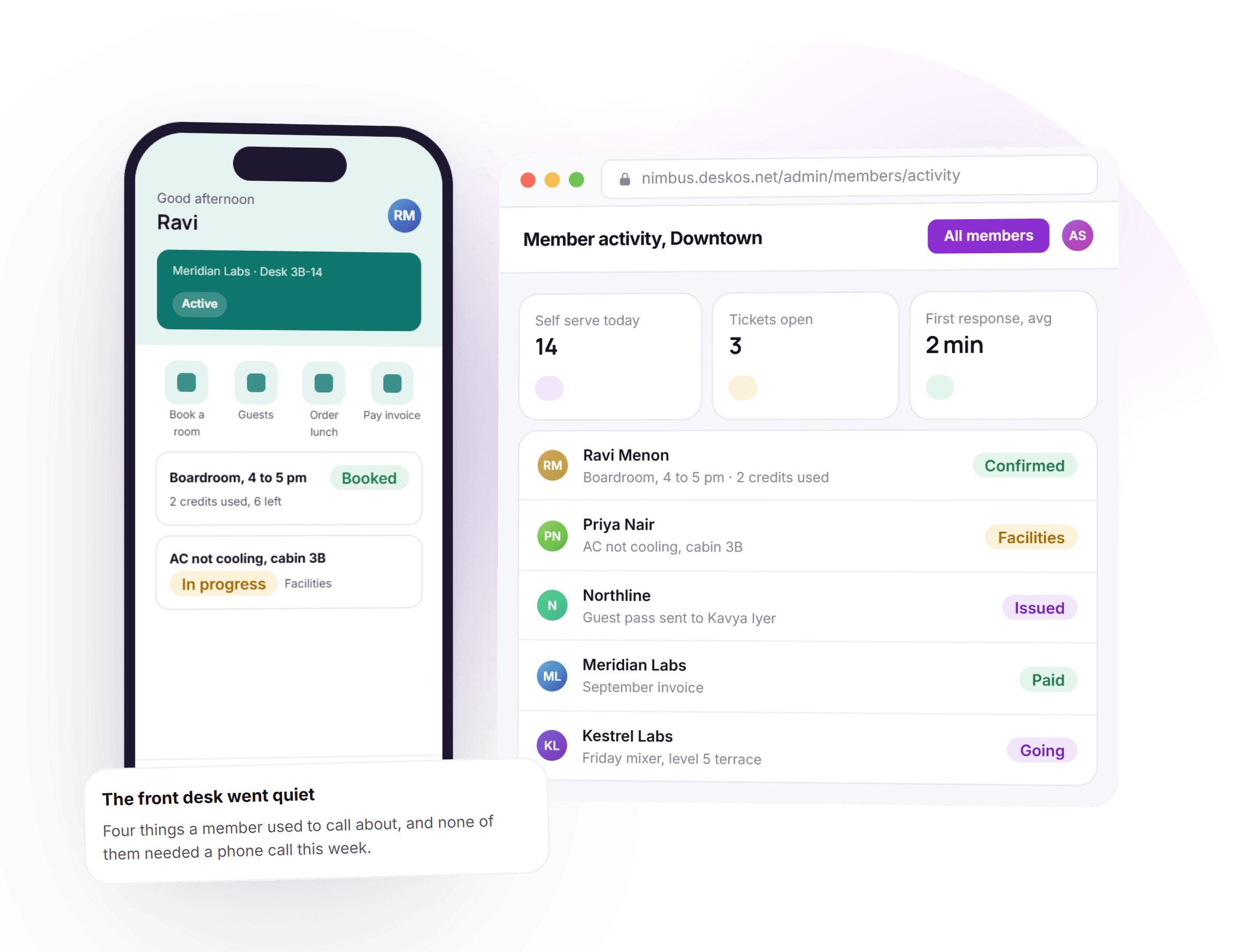
See your own app, not a demo of ours
A free thirty minute demo with a person, not a recording. Bring your own branding and we will show self serve and a ticket landing on your team, live.
Plays with the doors and payment tools you already use





Everything a member touches, in one app under your name.
A group chat only knows a message was sent. Here booking, billing, access and tickets are the same system a member uses, because it is one app rather than a channel bolted onto the front desk.
- Good morningPriyaDesk 3-14 · ActiveBoardroom · 4 pm$540 · Pay by cardyour
coloursYour name, your colours, your app
Members download one app under your own brand: your logo, your palette, your own domain. Not a DeskOS app with your logo pasted on the login screen.
- BookGuestsLunchPay4 fewer desk visits today
Self serve handles the routine
Book a room, pay an invoice, order lunch, invite a guest. Four things a member used to call the front desk for, now a tap in the app.
How self serve invoices work - AC not cooling, 3BIn progressFacilities · due 11:14 amRouted the moment it was raised
A ticket, not a message in a chat
A service request gets a team, a due time and a history that is still there next month. Nothing scrolls away in a group nobody can search.
- Lift maintenance, SaturdayAppEmailWA182 of 210 read
One notice, not one message per member
Send to a location, a floor or a company, on the channels people actually read, and see who has read it back.
How notifications route themselves - Friday mixer38 going
Events people actually RSVP to
A mixer or a challenge with seats, an RSVP count and a check-in at the door, not a headcount someone guessed on the way out.
- Welcome message sentWifi and house rulesApp login activeDoor credential issued
Day one, handled automatically
A welcome message, wifi, house rules, app login and a door credential, sent the moment a membership starts, configured once per location.
How a door credential is issued - NorthlineCompany adminAdds and removes their own team
A company manages its own team
A company admin adds and removes their own people, sees their own invoices and books rooms for their team, without calling you to do it.
Works on the web, not just the app
Everything in the app is also a web portal, for the member who would rather not install anything on their phone.
- WhatsAppTicket update sentApp pushBooking confirmedEmailInvoice receipt
Notified where they actually read
App push, email or WhatsApp, chosen per notification type, so an invoice reminder and a ticket update do not compete for the same inbox.
Thirty minutes with a person, on your own branding.
From the welcome message to a mixer with a real headcount.
Five things happen over a member's life in the app. None of them needs a person at the desk to remember.
- 1Day one
Onboarding sends the welcome message
Wifi, house rules, an app login and a door credential, sent automatically the moment a membership starts, per location.
- 2Every day
Self serve handles the routine
Booking a room, paying an invoice, ordering lunch and inviting a guest all happen in the app, without a call to the desk.
- 3When something breaks
A ticket goes to the right team
Raised from the app in a few taps, routed automatically, with a due time set the moment it is created.
- 4When it matters to everyone
An announcement reaches the building
One message, targeted at a location, a floor or a company, delivered on the channels people actually read.
- 5Beyond the desk
Community becomes measurable
Events carry an RSVP count and a check-in, so a location knows who is actually coming, not who said they might.
What used to mean a call to the desk, handled by the app itself.
Four things that used to need a person, and what they look like when the app answers them. The invoice picture is shown in dollars; DeskOS bills in your currency.
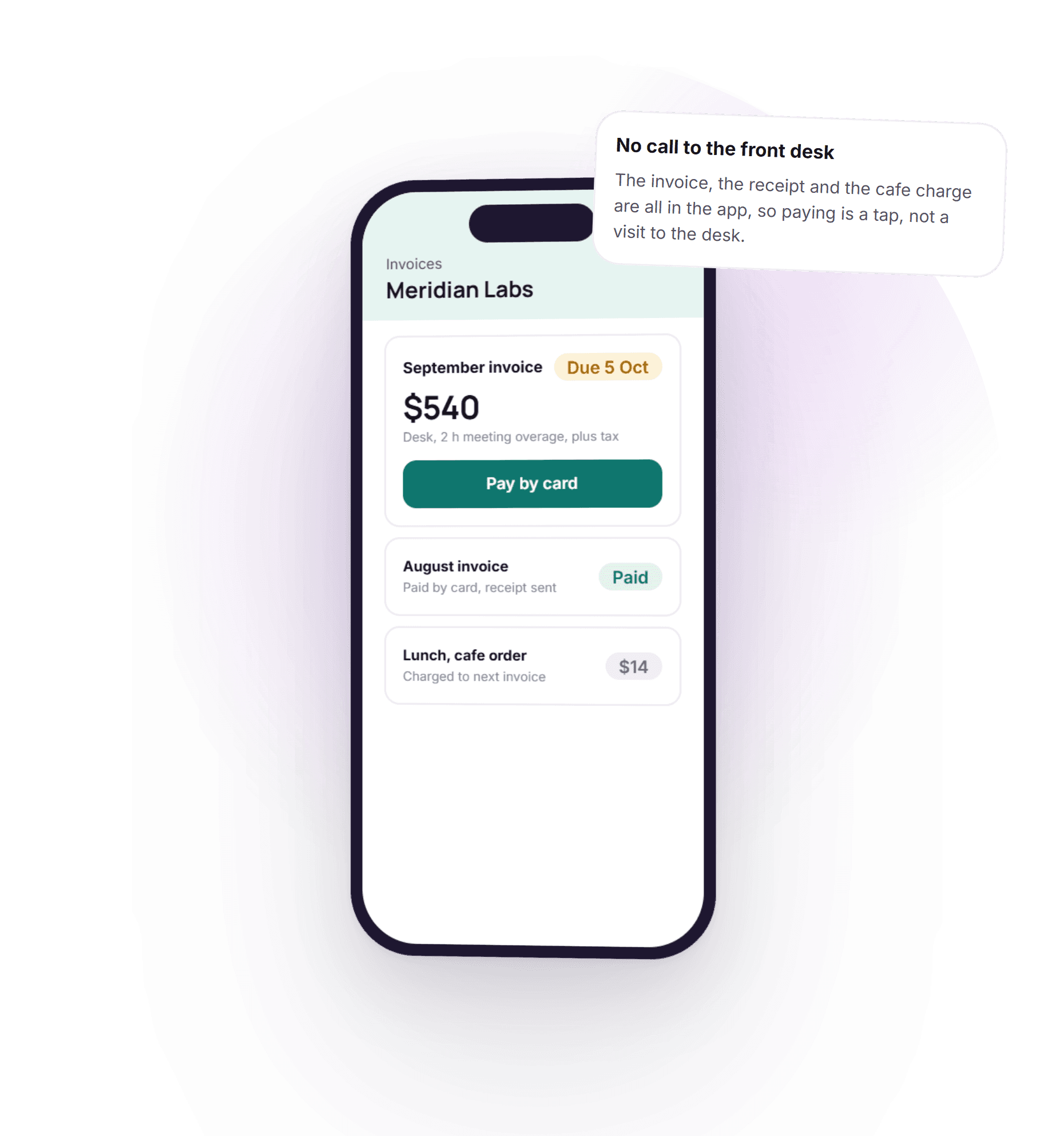
Paying an invoice stops being a trip to the desk.
An invoice used to mean a call to accounts or a walk to the front desk with a card. Here it is a tap: the invoice, the tax and the total sit in the app, and a cafe order from earlier in the week is already added to it.
- Invoice, tax and total shown before paying
- Pay by card without leaving the app
- A cafe order lands on the next invoice automatically
- Receipt sent the moment payment clears
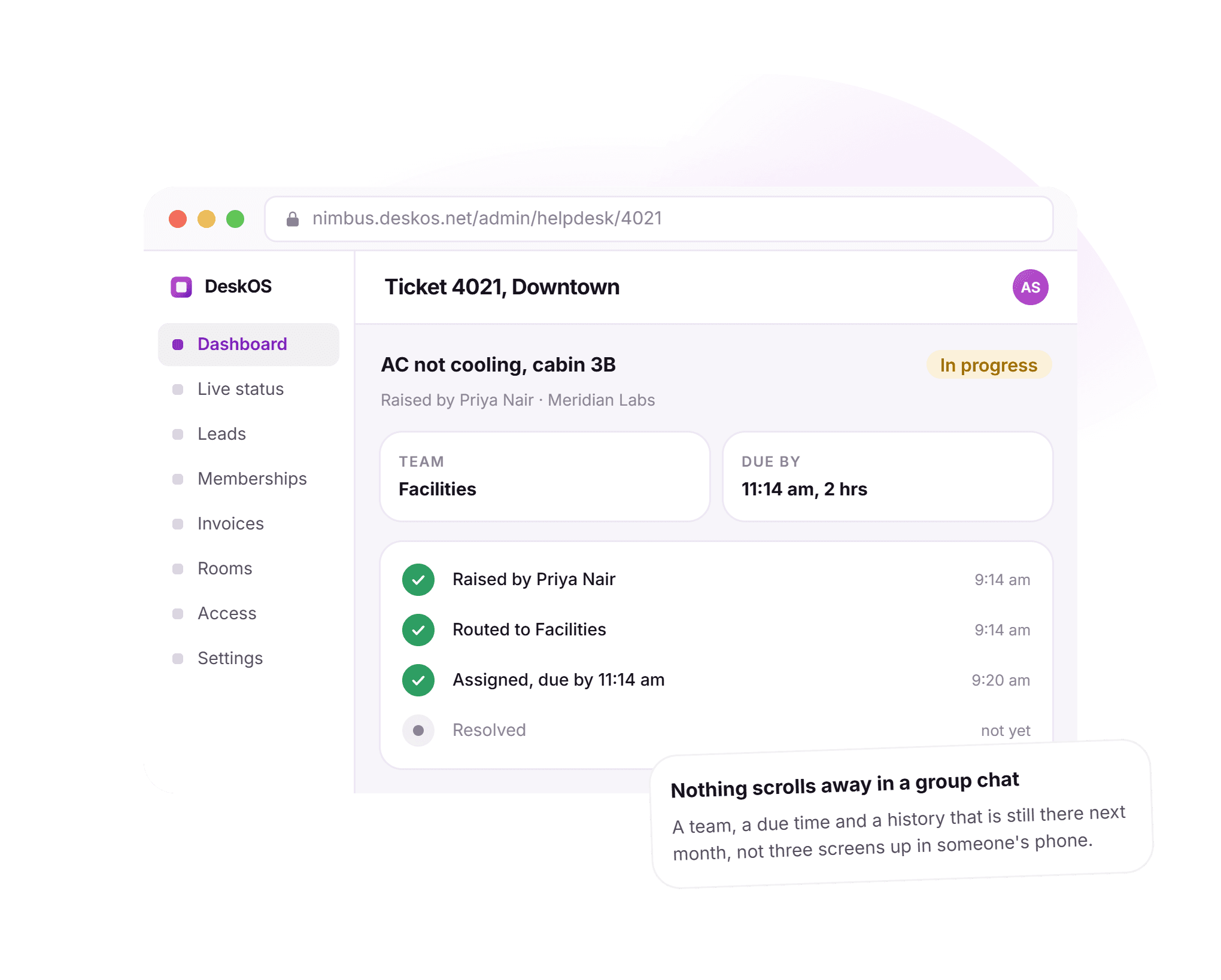
A ticket with a team, not a message that scrolls away.
A broken air conditioner used to mean a message in a chat that thirty other people were also in. Here it is a ticket: routed to the right team the moment it is raised, with a due time and a history that survives past next week.
- Raised from the app in a few taps
- Routed to a team automatically
- A due time, not a guess at when someone gets to it
- A timeline that is still there next month
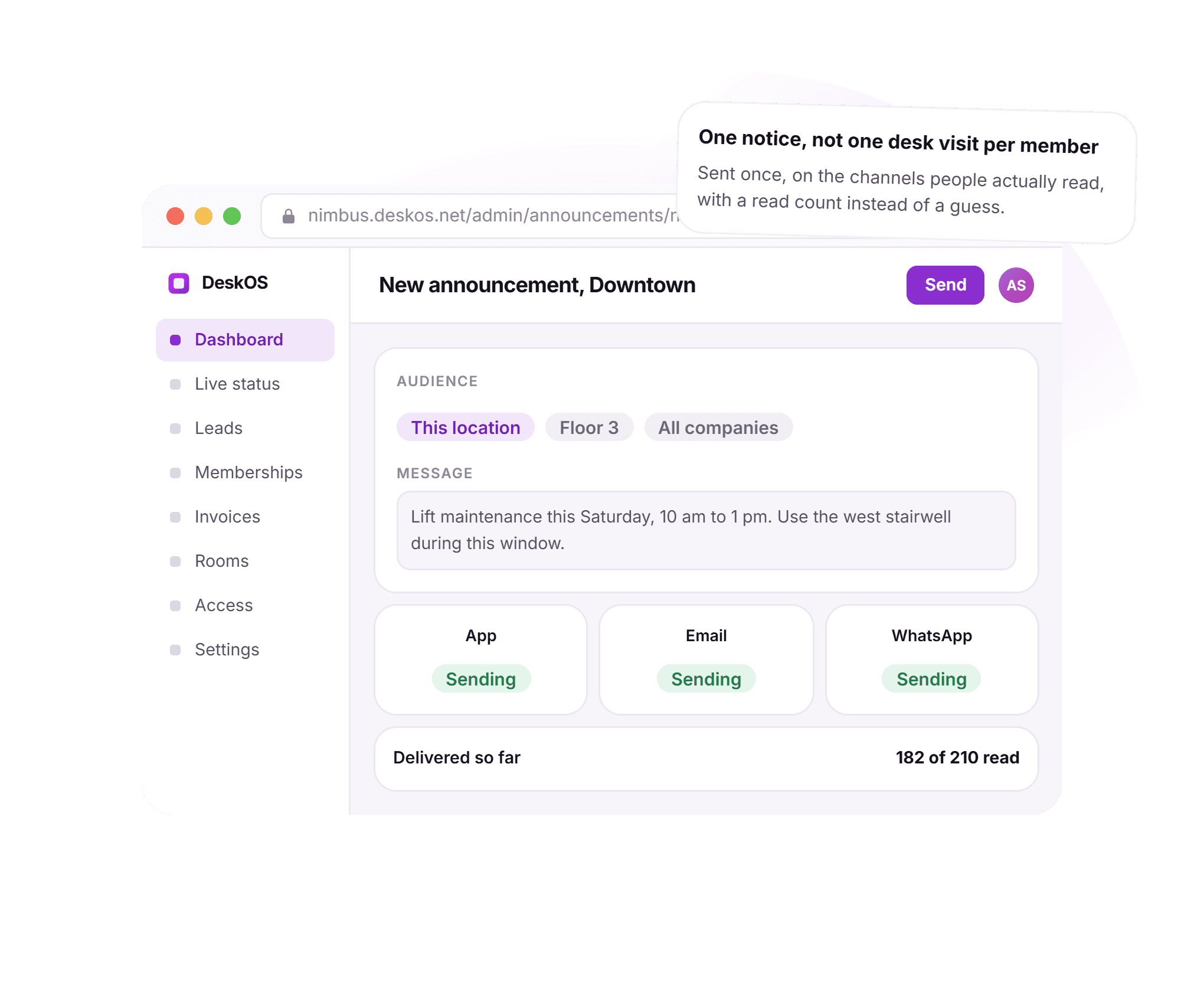
One notice reaches the building, not one call per member.
A lift outage used to mean a poster at reception and hoping people saw it. Here an announcement goes to a location, a floor or a company at once, on the channel each member actually reads, with a read count instead of a guess.
- Target a location, a floor or a company
- Delivered on app, email and WhatsApp together
- A read count instead of a guess
- One message, not one phone call per member
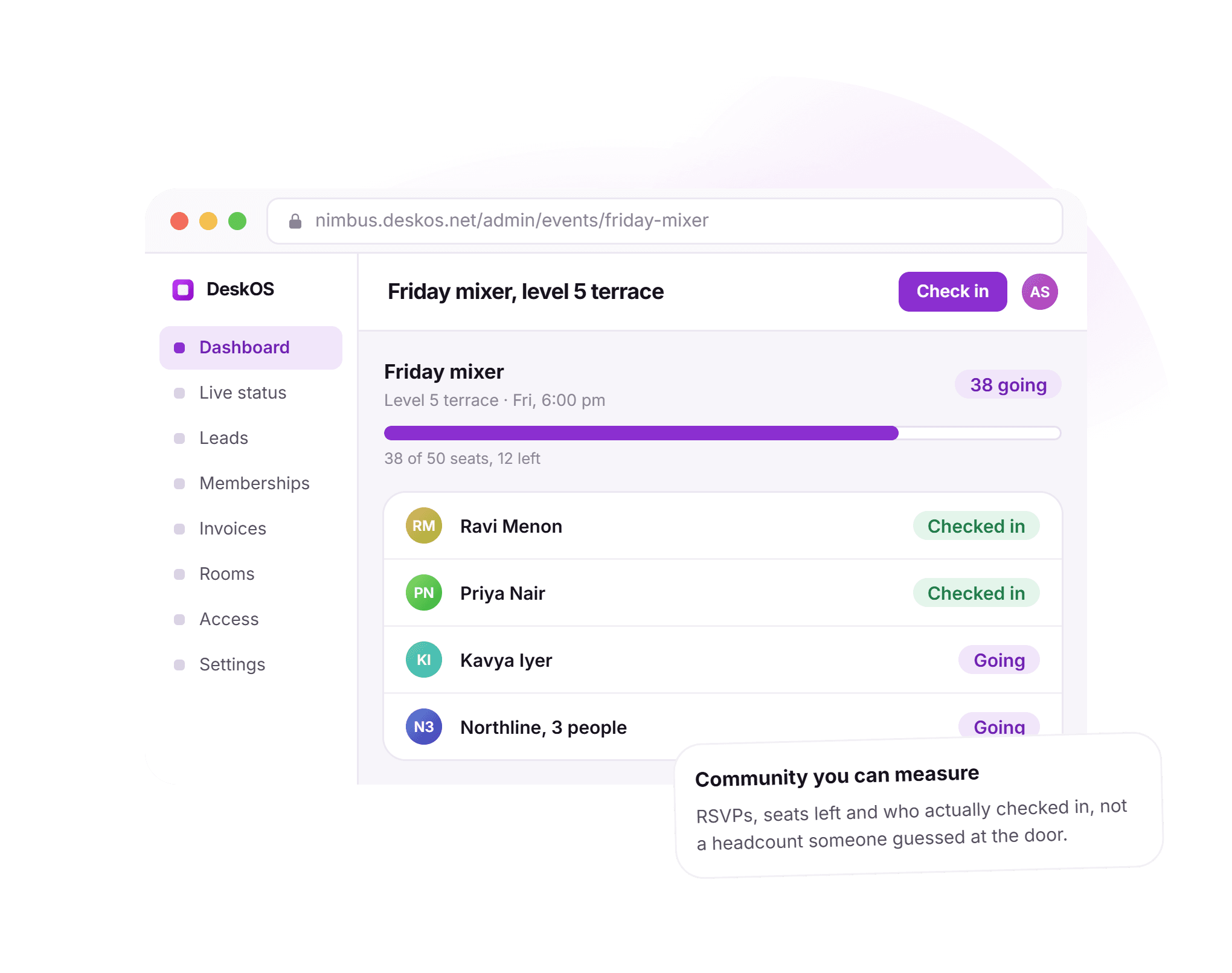
RSVPs and check-ins instead of a headcount at the door.
A mixer used to mean guessing how many to expect from how many said yes in a chat. Here an event has seats, an RSVP count and a check-in, so a location knows how many are coming and how many actually came.
- Seats and an RSVP count members can see
- Company RSVPs count everyone they bring
- Check-in at the door, not a guess at the gate
- Same model for a mixer, a workshop or a step challenge
See it running on your locations, your members and your team.
The app reads from the same billing, access and booking DeskOS already runs.
The app is not a separate product bolted onto the front desk. An invoice a member pays in the app carries VAT or GST the same way accounts sees it, and a member paying by card or bank transfer is matched to their invoice without anyone watching a gateway.
- The invoice a member pays is the real oneSelf serve payment posts straight to the same ledger accounts sees, with tax worked out the same way.Billing and payments
- A door credential ships with the welcome messageOnboarding issues real door access the day a membership starts, on the same grant model a visitor pass uses.Access control
- A guest is invited from the same appA member adds a guest without calling the front desk, and the guest gets a pass before they arrive.Visitor management
- A ticket and a notification route themselvesService requests and announcements use the same rules engine that runs reminders and renewals.Automation
Everything in member engagement.
For the reader who wants the whole feature list on one screen. Every line is something DeskOS does today.
Your app
- Whitelabel under your own name, logo and colours
- Your own domain, not a DeskOS subdomain
- One app covering every location a member can access
- Works on iOS, Android and the web
- A company admin role built for company accounts
- Same login across every device
Self serve
- Book a room and see credits left
- Pay an invoice by card from the app
- Order from the cafe, charged to the next invoice
- Invite a guest and see their pass issue
- Desk, membership and renewal status at a glance
- No self serve action requires a call to the desk
Service requests
- Raised from the app in a few taps
- Routed to a team automatically
- A due time set on every ticket
- Status visible to the member who raised it
- A history that stays past resolution
- A notification channel separate from other alerts
Announcements
- Target a location, a floor or a company
- Delivered on app, email and WhatsApp
- Read receipts on every announcement
- Scheduled or sent immediately
- Pinned announcements stay visible
- One message instead of one call per member
Community
- Events with scoring modes and challenges
- RSVP and seats left, visible to members
- Check-in at the door
- Company RSVPs cover everyone they bring
- Attendance feeds engagement reporting
- Gated by plan feature, on or off per operator
Onboarding
- Welcome message sent when a membership starts
- Wifi and house rules included automatically
- App login provisioned without a manual invite
- Door credential issued the same day
- Automated per location, not a manual checklist
- Runs the same for one member or fifty
Missing something? Ask. It may already be in there.

“DeskOS has been really valuable for us. The visibility helps us make better decisions, while the automation has taken a lot of manual work off our plate.”
Sanjeev Laroia, Spacetime · 3,000+ seats across India
700 invoices in a single click
A full month raised in one action, GST worked out per invoice, and every one delivered on WhatsApp and email the same day.
100 leads a day, nobody typing
Enquiries land, get qualified by workflow and are sent an invitation to come and see the space, without anyone opening a sheet.
Meeting rooms stop being your problem
Members book from the app, credits come off automatically, overages land on the next invoice, and the front desk keeps no diary.
What changes when the app is connected to everything else.
A WhatsApp group and a generic community app both work, right up to the moment a member wants to pay an invoice, a repair needs a team, or a company admin wants to manage their own people. This is what the difference looks like day to day.
- A member wants to book a room
- A WhatsApp group for the building
- Ask in the group and hope someone answers
- A generic community app
- Depends whether it even has bookings
- DeskOS
- Booked in the app in a few taps, credits shown before confirming
- Paying an invoice
- A WhatsApp group for the building
- Not something a group chat does
- A generic community app
- Rarely connected to real billing
- DeskOS
- Paid by card in the app, posted to the same ledger as the front desk
- Something breaks
- A WhatsApp group for the building
- A message thirty other people also see
- A generic community app
- A generic support form, if there is one
- DeskOS
- A ticket with a team, a due time and a history
- A notice for the whole building
- A WhatsApp group for the building
- Whoever is online reads it, everyone else misses it
- A generic community app
- A push notification, if anyone opens the app
- DeskOS
- App, email and WhatsApp together, with a read count
- Several locations under one brand
- A WhatsApp group for the building
- One chat per building, or one very busy one
- A generic community app
- Not built around locations at all
- DeskOS
- One app, scoped per location automatically
- A company admin managing their team
- A WhatsApp group for the building
- No concept of a company at all
- A generic community app
- Rarely a company level role
- DeskOS
- Its own view: their people, their invoices, their bookings
- A new member on day one
- A WhatsApp group for the building
- Someone remembers to add them to the group
- A generic community app
- A generic signup, disconnected from the membership
- DeskOS
- Welcome message, wifi, house rules and a door credential, automatic
- Your own brand
- A WhatsApp group for the building
- A group named after your business, running inside somebody else's app
- A generic community app
- Rarely whitelabelled at all
- DeskOS
- Your name, your colours, your domain, on iOS, Android and the web
Bring the awkward cases. A company admin, a broken AC, a mixer nobody could count.
Simple plans. No per module add-ons.
Basic starts at $59 a month billed yearly, excluding VAT or GST. Every plan includes every module. You pay for seats and locations, nothing else.
Basic
For smaller spaces streamlining operations and getting billing under control.
$59 / month
billed yearly
- Active seats
- Up to 100
- Locations
- 1
Includes
- Space management and utilisation
- Meeting room management
- Billing with automated invoicing
- Helpdesk and service requests
- Web based access for the team
- Most taken
Business
Growing spaces building a community and premiumising what they sell.
Quoted on request
Scoped to your seats and locations
- Active seats
- Up to 200
- Locations
- 2
Everything in Basic, plus
- Visitor management
- Daily check-in management
- Community management
- Leads management CRM
- Payment gateway, receipts and credit notes
- Dedicated relationship manager
Business+
Bigger spaces that want their own apps and their own brand in front of members.
Quoted on request
Scoped to your seats and locations
- Active seats
- Up to 600
- Locations
- 3
Everything in Business, plus
- Whitelabel Android and iOS apps
- Lease management
- Client attendance tracking
- Cafe management
- Advanced reports
- Priority support, 24x7
Running more than three locations or 600 seats? That is Enterprise, quoted once we know your portfolio.
Still tied into another platform? We will buy out your contract. Ask us on the call.
Your app, built by us first.
Before you sign anything, we put your branding on a real app and show you self serve, a ticket and an announcement working on your own locations. The person who sets it up is the person who answers when you call.
What happens next
- 1
Tell us your brand
Fill in the form or message us on WhatsApp. Send your logo and colours and tell us how many locations the app should cover.
- 2
We build your app in a sandbox
Your branding, your locations and a few real members, in a real app you can install. You watch self serve, a ticket and an announcement work, live.
- 3
Go live with your members
Onboarding configures the welcome message and door credentials your locations need. The person who set it up is the person who answers when you call.
Questions operators ask about member engagement.
Is the app really under our own brand, not DeskOS?
Yes. Members download an app carrying your name, logo and colours, on your own domain. There is no DeskOS branding for a member to see.
Do members have to install an app?
No. Everything in the app is also available as a web portal, for a member who would rather not install anything.
How does a service request find the right team?
A ticket is routed automatically based on its category and location, with a due time set the moment it is raised.
Can a company admin manage their own team?
Yes. A company admin sees their own people, invoices and bookings, and can add or remove their own team without calling you.
How is this different from a generic community app?
A generic app ends at the chat. Here booking, billing, access and tickets are the same system a member uses, so an action in the app is a real change, not a message someone still has to act on.
Can we turn community and events off?
Yes. Events and challenges are a plan feature switched on per organisation. A member app with self serve and service requests works without it.
How does onboarding know what to send a new member?
A welcome message, wifi details, house rules and a door credential are configured per location once, then sent automatically the moment a membership starts.
Can we choose how a member is notified?
Yes. App push, email and WhatsApp are set per notification type, so an invoice reminder and a service request update do not have to share a channel.
Does self serve include paying invoices?
Yes. An invoice, its tax and its total are shown in the app, and a member can pay by card without a call to accounts.
Is a service request the same as the coworking helpdesk?
Yes, it is the same ticketing system your team already uses, reached from the member side of the app instead of the admin console.
The rest of the system this plugs into.
- Cafe and POSMenu, orders and stockA cafe order from the app lands on the same invoice a member pays.Cafe and POS
- Meeting roomsBookings, credits and room panelsBooking a room from the app uses the same credits and rules the front desk sees.Meeting rooms
- AutomationReminders, workflows and outreachTickets and announcements route on the same rules engine that runs reminders.Automation
- Access controlDoors, biometrics and credentialsA member’s door credential is issued from the same onboarding that sends the welcome message.Access control
Bring one member and one ticket.
We will show self serve booking a room, an invoice paid in the app, and a service request landing on your team, live. It takes about ten minutes.