Coworking billing software that invoices, collects and reconciles for you.
DeskOS is coworking billing software for operators of coworking spaces and managed offices. Every membership raises its own invoice, sends it on WhatsApp and email with a payment link, and matches the money that comes back to the invoice by itself. Every line carries the right VAT or GST.
- Invoices raised from the membership, never retyped
- Correct VAT or GST per line, per legal entity
- Razorpay and Stripe, matched back by themselves
- Pushed to QuickBooks, Xero, Zoho Books or Tally
See it on your own invoices
A free thirty minute demo with a person, not a recording. Bring last month's invoices and we run them through.
Works with the money tools you already use




Everything between the membership and the bank.
Billing software that starts at the invoice makes you type the invoice. Here the invoice already knows what happened, and the money knows which invoice it belongs to.
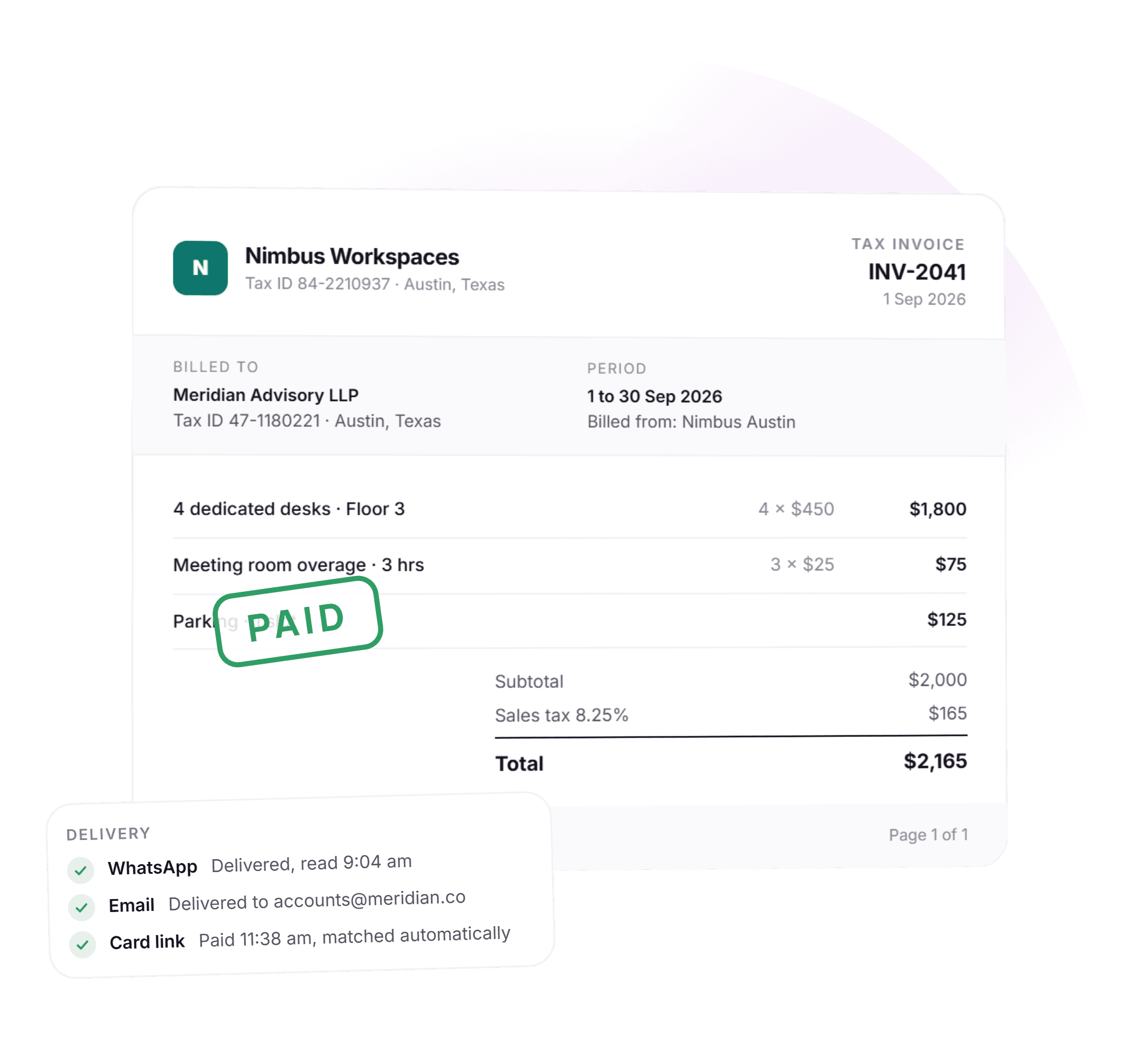
- Tax invoice · INV-2041Sep 20264 dedicated desks$1,800Sales tax 8.25%$149Total$1,949Paid · Card
Invoices raised from the membership
Seats, rooms, cafe, day passes and one off charges roll into the invoice for the right period on the right cycle. Nothing is retyped.
- Nimbus AustinSales tax 8.25%$165ResolvedNimbus BerlinVAT 19%€361ResolvedNimbus BengaluruCGST 9% + SGST 9%₹6,480Resolved
Tax resolved, not hardcoded
One engine works out VAT or GST from the country, the billing entity and the customer. Every line on every invoice, in every country you operate in.
- Nimbus Austin LLC
- Numbering
- INV-A-2041
- Gateway
- Stripe
- Currency
- USD
Nimbus Europe BV- Numbering
- INV-E-0392
- Gateway
- Stripe
- Currency
- EUR
One account, one login, separate booksSeveral legal entities, kept apart
Each billing entity carries its own numbering, tax registration, bank details and gateway account. An invoice is pinned to the entity that raised it.
- Hi Priya, your September invoice of $540 is ready. Pay in one tap: pay.nimbus.co/2051Paid · card · 11:38Receipt sentAlso by bank transfer, wallet or cash at the desk
A payment link on every invoice
Sent on WhatsApp and email. Members pay by card or bank transfer and the invoice is marked paid the moment the gateway says so.
- INV-2042 · Kestrel Labs$4,800Bank transfer$1,200From advance$600Cash at desk$400Balance$2,600
Part payments as they really happen
Cash, a bank transfer, an amount adjusted from an advance, a deposit applied and tax deducted at source, as separate lines on one invoice.
- Meridian AdvisoryBalance $012 AugCredit note CN-14$2,09014 AugPayment$01 SepInvoice INV-2041$2,1654 SepPayment$0
A statement of account per customer
Every invoice, receipt, credit note and adjustment against a customer in one running ledger with a live balance. Send it without editing it.
- ProformaPF-0088 · Fernhill Studio6 desks · from 1 Oct$2,700AwaitingConvert→Tax invoiceINV-2043 · Fernhill Studio6 desks · October$2,700RaisedSeats reserved on the proforma, membership starts on convert
Proforma first, tax invoice on confirm
A proforma records the order, the pending membership and the seats without activating anything. One action converts it to a tax invoice and the membership starts.
- 3 days before dueWhatsApp + emailDeliveredOn the due dateWhatsAppDelivered7 days afterWhatsApp + a call taskDelivered
Reminders that report back
Before the due date and after it, on WhatsApp and email. Each reminder records whether it was delivered, so a silent failure shows up as one.
Automation and reminders - qbQuickBooks · Nimbus Austin LLC142 invoices, 118 paymentsPushedXXero · Nimbus Europe BV38 invoices, 31 paymentsPushedTTally · Nimbus BengaluruExport ready, SeptemberExport
Pushed to your accounting software
Invoices and payments push to QuickBooks, Xero and Zoho Books, and export to Tally, per billing entity. Your accountant keeps working where they already work.
Accounting integrations
Thirty minutes with a person, on your own invoices.
From the membership to the bank, without a person in between.
Five things happen every cycle. None of them needs a spreadsheet open.
- 1When a deal closes
The membership sets the schedule
Plan, seats, price, cycle, deposit and escalation come from the agreement. Upgrades, seat changes and cancellations reprice the schedule themselves.
- 2On billing day
Every invoice is raised at once
One click, or no click at all. Each subscription raises its own invoice for its own period, with VAT or GST on every line and the right entity on the header.
- 3Minutes later
Sent with a payment link
On WhatsApp and email, from your name. A proforma goes first if the customer needs one, and converts to a tax invoice in one action.
- 4When money lands
Paid and matched by itself
Card and gateway payments mark the invoice paid on the webhook. Bank transfers are matched when you import the statement. Receipts go out on their own.
- 5Same moment
Ledger and accounts updated
The customer ledger, the collection register and your accounting software all show the same entry, because there is only one entry.
A billing month, with the admin done.
Four things that used to take a person, and what they look like when the system does them. Shown in dollars; DeskOS bills in your currency.
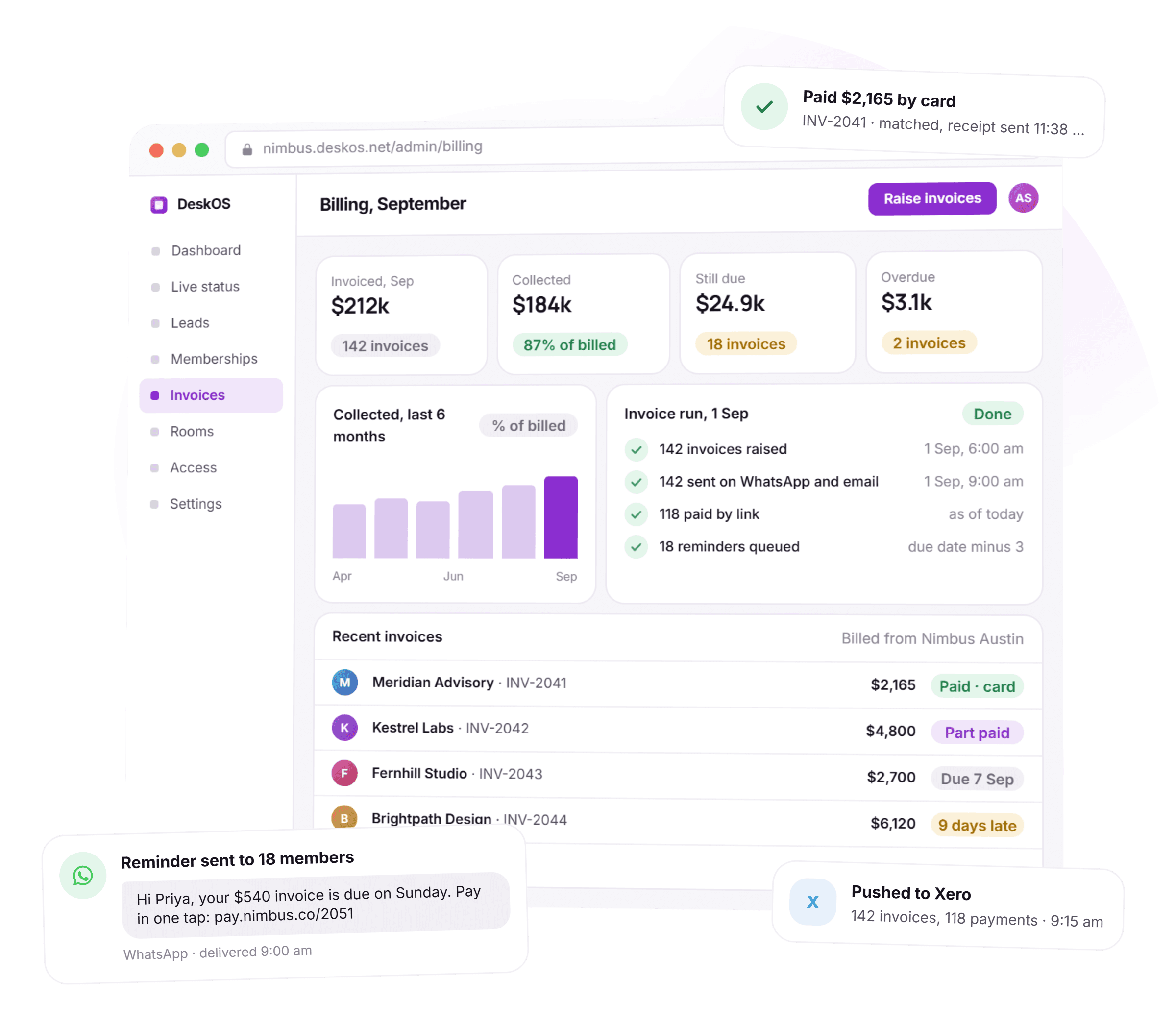
The first of the month stops being a day.
Every subscription raises its own invoice on its own cycle, with VAT or GST on every line. Each one goes out on WhatsApp and email with a payment link, and the ones that are not paid by the due date get a reminder without anyone remembering to send it.
- Invoices for the whole month raised in one click
- Seats, room overages, cafe and one off charges on the same invoice
- Proforma first when a customer needs one, converted in one action
- Reminders three days before, on the day and after, all logged
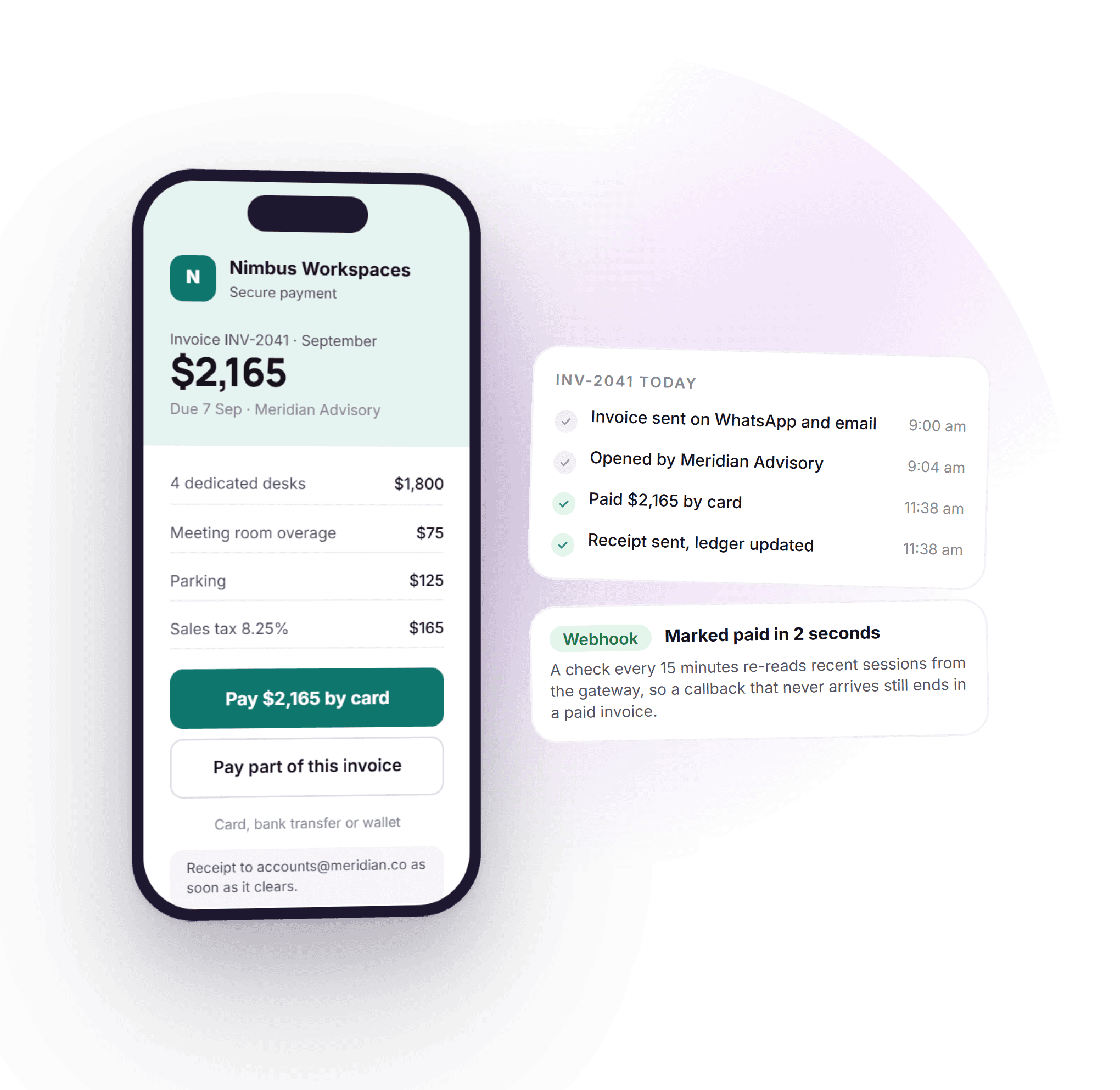
A link they can pay in one tap.
Every invoice carries a hosted payment page bound to that invoice, on Razorpay or Stripe depending on where you bill from. The member pays by card or bank transfer, the gateway tells DeskOS, and the invoice is marked paid with a receipt sent in the same breath.
- Payment page under your name, on the invoice, in the app
- Marked paid on the webhook, with a scheduled check behind it
- Part payment allowed on the page when you want to allow it
- One gateway account per legal entity, so money lands in the right bank
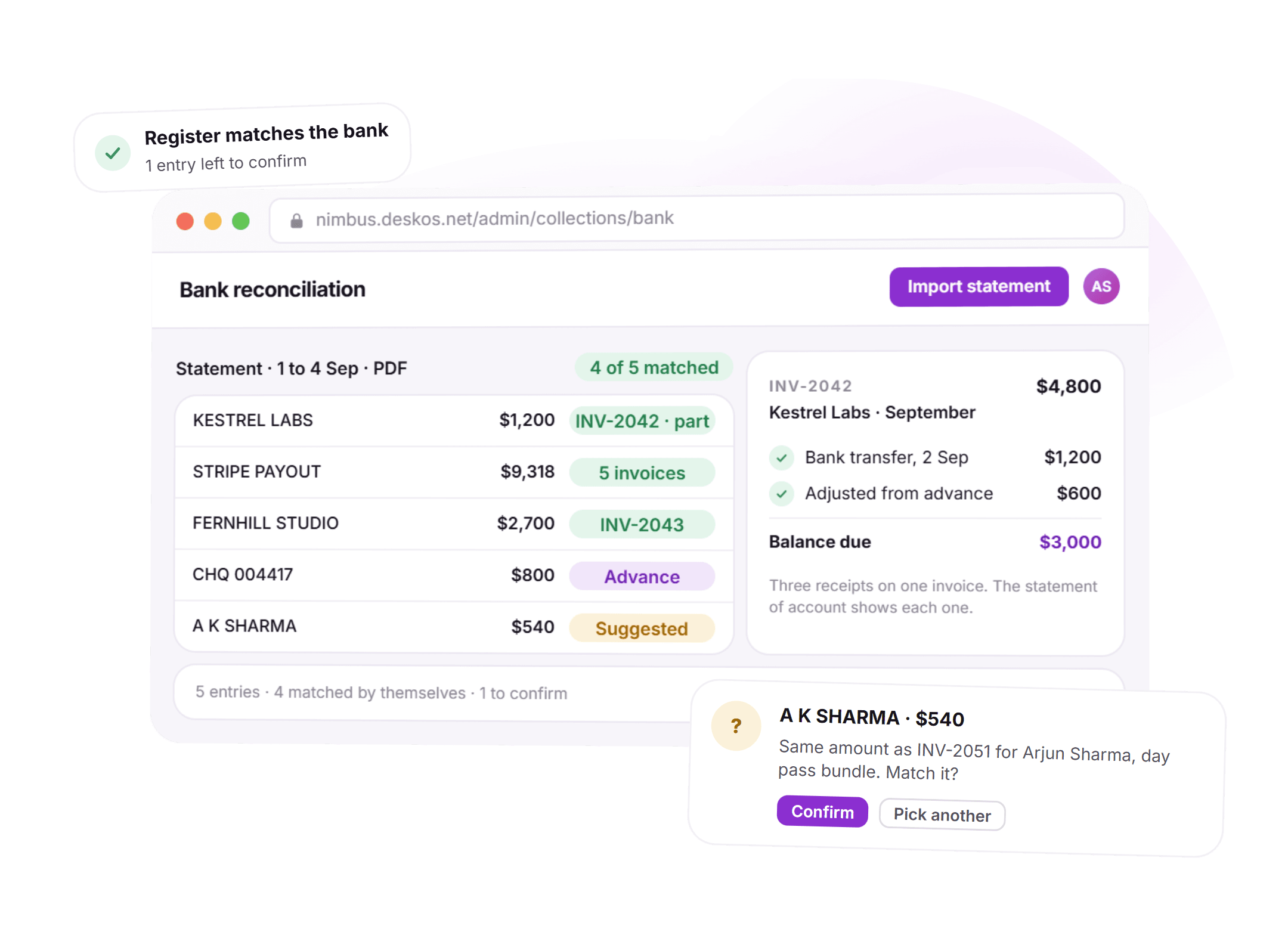
The register matches the bank.
Not every payment arrives by card. Import the bank statement and DeskOS matches each entry to an open invoice, an advance or a deposit, including tax deducted at source. One invoice can carry several receipts, and each one is a line, not a note in the margin.
- Bank statement import as PDF or spreadsheet, matched by amount, name and reference
- Cash, transfer, advance, deposit and tax deduction as separate lines on one invoice
- The one entry it cannot place is a question for a person, not a mystery
- Export the collection register for the auditor as it stands
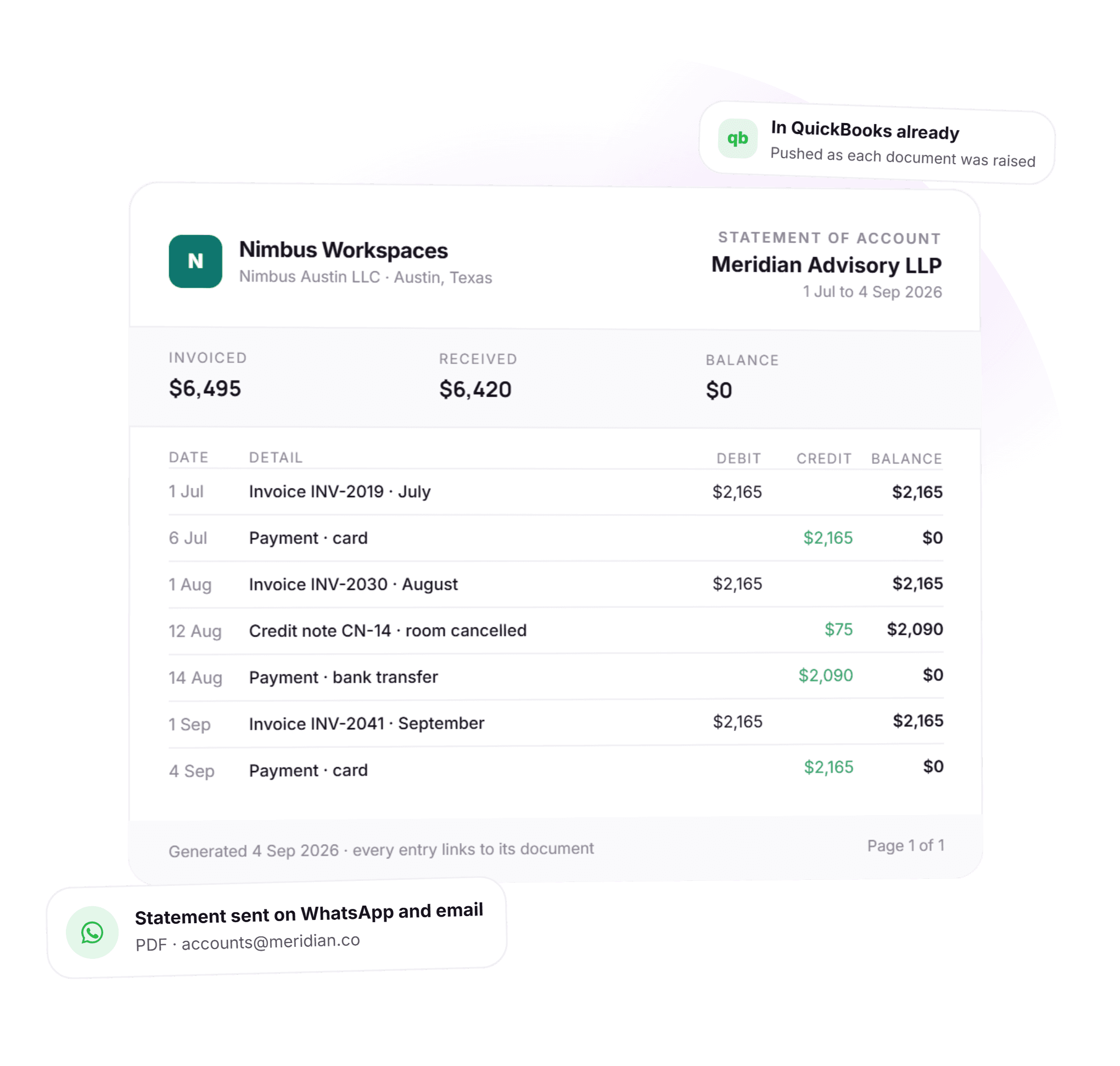
What do we owe you? A page, not an afternoon.
Every invoice, receipt, credit note, advance and adjustment against a customer sits in one running ledger with a live balance. When a client asks, you send the statement. When the accountant asks, it is already in the books they work in.
- Running balance per customer, correct at the moment you open it
- Every entry links back to the document that made it
- Sent on WhatsApp and email as a PDF, without editing
- Pushed to QuickBooks, Xero or Zoho Books, or exported to Tally
See it running on your plans, your tax and your entities.
An invoice is downstream of the seat, the room and the coffee.
The charges on the invoice come from the rest of DeskOS, so nothing is retyped and nothing is forgotten.
- Memberships and seatsUpgrades, downgrades, mid term seat changes and cancellations on a chosen date all reprice the schedule themselves.Space management
- Meeting roomsCredits consumed and overage billed come straight from bookings, on the correct entity with the correct tax.Meeting room management
- Cafe and POSCharges to a member account arrive on their next invoice rather than in a notebook behind the counter.Cafe and POS
- AgreementsDeposits, lock-in and yearly escalation come from the signed agreement, so year two prices itself.Proposals and agreements
Everything in billing and payments.
For the reader who wants the whole feature list on one screen. Every line is something DeskOS does today.
Invoicing
- Recurring invoices per subscription, on its own cycle and period
- Seats, meeting room overages, cafe, day passes and one off charges on one invoice
- Proforma invoices converted to tax invoices in one action
- Credit notes, advances and deposits as first class documents
- Invoice numbering and template per billing entity
- Mid term upgrades, seat changes and cancellations reprice the schedule
Tax and entities
- VAT or GST resolved per invoice from the country, entity and customer
- Intrastate, interstate and e-invoicing where the country requires it
- Separate legal entities with their own registration, bank and gateway
- Currency set per organisation and carried on every document
- Tax on the line, not typed into a screen
- Registered customer details on the invoice for business to business
Payments and collections
- Razorpay and Stripe hosted checkout bound to the invoice
- Marked paid on the webhook, re-checked on a schedule
- Part payments, cash, bank transfer, advance and deposit lines
- Tax deducted at source recorded against the invoice
- Bank statement import with automatic matching
- Receipts sent on WhatsApp and email the moment money lands
Reminders and chasing
- Reminders before the due date, on it and after it
- WhatsApp and email, from your name, with the payment link
- Delivery recorded per channel, so failures surface
- Escalation to a call task for the ones still unpaid
- Rules you can change per location
Ledger and reporting
- Statement of account per customer with a live balance
- Collection register that matches the bank
- Dues, overdue and collected per location and portfolio wide
- Every entry linked to its document
- Exports for the auditor as they stand
Accounting software
- Push to QuickBooks, Xero and Zoho Books per billing entity
- Export to Tally
- Invoices and payments pushed as they are raised
- The accountant never re-keys an invoice
Missing something? Ask. It may already be in there.

“DeskOS has been really valuable for us. The visibility helps us make better decisions, while the automation has taken a lot of manual work off our plate.”
Sanjeev Laroia, Spacetime · 3,000+ seats across India
700 invoices in a single click
A full month raised in one action, GST worked out per invoice, and every one delivered on WhatsApp and email the same day.
100 leads a day, nobody typing
Enquiries land, get qualified by workflow and are sent an invitation to come and see the space, without anyone opening a sheet.
Meeting rooms stop being your problem
Members book from the app, credits come off automatically, overages land on the next invoice, and the front desk keeps no diary.
What changes when billing knows about the seats.
A spreadsheet and an invoicing tool both work, right up to the month a part payment, a second entity or a lost webhook costs you a customer. This is what the difference looks like day to day.
- Raising the month’s invoices
- Spreadsheet and an invoicing tool
- A day of copying the occupancy sheet into the invoice tool
- Generic invoicing software
- Recurring invoices that know nothing about seats, rooms or the cafe
- DeskOS
- Raised from the membership in one click, with everything the member used
- Tax on every line
- Spreadsheet and an invoicing tool
- Worked out by hand, corrected at month end
- Generic invoicing software
- One rate per invoice, set by whoever set it up
- DeskOS
- Correct VAT or GST per line, per billing entity, in every country you operate in
- Several legal entities
- Spreadsheet and an invoicing tool
- Several sheets
- Generic invoicing software
- Several accounts, several logins
- DeskOS
- One account, separate books, numbering, bank and gateway per entity
- Getting paid
- Spreadsheet and an invoicing tool
- Chase, check the bank, mark it paid
- Generic invoicing software
- A payment link bolted on, reconciled by hand
- DeskOS
- A link on every invoice, paid by card or bank transfer, marked paid and receipted by itself
- Part payments and advances
- Spreadsheet and an invoicing tool
- A note in the margin
- Generic invoicing software
- One payment per invoice, or a workaround
- DeskOS
- Several receipts on one invoice, each a line the ledger can see
- Bank reconciliation
- Spreadsheet and an invoicing tool
- Tick a printout
- Generic invoicing software
- Not part of the product
- DeskOS
- Import the statement, matched by itself, one question for a person
- What a customer owes
- Spreadsheet and an invoicing tool
- An afternoon
- Generic invoicing software
- A report that is right until the next payment
- DeskOS
- A statement of account with a live balance, sent in one tap
- The accountant
- Spreadsheet and an invoicing tool
- Re-keys every invoice
- Generic invoicing software
- A CSV at month end
- DeskOS
- Pushed to QuickBooks, Xero or Zoho Books as each document is raised
Bring the awkward invoices. Part paid, two entities, a credit note.
Simple plans. No per module add-ons.
Basic starts at $59 a month billed yearly, excluding VAT or GST. Every plan includes every module. You pay for seats and locations, nothing else.
Basic
For smaller spaces streamlining operations and getting billing under control.
$59 / month
billed yearly
- Active seats
- Up to 100
- Locations
- 1
Includes
- Space management and utilisation
- Meeting room management
- Billing with automated invoicing
- Helpdesk and service requests
- Web based access for the team
- Most taken
Business
Growing spaces building a community and premiumising what they sell.
Quoted on request
Scoped to your seats and locations
- Active seats
- Up to 200
- Locations
- 2
Everything in Basic, plus
- Visitor management
- Daily check-in management
- Community management
- Leads management CRM
- Payment gateway, receipts and credit notes
- Dedicated relationship manager
Business+
Bigger spaces that want their own apps and their own brand in front of members.
Quoted on request
Scoped to your seats and locations
- Active seats
- Up to 600
- Locations
- 3
Everything in Business, plus
- Whitelabel Android and iOS apps
- Lease management
- Client attendance tracking
- Cafe management
- Advanced reports
- Priority support, 24x7
Running more than three locations or 600 seats? That is Enterprise, quoted once we know your portfolio.
Still tied into another platform? We will buy out your contract. Ask us on the call.
Your billing, run by us first.
Before you sign anything, we run your real billing cycle in a sandbox and show you what comes out, line by line. The person who sets up your entities and tax is the person who answers when you call.
What happens next
- 1
Bring last month’s invoices
Fill in the form or message us on WhatsApp. Send us a handful of real invoices, including the awkward ones: part paid, two entities, a credit note.
- 2
We run your billing cycle in a sandbox
Your plans, your tax, your entities. You see what comes out, line by line, including the collection register and the statement of account.
- 3
You go live on your next billing date
We import members, seats, open invoices and advances, connect your gateway and your accounting software. The old sheet is retired the same day.
Questions operators ask about billing.
We run several legal entities. Can DeskOS handle that?
Yes, and it is a first class concept rather than a workaround. Each billing entity has its own invoice numbering, tax registration, bank details and payment gateway account. Invoices and payment requests are pinned to the entity that issued them, so money cannot be collected into the wrong account. One login covers all of them.
How is tax worked out, and does it work outside India?
Tax is resolved by a single engine using the country, the billing entity and the customer, rather than by a fixed percentage typed into a screen. India gets intrastate and interstate GST with e-invoicing where it applies. Operators in other countries get their own treatment, such as VAT or sales tax, rather than an Indian rate relabelled. Currency is set per organisation and carried on every document.
Can we record a payment that arrives in parts, with tax deducted at source?
Yes. One invoice can carry several payment lines: cash, bank transfer, an amount adjusted from an advance, a deposit applied and a tax deduction such as TDS. The invoice shows what was actually settled, and the customer ledger tells the same story.
What happens if a customer pays online but the confirmation never reaches you?
The checkout session is bound to the invoice, the invoice is marked paid on the gateway webhook, and a scheduled check re-reads recent sessions from the gateway every few minutes. A payment that confirmed late is picked up rather than lost, and the customer is never chased for money they already sent.
Can we reconcile our bank statement against invoices?
Yes. Import a statement as a PDF or spreadsheet and DeskOS matches entries against open invoices, receipts and advances by amount, name and reference, including tax deducted at source. Anything it cannot place is shown as a suggestion for a person to confirm, so the collection register and the bank agree.
Do you support proforma invoices?
Yes. A proforma records the order, the pending subscription and the seats without activating anything. When the customer confirms, one action converts it into a tax invoice with the right number from the right entity, and the membership starts.
How do payment reminders work?
Reminders go out on WhatsApp and email before the due date, on the day and after it, from your name, with the payment link inside. Each one records whether the channel actually delivered, so a failed message shows up as a failure rather than as a customer who did not pay. The schedule is a rule you can change per location.
Which payment gateways and accounting tools does it work with?
Payments run through Razorpay or Stripe, with one gateway account per legal entity. Invoices and payments push to QuickBooks, Xero and Zoho Books, and export to Tally, per billing entity. Your accountant keeps the ledger they already work in.
Is billing an add-on, or part of every plan?
Part of every plan. DeskOS has no per module add-ons: billing, collections, the ledger and the accounting push are included from the Basic plan up. Payment gateway fees are charged by the gateway, not by us.
The rest of the system this plugs into.
- Space managementSeats, floors and live occupancyThe seats and memberships every invoice is raised from.Space management
- Meeting roomsBookings, credits and room panelsWhere the room credits and overages on the invoice come from.Meeting rooms
- AnalyticsOccupancy, revenue and churnCollections, dues and overdue per location, live from the same records.Analytics
- AutomationReminders, workflows and outreachThe reminders and receipts that go out without being asked.Automation
Bring last month’s invoices.
We will run your real billing cycle in a sandbox and show you what comes out, including the tax lines, the collection register and the statement of account.