How DeskOS works
The admin console, page by page. The same documentation your team reads inside the product, open to anyone deciding whether DeskOS fits how they run their space.
Email Configuration
Send invoices, reminders and notifications from your own address instead of ours.
Almost everything DeskOS sends on your behalf leaves as an email: invoices and payment reminders, onboarding messages to new members, replies on service requests, and notifications to your own team. Email Configuration, under Settings, is where you connect the mailbox those go out from. Until you do, members see a DeskOS address on mail about their bill, which is not the impression a whitelabel product is supposed to leave.
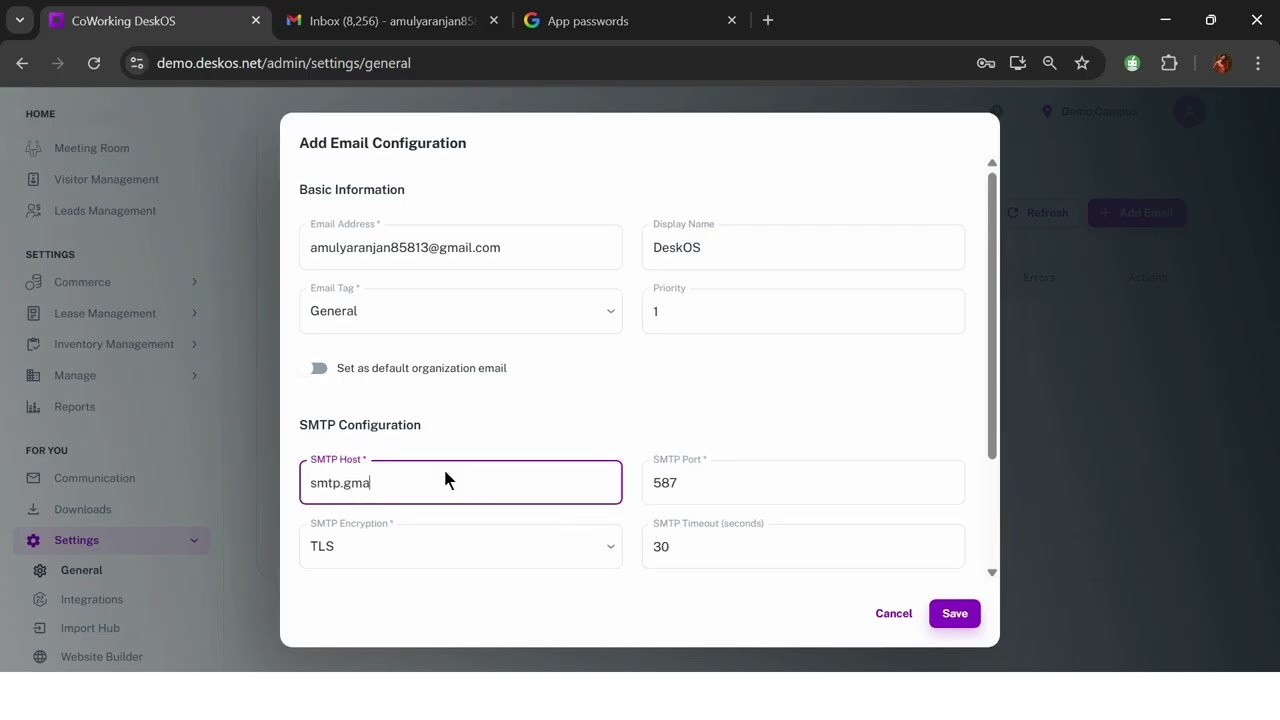
Connecting a mailbox
Add an email and you are asked for the address, a display name, and the SMTP details from your provider: host, port, encryption, username and password. Encryption offers none, SSL, TLS and STARTTLS, and the defaults are port 587 with TLS, which is what most providers want. The display name is what a member actually sees in their inbox, so it is worth setting to your brand rather than leaving it as the address.
Receiving is optional and off by default. Turning on IMAP, under the advanced options, adds a second set of host, port, encryption and credential fields, and lets the mailbox take replies as well as send. The advanced options also hold a daily send limit, useful when your provider enforces one and you would rather queue than get throttled, and a description field for whoever inherits the setup after you.
Test before you trust it
Each configured address has a test action that sends a real message to an address you nominate. Do this before your first billing run rather than after: a mailbox that authenticates but silently fails to deliver looks identical to a working one from inside the console, right up until nobody pays because nobody was invoiced. Addresses carry a status of active, testing, failed or inactive, plus a verified marker and a running error count, so a mailbox that starts rejecting is visible on the list rather than discovered from a member complaint.
Tags, priority and the default
You can connect more than one mailbox and label each with a tag: general, accounting, sales, marketing, support, billing, HR, operations, legal, IT, onboarding, or a custom name of your own. That is how billing mail goes out from accounts@ while a ticket reply comes from support@. One address is marked as the organisation default and is what anything without a more specific match uses. Priority orders the fallbacks when several could serve.
Analytics
The second tab reports on what has actually been sent: volume, delivery rate, a breakdown by status, and per-address performance. This is the page to open when somebody insists they never received an invoice, because it will tell you whether it left the building.
Still need help?
If the docs did not answer your question, our team will. Signed in customers can also raise a request from Support inside the admin console.