How to Switch Coworking Software in 30 Days Without a Messy Billing Month
You can switch coworking software in 30 days if you plan around one billing cycle. Here is the week-by-week plan, the data to move first, and the one check that prevents a bad first invoice run.
You can switch coworking software in about 30 days if you plan the move around one billing cycle: audit and export in week one, clean and import in week two, check a full draft billing run in week three, and cut over in week four. The operators who struggle are rarely let down by the new tool. They skip the billing check and find their mistakes on members' invoices.
This guide is the plan we would follow ourselves. It covers the order to move your data in, what to leave behind, the gate that ends each week, and what to tell members. It works whether you are leaving spreadsheets, a generic CRM, or another coworking platform.
When is it time to switch coworking software?
Most operators do not switch because of a missing feature. They switch because the current setup has started to cost them money or hours in ways that are hard to see on a single day. The common signs:
- Invoices need manual fixes every month. Proration, mid-month joins, credits and tax are adjusted by hand before anything goes out.
- Occupancy lives in a different place from billing. The floor sheet says one thing, the invoice run says another, and nobody is sure which is right.
- Rules live in one person's head. If your finance lead or community manager is away, renewals, deposits or notice periods slip.
- You are adding a second location. What worked for one floor rarely survives two, especially when each has its own billing entity.
- Members ask for things you cannot give them. Self-serve room booking, a member app, door access on their phone, or a clean statement of account.
If two or more of these are true, the cost of staying usually exceeds the cost of a month of careful work. If you are still choosing a platform, start with our guide to choosing coworking space software and come back here once you have picked one.
How long does it take to switch coworking software?
For a single-location operator with clean-ish data, 30 days is realistic and gives you slack. The work itself is not 30 days of effort. It is a few focused hours a week, spread so that each step can be checked before the next one starts.
What stretches the timeline is almost never the import. It is decisions that were never written down: how you prorate a mid-month join, whether room credits roll over, which members are on a grandfathered price. Week one exists to surface those decisions while there is still time to make them calmly.
The single most important scheduling choice is your go-live date. Pick the first day of a billing cycle. Going live mid-cycle means one month is split across two systems, and that month becomes the one your members remember.
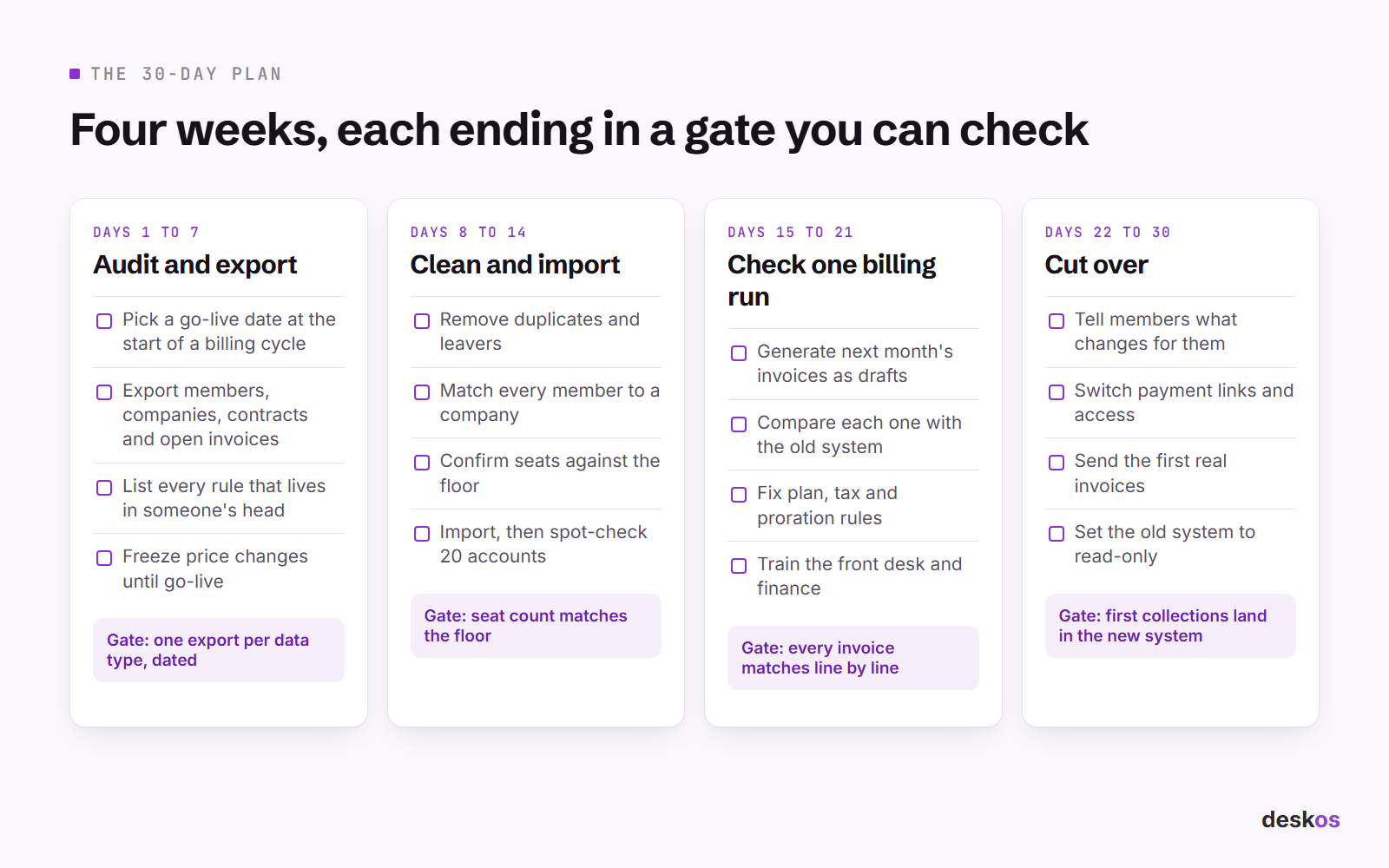
Week 1 (days 1 to 7): audit and export
The goal of week one is to have a dated copy of everything that matters and a written list of every billing rule you actually use.
- Pick the go-live date. First day of the next billing cycle that is at least four weeks away.
- Export each data type separately. Companies, members, active contracts or subscriptions, seat allotments, deposits, open invoices, credit balances and future bookings. One file per type, each with the export date in the file name.
- Write down the rules nobody has written down. Proration method, notice periods, deposit terms, late fees, discounts, credit rollover, tax treatment by plan type. If two people answer the same question differently, you have found a rule to settle now.
- Freeze price changes. No new discounts or plan changes until go-live, unless they are recorded in both places the same day.
If you are on a platform that makes exporting hard, ask for your data in writing. In the EU and UK, members have a right to receive their personal data in a structured, machine-readable format under GDPR Article 20, and most vendors will provide a full account export to the operator on request.
Gate: one export per data type, dated, stored somewhere the whole team can reach. A written rules list signed off by whoever owns billing.
What data should you move, and what should you archive?
The fastest migrations move less. You do not need every past invoice or every room booking since 2019 inside the new system. You need everything that will produce or affect next month's invoices, plus money that is still in motion. The rest is kept as an archive you can open if a member asks.
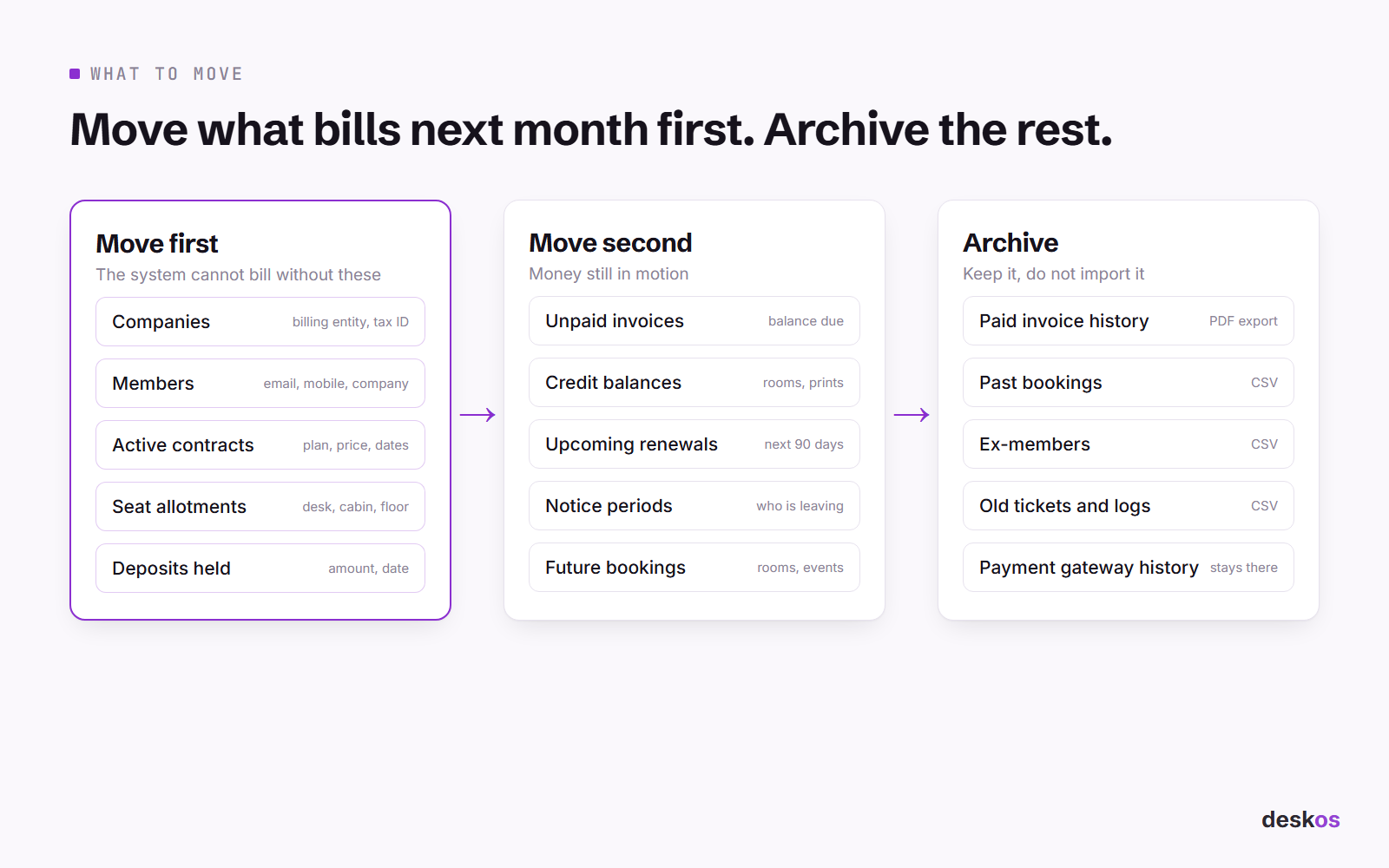
Move first: the system cannot bill without these
- Companies with their billing entity name, address and tax ID.
- Members with email, mobile and the company they belong to.
- Active contracts with plan, price, start date, end date and billing cycle.
- Seat allotments: which desk or cabin each company holds.
- Deposits held, with amount and date received.
Move second: money still in motion
- Unpaid invoices as opening balances, so reminders and statements stay correct.
- Credit balances for rooms, printing or anything prepaid.
- Renewals due in the next 90 days, so none of them are missed during the move.
- Notice periods for members who are leaving.
- Future bookings for meeting rooms and events.
Archive: keep it, do not import it
- Paid invoice history, as a PDF export.
- Past bookings, ex-members and old helpdesk tickets, as CSV.
- Payment gateway history, which stays in the gateway dashboard anyway.
One caution on payments: saved cards and mandates usually belong to your payment gateway account, not to your coworking software. If you are keeping the same gateway, they can often stay where they are. If you are changing gateways, read your provider's guidance before promising members anything. Stripe, for example, documents a formal data migration process that takes time to arrange.
Week 2 (days 8 to 14): clean and import
Clean data before it goes in, not after. Every duplicate you import becomes a duplicate invoice later.
- Remove duplicates and leavers. The same person under two emails, companies that left last year but still show as active.
- Match every member to a company. Unattached members are the most common source of invoices sent to the wrong person.
- Confirm seats against the floor. Walk the space, or have the community manager do it, and check that every allotted seat in the export is actually occupied by that company.
- Import, then spot-check 20 accounts. Pick a mix: your largest client, a mid-month joiner, someone on notice, a virtual office, a company with credits. Open each one in the new system and check it against the export.
The floor walk matters more than it sounds. Seat counts drift. A team that shrank from eight to six without a contract change, or a cabin promised verbally to a new client, will show up here or on an angry phone call later. If you want to understand why the number that matters is sold seats rather than bodies in chairs, read why occupancy is a vanity metric.
Gate: the seat count in the new system matches the floor, and all 20 spot-checked accounts are correct.
Week 3 (days 15 to 21): check one full billing run
This is the week that decides whether the switch feels smooth. Generate next month's invoices in the new system as drafts, without sending anything, and compare every one against what the old system would have produced.
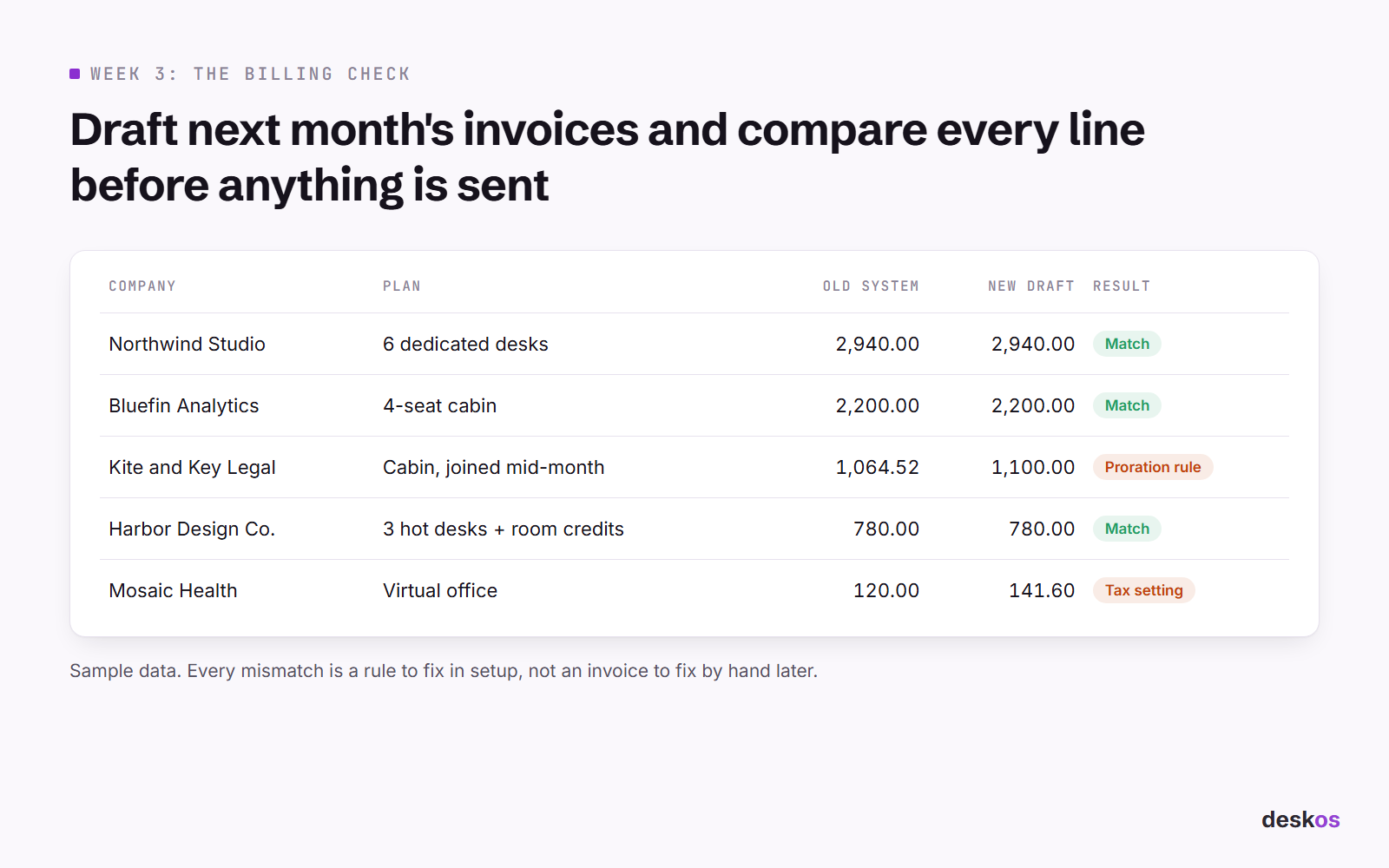
Work through it line by line. When a figure does not match, do not edit the invoice. Find the rule that produced it and fix the rule. In the example above, two mismatches point to two settings: a proration method that differs from the one you used before, and a tax rate applied to a plan that should be treated differently. Fix those and every future invoice is right, not just this one.
The usual suspects, in rough order of frequency:
- Proration. Calendar days, 30-day months, or a fixed half-month rule.
- Tax. Different rates or exemptions by plan type, or by the billing entity.
- Discounts. Percentage versus fixed, and whether they expire.
- Credits. Included room hours or print credits, and whether unused credit rolls over.
- Deposits. Deposits should sit as a liability, not appear as revenue on an invoice.
Use the rest of the week to train the people who will live in the system: the front desk on check-ins, visitors and bookings, and finance on invoices, payments and reminders. Short sessions on real accounts beat a long demo.
Gate: every draft invoice matches line by line, or the difference is a deliberate change you have decided to make.
Week 4 (days 22 to 30): cut over
- Tell members what changes for them. Keep it to what they will notice: a new app or portal link, how to book rooms, how invoices will arrive and how to pay. Send it a week before go-live and again on the day.
- Switch payment links and access. Update payment links in invoice templates and, if your door access or Wi-Fi is tied to member records, confirm that enrolments carried over.
- Send the first real invoices on your normal day, from the new system only.
- Set the old system to read-only. Keep the login for reference, but stop recording anything there. Two live systems is how data drifts apart again.
Gate: the first collections land in the new system and reconcile against your bank or gateway.
What to tell members when you switch
Members care about three things: whether their price is changing, whether booking a room is going to be harder, and whether they will be charged twice. Answer those directly. A short message works better than a long one:
From 1 [month], we are moving to a new member app. Your plan and price are not changing. You can book meeting rooms and see your invoices in the app from [date]. Your [month] invoice will come from the new system, and your old payment method will [stay the same / need to be added once]. If anything looks wrong, reply to this email.
Then make sure someone actually reads the replies in the first week.
Common mistakes when switching coworking software
- Going live mid-cycle. Splits one billing month across two systems.
- Importing history you do not need. It slows the import, clutters reports and rarely gets used.
- Fixing invoices instead of rules. The same mismatch comes back next month.
- Skipping the floor walk. Seat counts that are wrong on day one stay wrong.
- Leaving the old system writable. Someone will record a payment there out of habit.
- Telling members too late. A surprise new invoice format generates more support tickets than any bug.
How DeskOS handles a switch
If you are moving to DeskOS, the plan above is the plan we run with you. We import members, companies, seat allotments, running subscriptions and outstanding invoices from any spreadsheet, so your week two is mostly checking rather than typing. Most single-location operators are live within a week. Existing access enrolments on supported devices can be linked to members, so nobody needs to re-enrol at the door.
Business plans and above come with a named contact, and we are on hand through your first billing run, which is the moment that matters most. Guided setup is available as an optional one-time charge if you would rather we do the heavy lifting. You can read the details on our onboarding and support page, see how invoices, payments and reminders work on billing and payments, and compare plans on the pricing page.
If you want to walk through your current setup and get a realistic timeline for your space, book a demo.
Frequently asked questions
How long does it take to switch coworking software?
About 30 days for a single location if you plan around one billing cycle. The import itself takes days, not weeks. The time goes into cleaning data, settling billing rules and checking one full draft billing run before going live.
Do I need to run the old and new systems in parallel?
Not for a full month. A draft billing run in the new system, compared line by line against the old one, gives you the same confidence without asking your team to record everything twice. Once you go live, set the old system to read-only.
Should I import all my old invoices?
No. Import unpaid invoices as opening balances so statements and reminders stay correct. Export paid invoice history as PDFs and keep it as an archive.
What is the best day to go live?
The first day of a billing cycle. Going live mid-cycle splits one month across two systems, which is where most billing errors come from.
Will members have to re-enter their card details?
It depends on your payment gateway, not your coworking software. If you keep the same gateway, saved payment methods can often stay in place. If you change gateways, check your provider's migration process early, because it can take several weeks to arrange.
What is the most common mistake when switching?
Fixing mismatched invoices by hand instead of fixing the rule that produced them. Find the setting, correct it, and every invoice after that is right.
DeskOS / The software layer in commercial real estate
DeskOS is the operating system for coworking and flex space. We write about what we see operators actually deal with.
See it on your own floor plan.