Coworking Membership Agreement Template (Free, Editable Word Download)
A free, editable coworking membership agreement template in Word, with 20 clauses, a one-page membership schedule and house rules. Plus what each clause is for and the mistakes that cause disputes.
A coworking membership agreement template gives you a ready-made contract for each member: who the parties are, what space and services they get, what they pay, how the deposit works, and how either side can end it. Below you can download ours free as an editable Word file, then read what each clause is for so you can adapt it to your space with confidence.
Download the coworking membership agreement template (Word, .docx)
It has 20 clauses, a one-page membership schedule for the numbers that change per member, and a set of house rules. Every blank is in [square brackets] and highlighted, so nothing gets missed. No email address needed.
This template is a practical starting point, not legal advice. Laws on licences, deposits, notice and data protection differ by country and sometimes by state. Have a qualified lawyer where you operate review it before you use it.
What is a coworking membership agreement?
A coworking membership agreement is the contract between a workspace operator and a member company or individual. It grants the right to use desks, offices and shared services at a location for a fee, on stated terms, without giving the member a tenancy of the space.
It is sometimes called a membership contract, a licence agreement, a desk agreement or a service agreement. The name matters less than the content. A good one does three jobs at once:
- It protects revenue. Fees, deposits, late payment, lock-in and annual increases are written down before there is any disagreement about them.
- It protects the space. House rules, guests, access credentials and use of the address are clear, so the community team can enforce them without improvising.
- It makes endings predictable. Notice, move-out and deposit refunds follow a process both sides agreed to on day one.
Is a coworking agreement a licence or a lease?
Most coworking agreements are drafted as a licence: a permission to use space and services, where the operator keeps control of the premises. A lease gives the tenant exclusive possession of a defined space, and in many countries leases carry statutory protections such as security of tenure or limits on how they can be ended.
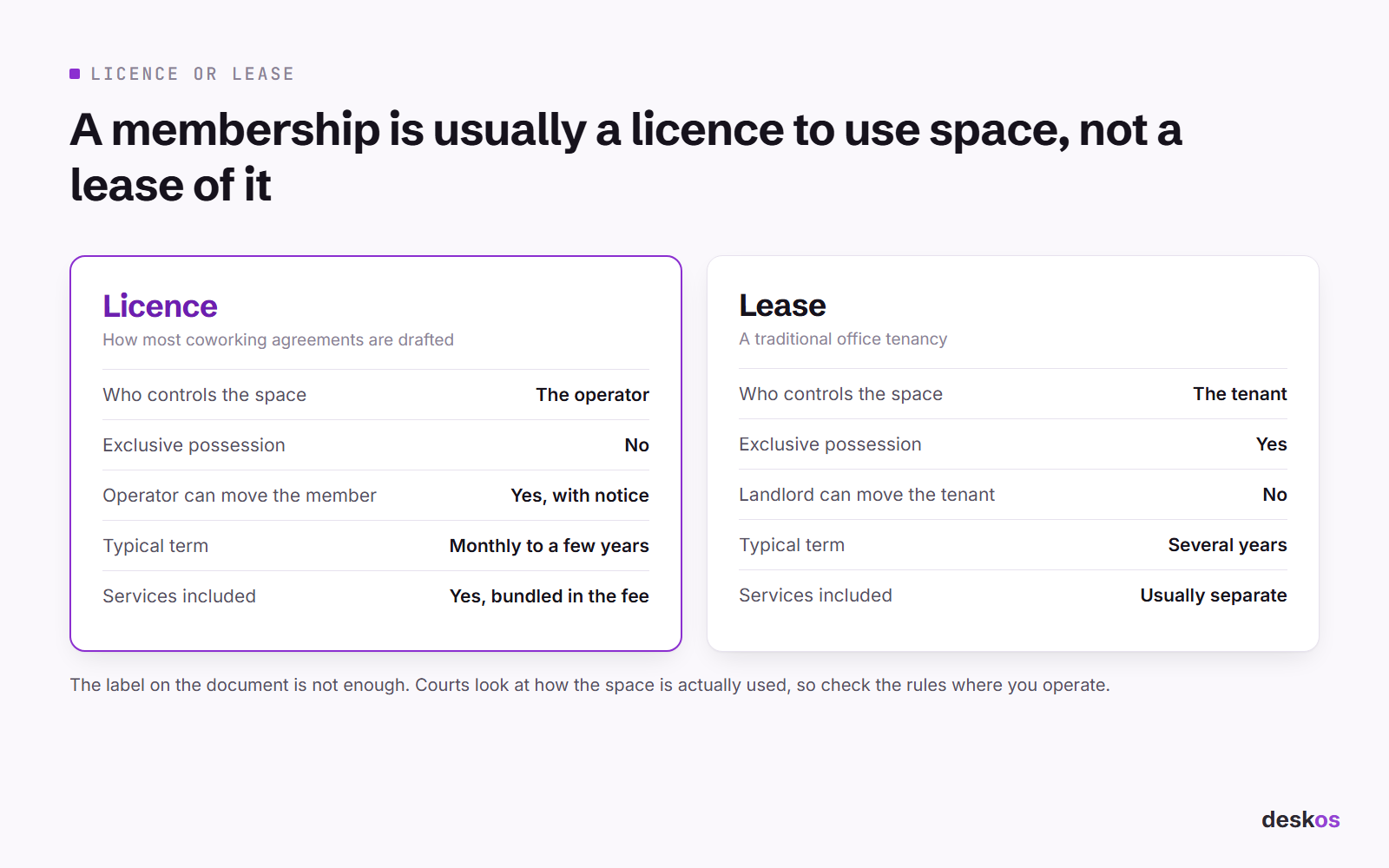
That is why the template opens with clause 1, which says the agreement is a licence, that the member does not have exclusive possession, that the operator keeps control and can enter any part of the space, and that the operator can move the member to comparable space with notice.
The label alone does not decide it, though. Courts in common law countries look at the substance of the arrangement. The leading English case, Street v Mountford, held that an arrangement granting exclusive possession for a term at a rent is likely to be a tenancy whatever the parties call it. A locked private office that the operator never enters looks more like a lease than a hot desk does. If you rent out private offices on long terms, this is the first clause to have a local lawyer review.
What should a coworking membership agreement include?
The template's 20 clauses fall into four groups. The clause numbers below match the Word file.
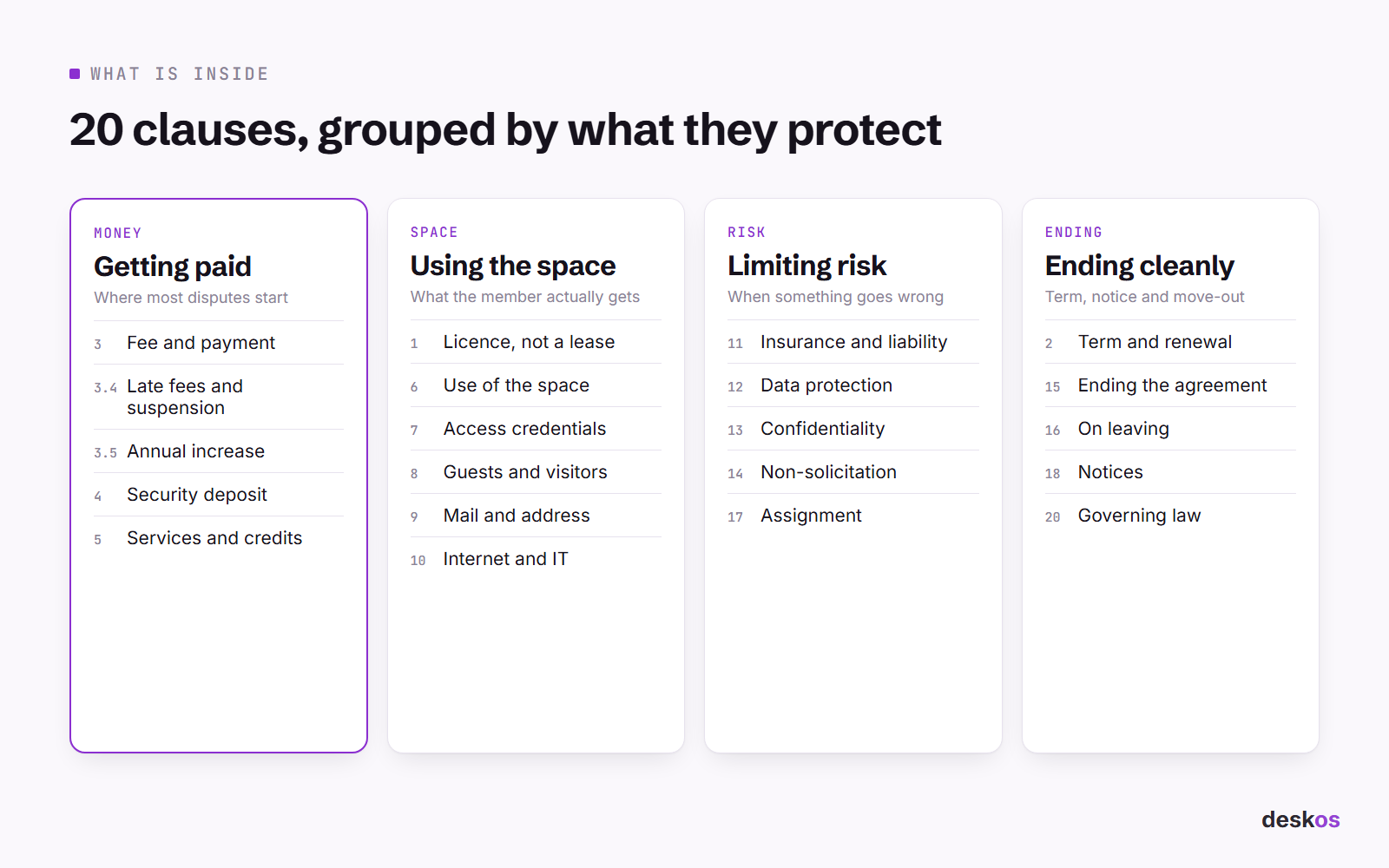
Money: getting paid
- Membership Fee and payment (clause 3). Fees are paid in advance by a stated due date, tax is added on top, and extras like additional meeting room hours or printing are billed at your published rates. Being explicit that fees exclude tax avoids the most common invoice dispute in the first month.
- Late payment and suspension (3.4). A late fee or interest, plus the right to suspend access after written notice. The notice step matters: suspending a member's door access without warning invites a complaint even when you are in the right.
- Annual increase (3.5). A fixed percentage on each anniversary. Writing it in now means year two prices itself instead of becoming a negotiation.
- Security deposit (clause 4). Held as security, not as prepaid fees. It can be applied to unpaid amounts or damage, must be topped back up if used, and is returned within a stated number of days after move-out with an itemised statement of any deductions.
- Services and credits (clause 5). What is included, and whether unused meeting room hours or print credits carry over. Say clearly that they have no cash value, or someone will ask for a refund of unused hours when they leave.
Space: what the member actually gets
- Licence, not a lease (clause 1). Covered above.
- Use of the space (clause 6). Business use only, a maximum number of authorised users, house rules that apply to guests too, and no alterations or signage without consent.
- Access credentials (clause 7). One card, fob or mobile credential per person, never shared, with a replacement fee for lost ones. This clause is what lets you deal with tailgating and card sharing.
- Guests and visitors (clause 8). Registered on arrival and accompanied by their host, with the member responsible for them.
- Mail and business address (clause 9). Delete it if you do not offer it. If you do, require the member to stop using your address, and update official records, within a set period after they leave. Virtual office members are where this goes wrong most often.
- Internet and IT (clause 10). Shared service, no guarantee of uninterrupted access, acceptable use rules, and the member is responsible for their own devices and data.
Risk: when something goes wrong
- Insurance and liability (clause 11). Members insure their own property, you exclude indirect losses such as lost profit or data, and your total liability is capped at a few months of fees. The last sub-clause keeps liability that cannot legally be excluded, which also helps the rest of the clause stand up.
- Data protection (clause 12). You hold contact details, access logs, bookings and possibly CCTV footage for every member and guest. Point to your privacy notice. Under the GDPR, for example, people must be told what you collect and why when you collect it; Article 13 lists what that notice has to contain.
- Confidentiality (clause 13), non-solicitation (clause 14) and assignment (clause 17). Short, standard, and the reason a member cannot quietly sublet a desk to another business or hire your community manager away.
Ending: term, notice and move-out
- Term and renewal (clause 2). An initial term, automatic renewal, and a lock-in period during which neither side can simply walk away.
- Ending the agreement (clause 15). Notice in writing, taking effect at the end of a billing period and not before the lock-in ends. You can terminate immediately for serious non-payment, unremedied material breach or insolvency. The member gets a matching right if you breach or the space becomes unusable, which makes the agreement fairer and easier to sign.
- On leaving (clause 16). Vacate, remove belongings, return credentials, leave the space as found. Items left behind can be disposed of after a set period.
- Notices (clause 18) and governing law (clause 20). Notices by email to named addresses, and the law and courts that apply.
Schedule 1: put every number on one page
The single most useful design choice in the template is separating the clauses, which rarely change, from the numbers, which change for every member. All the commercial terms sit in Schedule 1: membership type, space, authorised users, start date, initial term, lock-in, fee, billing date, deposit, annual increase, included credits, access hours, notice period and notice emails.
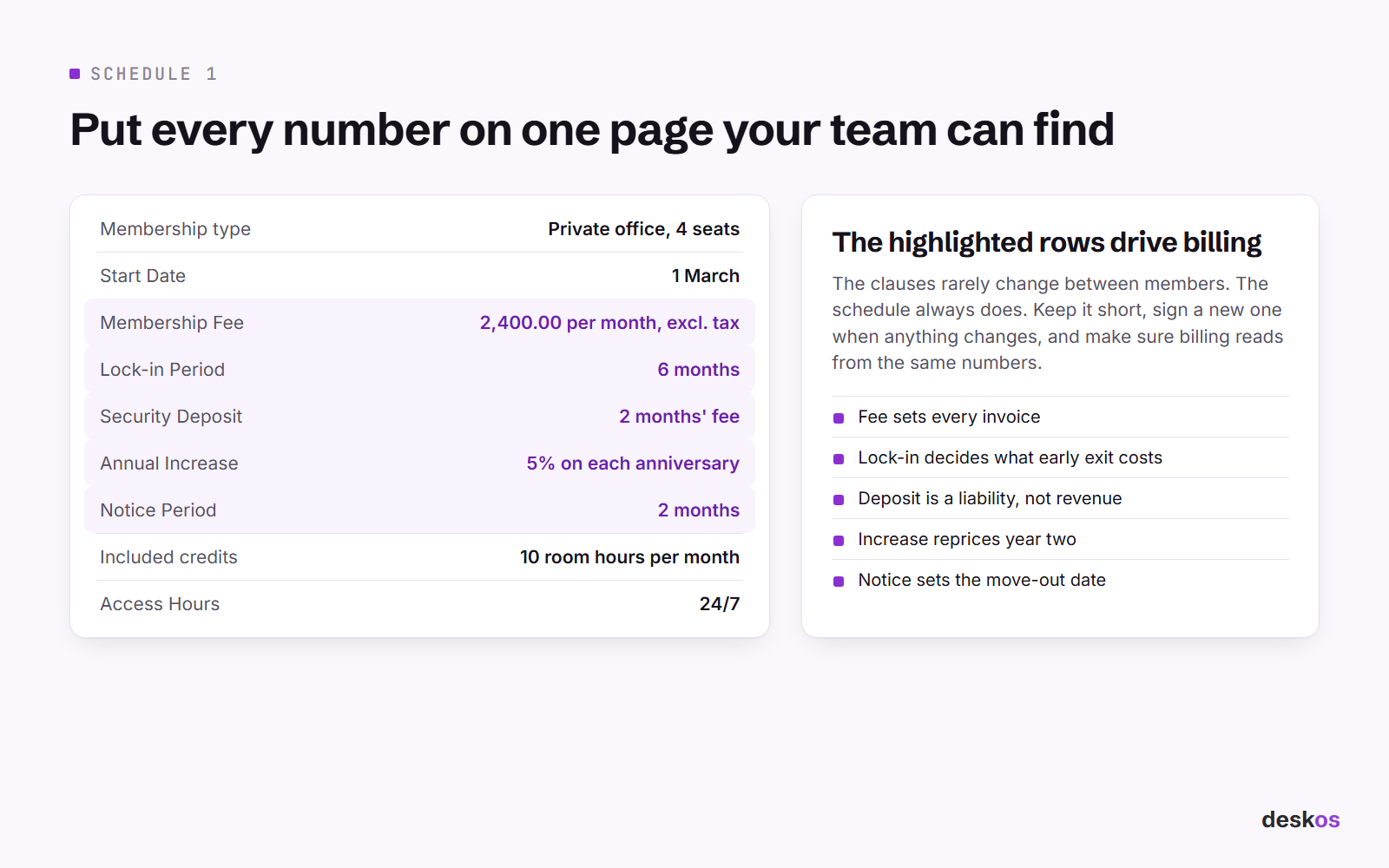
This has two practical benefits. Your sales team only edits one page per deal, so the legal wording does not drift between members. And when something changes, such as a member adding two desks, you sign an updated Schedule 1 instead of rewriting the agreement.
It also shows you exactly which numbers your billing has to reflect. If the schedule says a 5% increase on the anniversary and nobody applies it, you have given away 5% for as long as nobody notices. If you are moving systems and want to check that every one of these numbers carried over correctly, our guide on how to switch coworking software in 30 days covers the billing check step by step.
How to fill in the template
- Set your defaults once. Go through the clauses and replace the bracketed values that are the same for every member: late fee, deposit refund period, notice for house rule changes, governing law. Save that as your master copy.
- Delete what does not apply. No business address service? Remove clause 9. No staff non-solicitation? Remove clause 14. Then check that the clause cross-references still point to the right numbers.
- Have it reviewed locally. Pay particular attention to clause 1 (licence or lease), clause 4 (deposits, which some places regulate), clause 11 (liability limits) and clause 15 (early exit charges).
- Fill in Schedule 1 per member. This is the only part that changes deal to deal.
- Sign before move-in. Never hand over access credentials before the agreement is signed and the deposit and first payment are in.
Company agreements versus individual memberships
The template is written for a company taking desks or an office for its team, because that is where the money and the risk are. One agreement covers the company, Schedule 1 sets the number of authorised users, and the company is responsible for its people and guests.
For individual hot desk or day pass members, a full agreement is usually too heavy. Most operators use shorter online terms accepted at sign-up, built from the same clauses: fees, use of the space, house rules, access, liability and cancellation. If you sell to consumers rather than businesses, consumer protection law may also give them cancellation rights you cannot contract out of.
Common mistakes in coworking agreements
- Calling it a licence while granting a lease. Fixed private office, exclusive keys, no operator access, long term. The label will not save it.
- No lock-in. Without one, a 12-month agreement is really a monthly rolling one with a month's notice.
- Deposit treated as revenue. It is a liability until it is applied or returned. Booking it as income overstates revenue and causes trouble at refund time.
- Increases agreed but never applied. The clause is only worth something if billing actually applies it.
- Vague notice rules. "One month's notice" given on the 20th: does it end on the 20th of next month, or at the end of the billing period? The template ties notice to the end of a billing period so there is only one answer.
- Different terms for every member. Side deals in emails instead of Schedule 1 mean nobody knows what was actually agreed when the person who negotiated it leaves.
Keep the agreement and the billing telling the same story
Most coworking disputes are not really about the contract. They happen because the agreement says one thing and the invoices say another: an increase that was never applied, a deposit that was refunded twice, a lock-in nobody remembered, a notice period counted from the wrong date.
In DeskOS, plan, seats, price, billing cycle, deposit and escalation come from the agreement itself, so year two prices itself. Upgrades, seat changes and cancellations reprice the schedule automatically. Terms approaching expiry, notices given, escalations coming up and seats about to release show up as dated work for your team, read off the agreement rather than a calendar someone keeps in sync by hand. And if you use other tools, a signed agreement can be pushed out as a webhook.
See how that works on billing and payments and automation and efficiency, compare plans on the pricing page, or book a demo and bring one of your own agreements to walk through. If you are still setting up, our guide on how to start a coworking space covers the steps before your first member signs.
Download the free coworking membership agreement template (Word, .docx)
Frequently asked questions
Is this coworking membership agreement template free?
Yes. It is a free, editable Word file with no sign-up. You can open it in Microsoft Word, Google Docs or any word processor that reads .docx files, and adapt it for your own space.
Is a coworking membership agreement legally binding?
Yes, once both parties sign it, like any other commercial contract. Whether specific clauses are enforceable, such as liability caps, early exit charges or deposit terms, depends on local law, which is why you should have it reviewed where you operate.
What is the difference between a coworking licence and a lease?
A licence gives permission to use space and services while the operator keeps control. A lease gives the tenant exclusive possession of a defined space and often comes with statutory protections. Most coworking agreements are licences, but courts look at how the space is actually used, not just the title of the document.
How much security deposit do coworking spaces charge?
Commonly one to three months of the membership fee for dedicated desks and private offices, and often none for hot desks or day passes. Some jurisdictions regulate deposits, so check local rules, and always state the refund period in the agreement.
What notice period is normal for a coworking membership?
One month is common for flexible and monthly memberships. Private offices on longer terms often use two or three months. Tie notice to the end of a billing period so there is no argument about the exact end date.
Do I need a separate agreement for each member?
You need a signed agreement per member company, but the clauses can be identical for everyone. Only Schedule 1, with the fee, space, dates and notice period, changes from member to member.
DeskOS / The software layer in commercial real estate
DeskOS is the operating system for coworking and flex space. We write about what we see operators actually deal with.
See it on your own floor plan.